Vigor130 Series User’s Guide
119
3
3
.
.
8
8
.
.
2
2
T
T
R
R
-
-
0
0
6
6
9
9
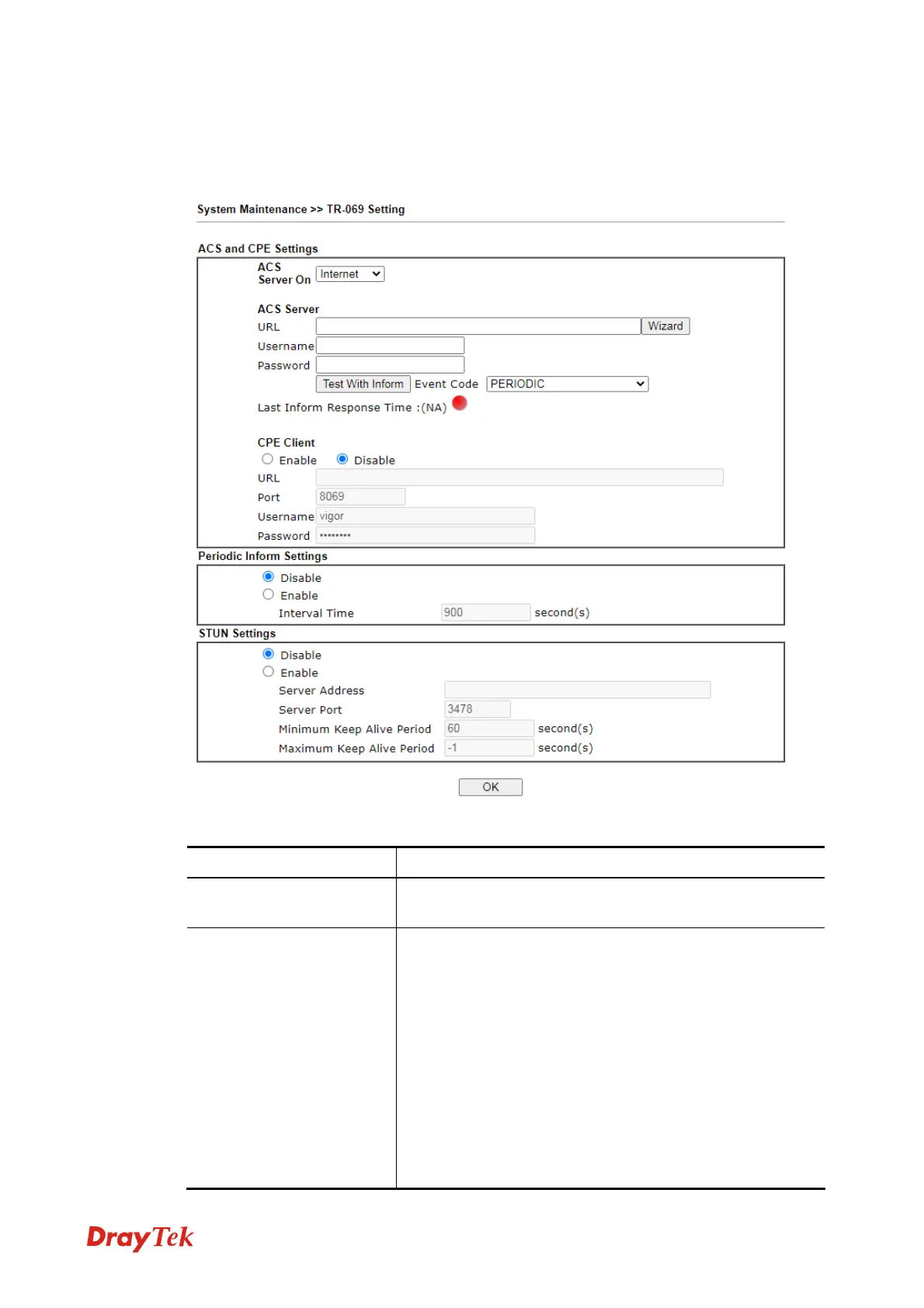
This device supports TR-069 standard. It is very convenient for an administrator to manage a
TR-069 device through an
Auto Configuration Server, e.g., VigorACS.
Available settings are explained as follows:
Item Description
ACS Server On
Choose the interface for the modem connecting to ACS
server.
ACS Server
URL/Username/Password – Such data must be typed
according to the ACS (Auto Configuration Server) you
want to link. Please refer to Auto Configuration Server
user’s manual for detailed information.
Test With Inform – Click it to send a message based on
the event code selection to test if such CPE is able to
communicate with VigorACS SI server.
Event Code – Use the drop down menu to specify an event
to perform the test.
Last Inform Response Time – Display the time that
VigorACS server made a response while receiving Inform
message from CPE last time.



 To Next Page