Vigor130 Series User’s Guide
14
2
2
.
.
4
4
I
I
n
n
t
t
r
r
o
o
d
d
u
u
c
c
i
i
n
n
g
g
D
D
a
a
s
s
h
h
b
b
o
o
a
a
r
r
d
d
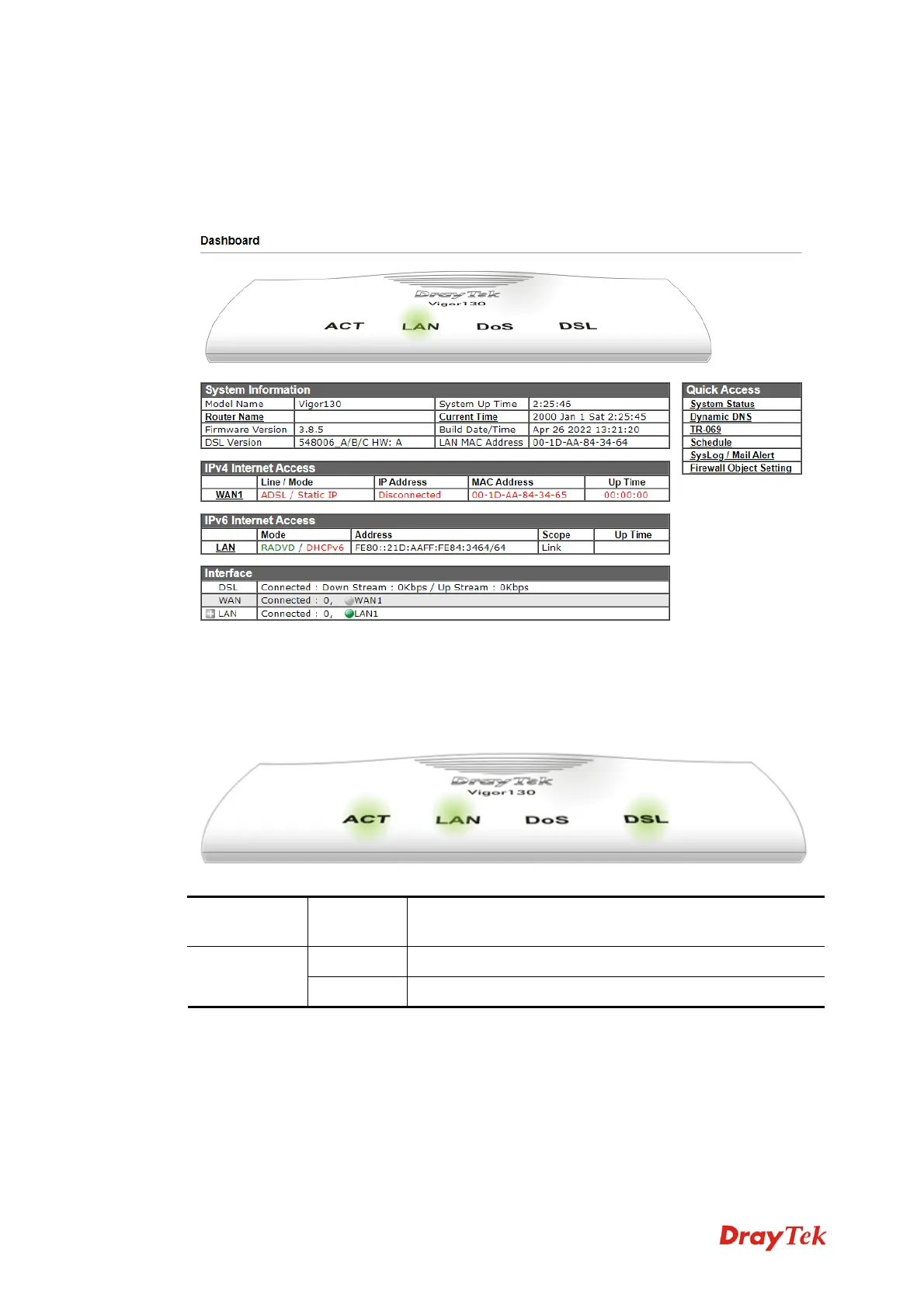
The Dashboard (home page) shows the connection status including System Information,
IPv4 Internet Access, IPv6 Internet Access, Interface (physical connection), Security and
Quick Access.
2
2
.
.
4
4
.
.
1
1
V
V
i
i
r
r
t
t
u
u
a
a
l
l
P
P
a
a
n
n
e
e
l
l
On the top of the Dashboard, a virtual panel (simulating the physical panel of the modem)
displays the physical interface connection. It will be refreshed every five seconds.
P
P
o
o
r
r
t
t
C
C
o
o
l
l
o
o
r
r
D
D
i
i
s
s
p
p
l
l
a
a
y
y
e
e
d
d
E
E
x
x
p
p
l
l
a
a
n
n
a
a
t
t
i
i
o
o
n
n
B
B
l
l
a
a
c
c
k
k
I
I
t
t
m
m
e
e
a
a
n
n
s
s
t
t
h
h
e
e
m
m
o
o
d
d
e
e
m
m
o
o
r
r
t
t
h
h
e
e
f
f
u
u
n
n
c
c
t
t
i
i
o
o
n
n
i
i
s
s
n
n
o
o
t
t
w
w
o
o
r
r
k
k
i
i
n
n
g
g
.
.
L
L
E
E
D
D
(
(
l
l
e
e
f
f
t
t
s
s
i
i
d
d
e
e
)
)
G
G
r
r
e
e
e
e
n
n
I
I
t
t
m
m
e
e
a
a
n
n
s
s
t
t
h
h
e
e
m
m
o
o
d
d
e
e
m
m
o
o
r
r
t
t
h
h
e
e
f
f
u
u
n
n
c
c
t
t
i
i
o
o
n
n
i
i
s
s
w
w
o
o
r
r
k
k
i
i
n
n
g
g
.
.
For detailed information about the LED display, refer to 1.2 LED Indicators and
Connectors.



 To Next Page