Vigor130 Series User’s Guide
8
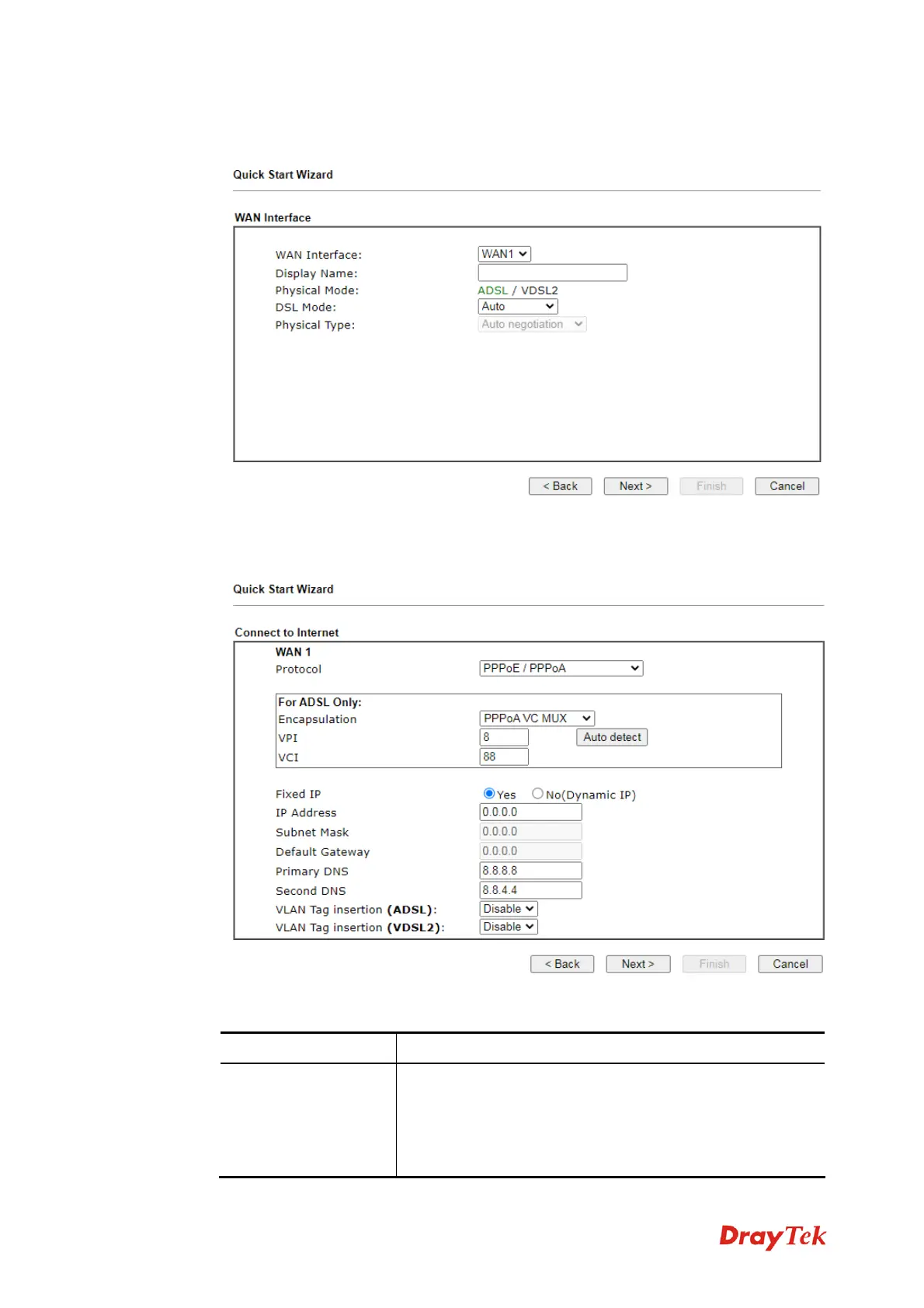
3. On the next page, please select the WAN interface (at present, only WAN1 is available)
that you use and specify the DSL mode.
4. You can configure the modem to access the Internet with different protocol/modes such
as PPPoE/PPPoA or MPoA/Static or Dynamic IP. The modem supports the ADSL
WAN interface for Internet access. In this case, choose PPPoE/PPPoA.
Available parameters are listed below:
I
I
t
t
e
e
m
m
D
D
e
e
s
s
c
c
r
r
i
i
p
p
t
t
i
i
o
o
n
n
F
F
o
o
r
r
A
A
D
D
S
S
L
L
O
O
n
n
l
l
y
y
Y
Y
o
o
u
u
h
h
a
a
v
v
e
e
t
t
o
o
s
s
e
e
l
l
e
e
c
c
t
t
a
a
n
n
a
a
p
p
p
p
r
r
o
o
p
p
r
r
i
i
a
a
t
t
e
e
W
W
A
A
N
N
c
c
o
o
n
n
n
n
e
e
c
c
t
t
i
i
o
o
n
n
t
t
y
y
p
p
e
e
f
f
o
o
r
r
c
c
o
o
n
n
n
n
e
e
c
c
t
t
i
i
n
n
g
g
t
t
o
o
t
t
h
h
e
e
I
I
n
n
t
t
e
e
r
r
n
n
e
e
t
t
t
t
h
h
r
r
o
o
u
u
g
g
h
h
t
t
h
h
i
i
s
s
m
m
o
o
d
d
e
e
m
m
a
a
c
c
c
c
o
o
r
r
d
d
i
i
n
n
g
g
t
t
o
o
t
t
h
h
e
e
s
s
e
e
t
t
t
t
i
i
n
n
g
g
s
s
t
t
h
h
a
a
t
t
y
y
o
o
u
u
r
r
I
I
S
S
P
P
p
p
r
r
o
o
v
v
i
i
d
d
e
e
d
d
.
.
A
A
u
u
t
t
o
o
d
d
e
e
t
t
e
e
c
c
t
t
–
–
C
C
l
l
i
i
c
c
k
k
i
i
t
t
t
t
o
o
d
d
e
e
t
t
e
e
c
c
t
t
s
s
u
u
i
i
t
t
a
a
b
b
l
l
e
e
v
v
a
a
l
l
u
u
e
e
s
s
b
b
e
e
l
l
o
o
w
w
b
b
y
y
t
t
h
h
e
e
m
m
o
o
d
d
e
e
m
m
a
a
u
u
t
t
o
o
m
m
a
a
t
t
i
i
c
c
a
a
l
l
l
l
y
y
.
.



 To Next Page