11
LFO (slider 5) - the low frequency oscillator control sets how much LFO 1 modulates the pitch of the waveform.
This can be used to create just a subtle vibrato to more extreme sound effects.
PW (shift-slider 1) - the pulse-width control lets you adjust the pulse-width of the pulse or square wave, changing
the characteristics of the sound. Modulating the PW with an LFO can produce a slightly-detuned sound that Nick
from Sonic State loves. As long as there is some pulse-wave selected, the pulse width can be adjusted. When
the waveshape is strictly a saw wave or a triangle, changing the pulse width has no effect. Modulating the PW
requires the use of LFO2
GLD (shift-slider 2) - the glide control (also referred to as portamento) lets you set the glide rate between
successively played notes. Glide is xed-rate, not a xed-time and polyphonic. Whether the glide reacts to legato
playing or not is set through the menu. See the MENU MAP for how to change the legato setting. On the
polyphony, note that glide is heavily depending on the number of voices, and whether there is a free available
voice or not.
DTN (shift-slider 3) - the detune control lets you detune the intervals between notes, from a slight effect to a
dramatic. The detune can be used in any of the various polyphonic or unison modes, creating some incredibly
thick sounding notes.
CHORD (shift-slider 4) - the chord control lets you use the slider to choose different predened chords that can
be programmed via the MENU function. On POLY and MONO modes, this has no effect
EG (shift-slider 5) - the envelope generator control lets you program how much the lter envelope modulates the
pitch of the oscillator. Important to note, envelopes are unipolar.
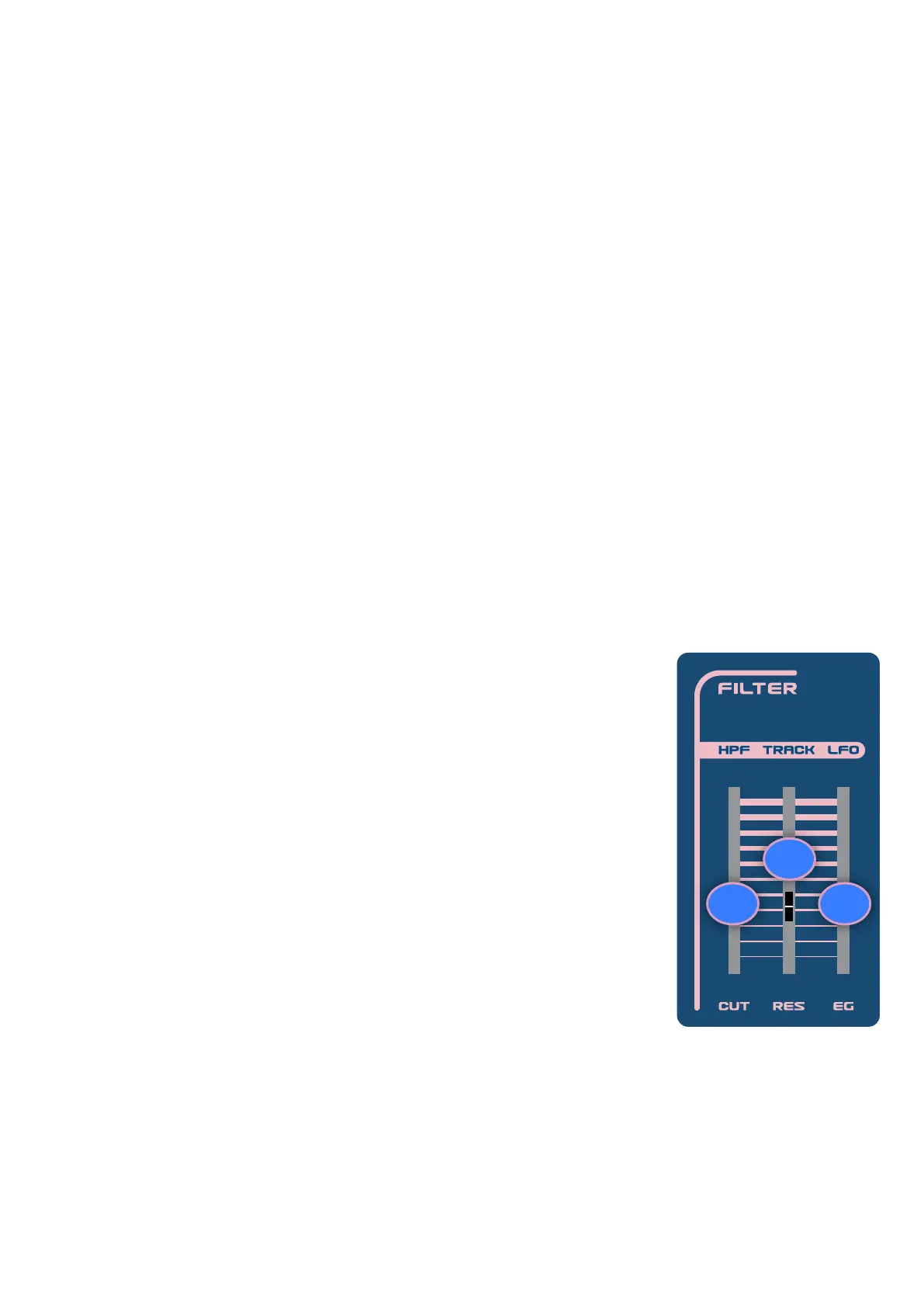
3.4 Filter
The Nymphes has a 24db lowpass (LP), resonant lter which feeds into a 6db High
Pass (HP), non-resonant lter. The 6 available settings in the lter section are
controlled with the 3 sliders and the shift button. These 6 settings let you program
parameters for both lters like cutoff and resonance, as well as modulations like
key tracking, envelope, and LFO.
CUT (slider 6) - the lter cutoff control lets you set the cutoff frequency of the LP
lter. Frequency range is from 32,7 hZ up to 16.744 hZ
RES (slider 7) - the lter resonance control let you set the amount of resonance,
also sometimes referred to as Q. At it’s max setting it will self oscillate.
EG (slider 8) - lter envelope generator (EG) control lets you set how much the
lter envelope modulates the lter cutoff
HPF (shift-slider 6) - the high-pass lter control lets you set the frequency cutoff
for the high-pass lter. Note, the HPF is routed in series after the LPF, giving you a
band-pass effect.
TRACK (shift-slider 7) - the lter key tracking control lets you set how much the lter frequency cutoff follows
the keys. When the slider is all the way up, the lter cutoff will track to the oscillator pitch at a 1:1 ratio (the cutoff
will increase 1 octave for every octave the pitch of the note increases).
LFO (shift-slider 8) - the low frequency oscillator control sets how much the LFO 1 modulates the lter frequency
cutoff.
Playing only with the lter as a source: Set up the Oscillator LVL, SUB and NOISE to 0% and then on the lter :
CUT = 0%, RES= 100%, EG=0%, HPF=0%, TRACK=100%, LFO= 0% .
This will allow for the lter to be in perfect tune and matched with the oscillator’s frequency.
7
6 8


 To Next Page