12
3.5 Envelope
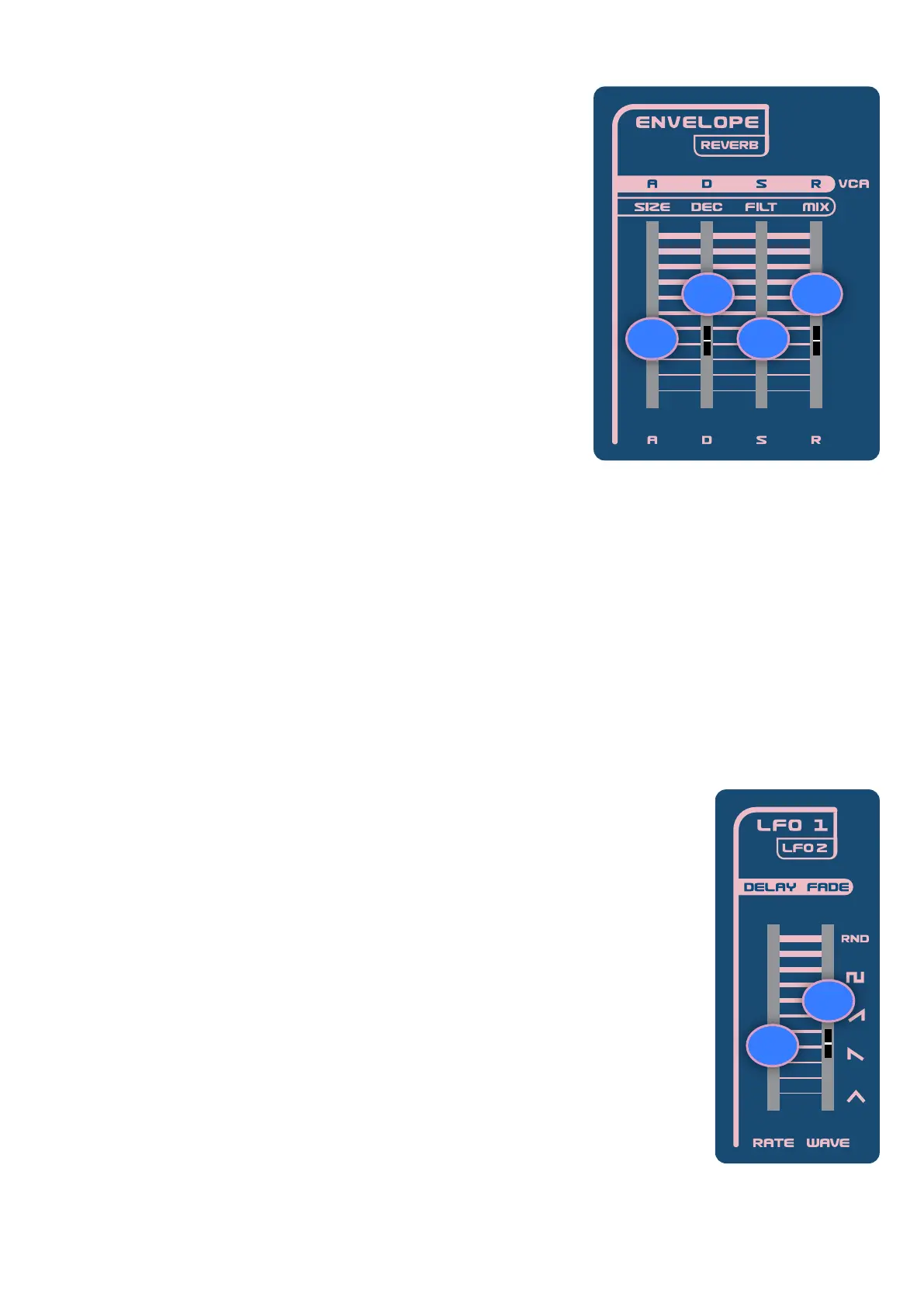
The 8 available settings in the envelope section are controlled with the
4 sliders and the shift button (discussed later in the manual, these
controls can also be used to program the reverb effect). The sliders
allow you to shape the envelope generator or EG for modulating both
the lter cutoff and the amplitude or volume of output.
Filter Cutoff and Pitch Envelope
A (slider 9) - the attack control sets how fast or how slow the envelope
rises to its peak lter cutoff value.
D (slider 10) - the decay control sets how fast or how slow the envelope
drops from its peak value lter cutoff value to its sustain value.
S (slider 11) - the sustain control lets you set the level lter cutoff
sustain value.
R (slider 12) - the release control lets you set how fast or how slow the
envelope drops from the lter cutoff sustain value to a zero value,
totally closing the lter cutoff.
Amplitude Envelope
A (shift-slider 9) - the attack control sets how fast or how slow the amplitude envelope rises to its peak value.
D (shift-slider 10) - the decay control sets how fast or how slow the amplitude envelope drops from its peak
value to the value the envelope will sustain at.
S (shift-slider 11) - the sustain control lets you set the amplitude envelope’s sustain value.
R (shift-slider 12) - the release control determines how fast or how slow the envelope drops from the amplitude
sustain value to value of zero.
3.6 LFO
The Nymphes has 2 Low Frequency Oscillators or LFO’s referred to as LFO1 and LFO2.
Both are bipolar and can be used to modulate various parameters on the synth. LFO 1
is polyphonic and can only modulate 1) the frequency or pitch of the oscillator and 2)
the lter cutoff. LFO 2 is monophonic but can be programmed as a modulation source
for 24 different destinations.
Both LFO 1 and 2 have four different rate settings accessed through the MENU, and
both can be set to 1) low, 2) high, 3) track (where the rate is determined by key tracking),
and 4) BPM (where the rate can sync to midi clock). Lastly, KEY SYNC can be switched
on or off for both LFOs. When the Rate is set to BPM , but no clock is send, it
automatically works on low rate mode.
RATE (slider 13) - the LFO frequency rate control sets the LFO 1 frequency or how fast
it will cycle.
WAVE (slider 14) - the LFO wave shape control lets you select the wave shape for LFO1.
Unlike the Nymphes oscillator waveforms that are continuously variable, the LFO wave
forms are ve discreet (individual) wave forms including: 1) triangle, 2) saw/ramp
down, 3) saw/ramp up, 4) square, and 5) random (sample-and-hold).
DELAY (shift-slider 13) - the LFO amplitude delay control lets you set an amount of time or delay before the LFO
amplitude increases.
10 12
119
14
13


 To Next Page