15
5. Menu Accessible Parameters
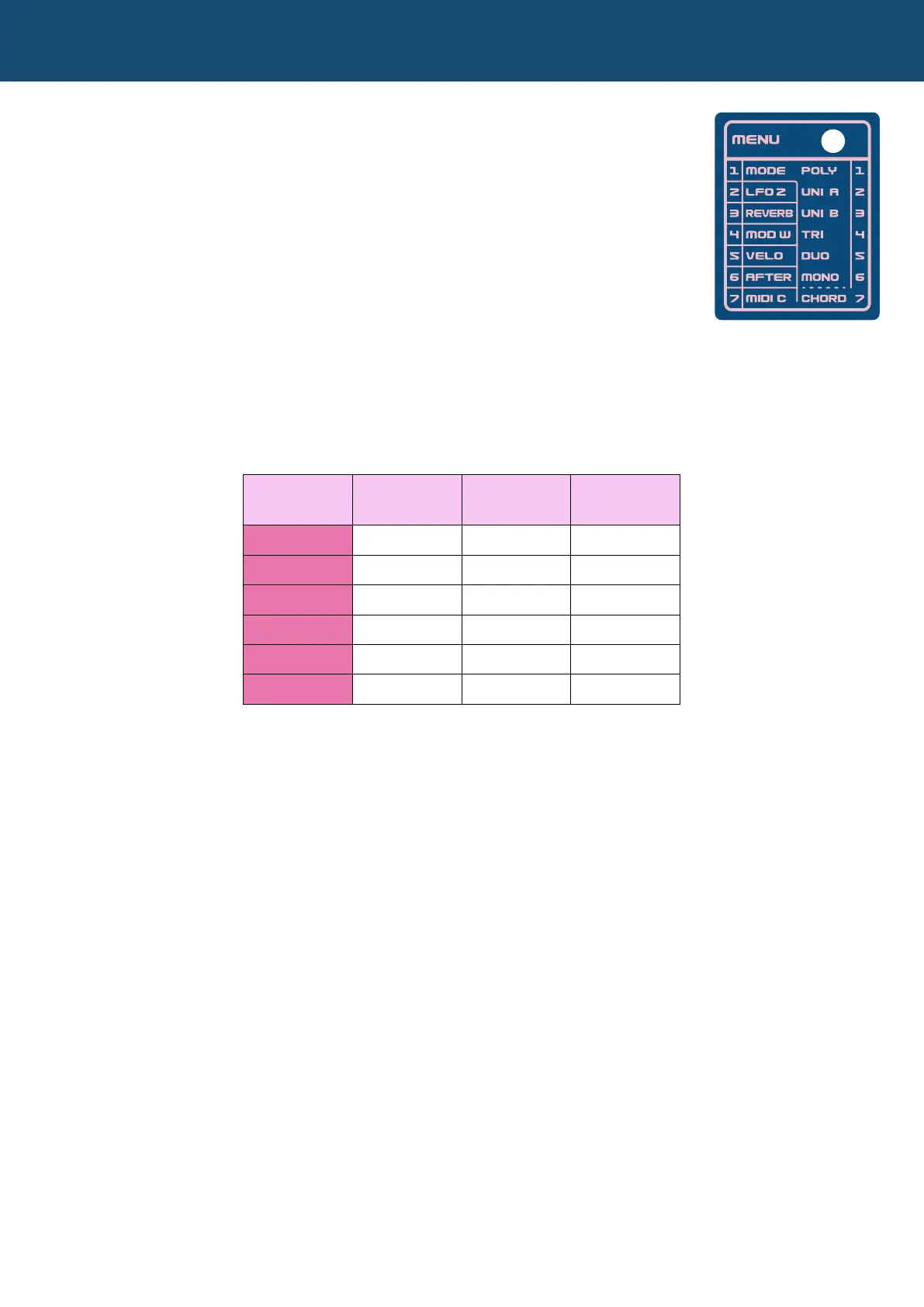
The menu section lets you access parameters and settings that help you further:
1) program your patches and
2) congure how the Nymphes operates.
To access any of the menu items, just press the MENU button, which will light up,
and using the rotary selector, choose numbers 1 through 7. When you’re nished
editing whatever menu option, just press the MENU button again to return to
normal operation.
5.1 Play MODE (MENU item 1)
This option lets you set how many oscillators will sound with each note, which will overall affect the polyphony
as well. See the table below that describes each mode.
5.2 CHORD Edit Mode
Also accessed under the MODE submenu is the CHORD option (submenu item 7). With any of the four unison
play modes (UNI A, UNI B, TRI, and DUO), this submenu option lets you program 7 different chords that are
stored with the patch and can be changed with the CHORD slider (shift-slider 4). The slider accesses the 7
chords from lowest to highest, meaning when the slider is all the way down, chord EDIT 1 is playing, and as you
push the slider up, it will select the next chord sequentially (EDIT 2, then EDIT 3, etc) until the slider is all the way
up, and chord EDIT 7 is playing.
Programming Chords
Programming chords is fairly easy, though a bit lengthy, and naturally starts with a click of the MENU button:
1) Press the MENU button, which will light up.
2) With the rotary switch, select option 1, PLAY MODE.
3) Press the MENU button again, which will begin to blink.
4) With the rotary switch, select option 7, CHORD EDIT.
5) Press the MENU button again (which will blink faster still), and the EDIT 7 chord will begin to play
automatically.
6) Select the chord EDIT number you want to program, and simply play the chord, which is automatically
saved.
7) Select any other chord EDIT numbers, program the chords you want and hit the MENU button to return to
normal operation when you’re done.
An interesting thing to try: Adding some interesting possibilities, the CHORD selection slider (shift-slider 4) can
be a modulation destination, letting you sequence through the chords using a modulation source, like the mod
wheel or an LFO.
MODE Submenu # Polyphony
Oscillators
per Note
POLY
1 6 1
UNI A
2 1 6
UNI B
3 1 4
TRI
4 3 2
DUO
5 2 3
MONO
6 1 1


 To Next Page