33
SETUP
For a hardwire connection:
1. Connect the Ethernet Cord to the
Dremel LC40 Laser Cutter (Fig. 22)
and the computer.
2. Open an internet browser window on
the computer.
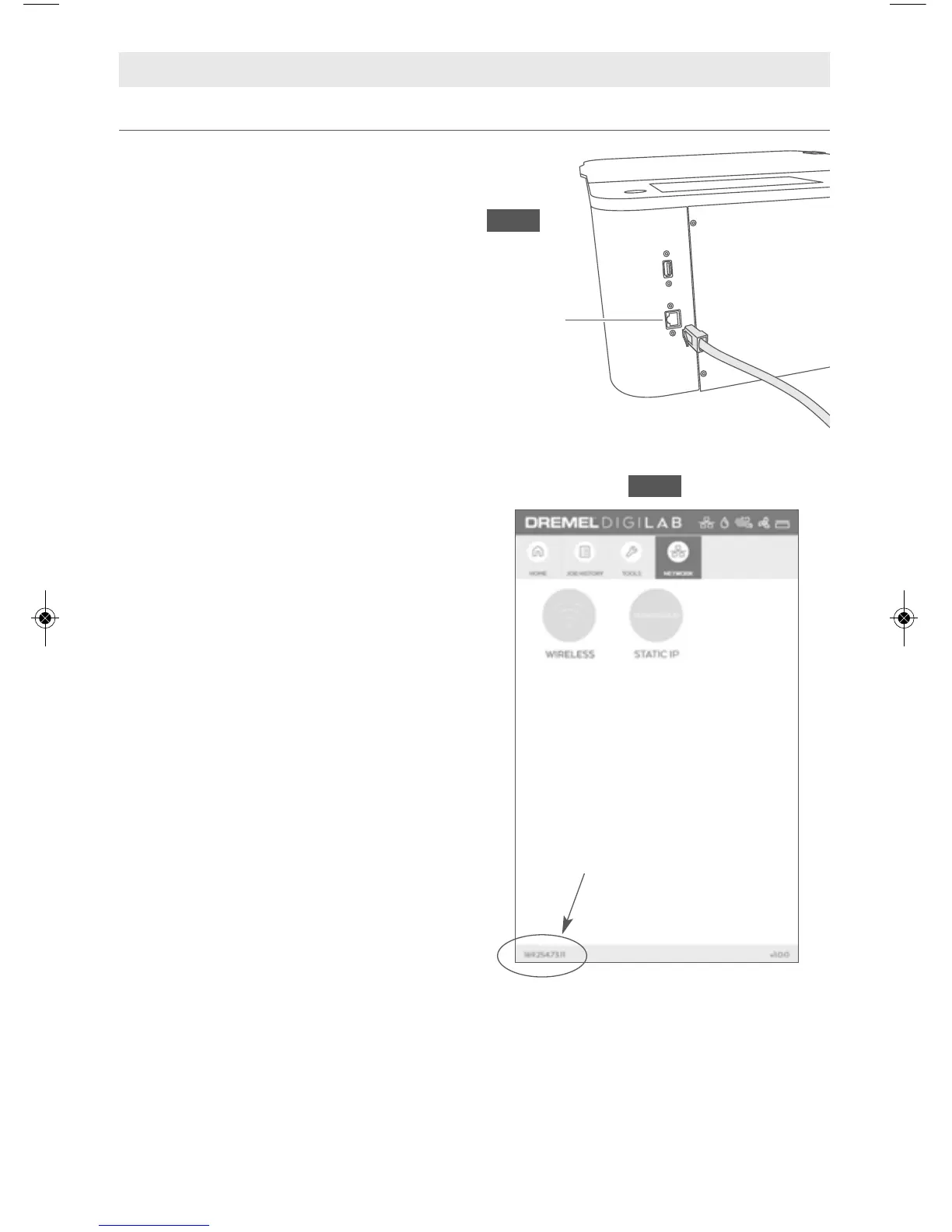
3. Type in the "IP" number displayed at
the bottom of the Dremel LC40 Laser
Cutter’s LCD screen into the browser’s
URL bar.
For a wireless connection:
1. Select Network on the Dremel LC40
Laser Cutter’s LCD screen (Fig. 23),
then select Wireless from the Network
menu.
2. Select a network from the list of
avaliable networks, then enter
password to connect the Dremel LC40
Laser Cutter.
3. Open an internet browser window on
the computer.
4. Type in the "IP" number displayed at
the bottom of the Dremel LC40 Laser
Cutter’s LCD screen into the browser’s
URL bar.
For a static IP address: Connect to the
network by assigning a persistent IP
address that is assigned for the machine.
This address will be maintained
permanently and will not change if the
machine is rebooted.
TIP: If the Dremel LC40 Control Software is
taking a while to load, or not working
properly try refreshing the browser to
reload the software.
Connect a Computer to the Dremel LC40 Laser Cutter
Ethernet
Port
Fig. 22
"IP" Number
Fig. 23



 To Next Page
 Loading...