34
SETUP
Network Setups
PEER TO PEER ETHERNET CONNECTION
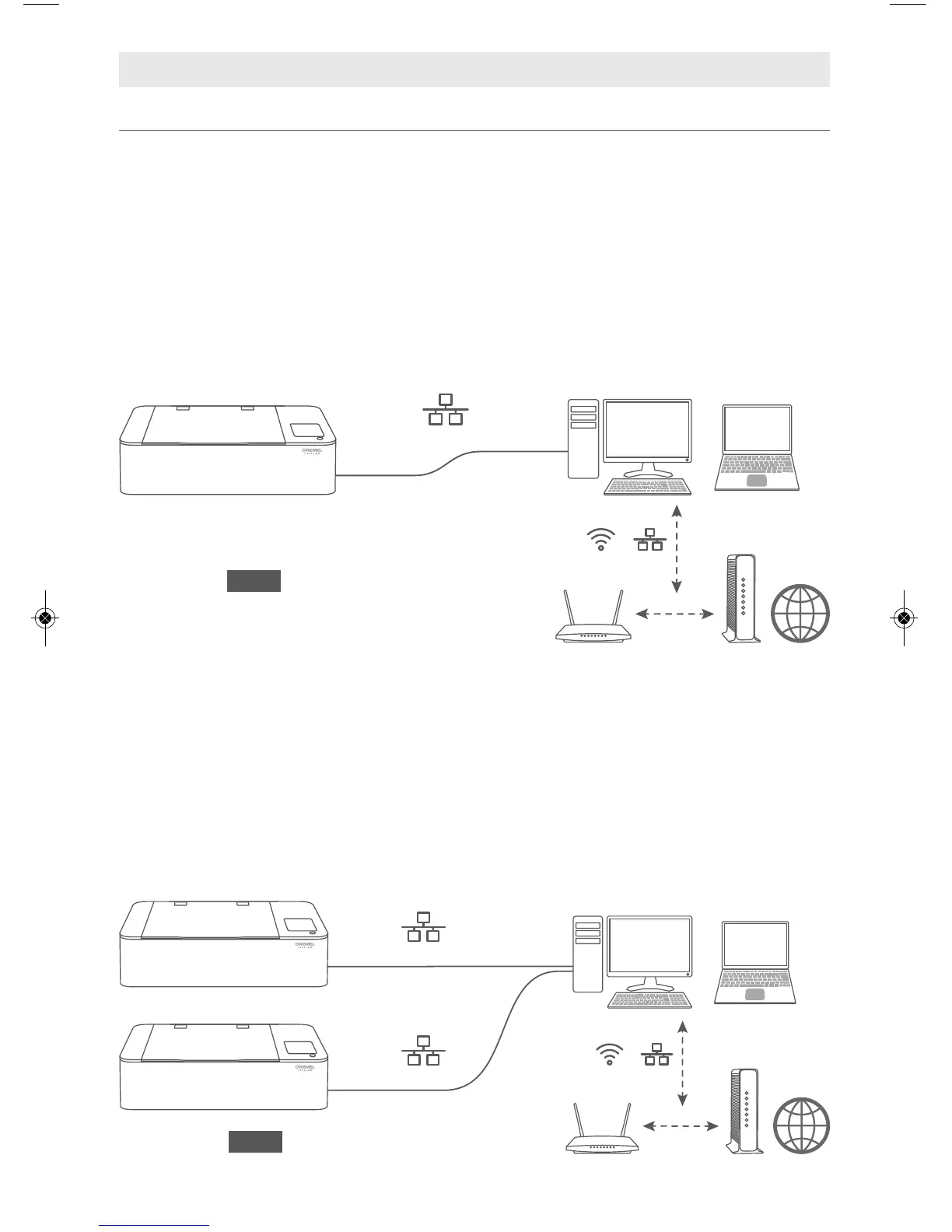
Scenario 1: Connecting the Dremel LC40 Laser Cutter to a single computer using
Ethernet connection.
• Optional: If the computer has a second Ethernet Port or built-in wireless, the
computer can access both the internet and the Dremel LC40 Laser Cutter.
• The Dremel LC40 Laser Cutter does not have access to the Internet (optional for
Dremel LC40 Laser Cutter connection) unless the computer bridges/shares the
Internet connection.
Note: The Dremel LC40 Laser Cutter does have the option to set a Static IP address
using the LCD software interface.
Scenario 2: Connecting two or more Dremel LC40 Laser Cutters to a single
computer using Ethernet connection.
A computer that has two or more Ethernet ports may connect to additional Dremel
LC40 Laser Cutters.
• Optional: If the computer has an additional, separate Ethernet Port or built-in
wireless, the computer can access both the internet and the laser unit.
• The Dremel LC40 Laser Cutter does not have access to the Internet (optional for
Dremel LC40 Laser Cutter connection) unless the computer bridges/shares the
Internet connection.



 To Next Page
 Loading...