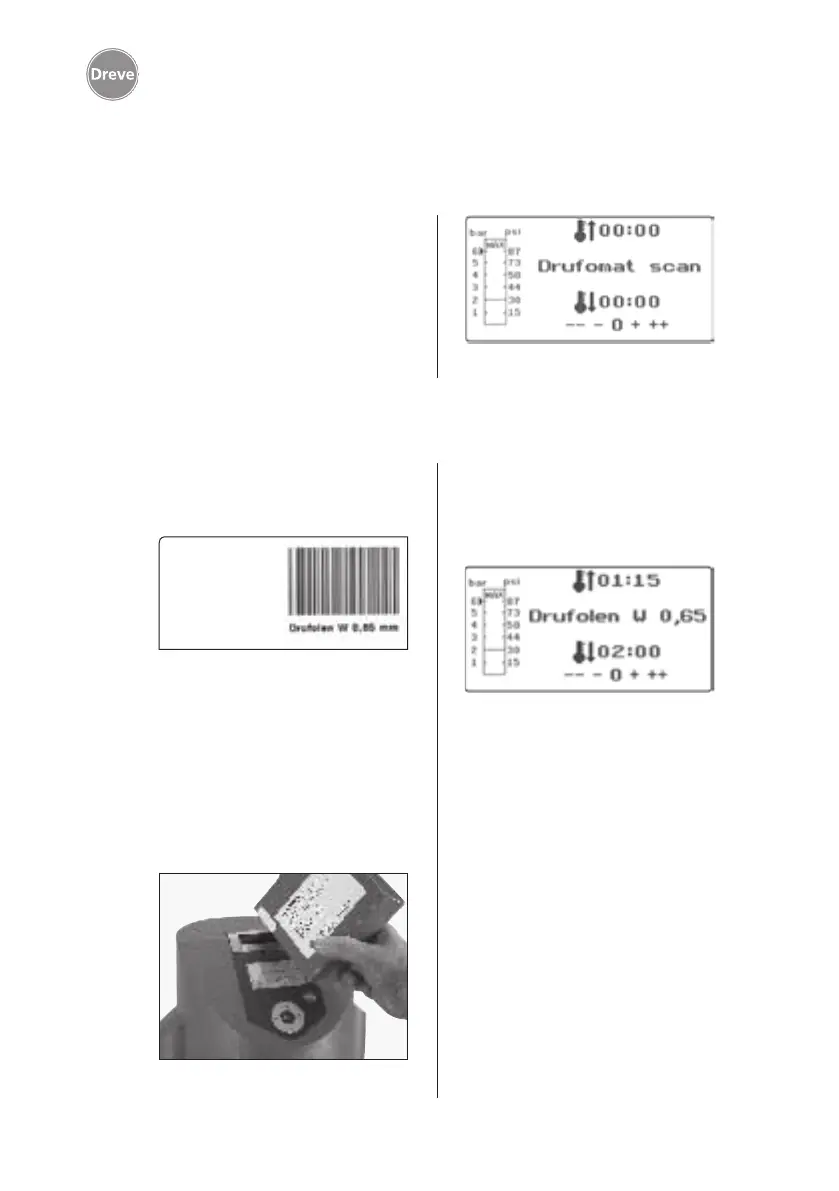
Drufomat scan
36
8. Operation
8.1 Scan modus
Turn the unit on by means of the main
switch (33) at the back of the unit. By
this the scanner (1) and the display (2)
at the front of the unit will be activated.
An acoustic signal shows that the unit
is ready for operation; the display will
show the name of the machine Drufo-
mat scan.
Every outer package of Dreve thermo-
forming blanks is labelled with a bar-
code label.
This barcode contains the encrypted
product name, material strength as
well as the individual heating and cool-
ing times.
In order to scan the material data with
the Drufomat scan the barcode is to be
placed as centrally and evenly as pos-
sible onto the scan field (1).
There will be an acoustic signal for
the confirmation of the data capture
and the display will show all neces-
sary data.
Info
The light emanating from the
scanner is harmless. Even in case
of direct eye contact it has no neg-
ative impact!
After 15 min. without use the
scanner turns off automatically.
By pressing any key it can be re-
activated again.
During an active thermoforming
process the scanner is deactivated.
After termination of the process
it will be re-activated automati-
cally.


 To Next Page