110489Q #110128 (F410), #110133 (F411) 4 Legend Brands, Inc.
HOW TO USE THE CONTROL PANEL
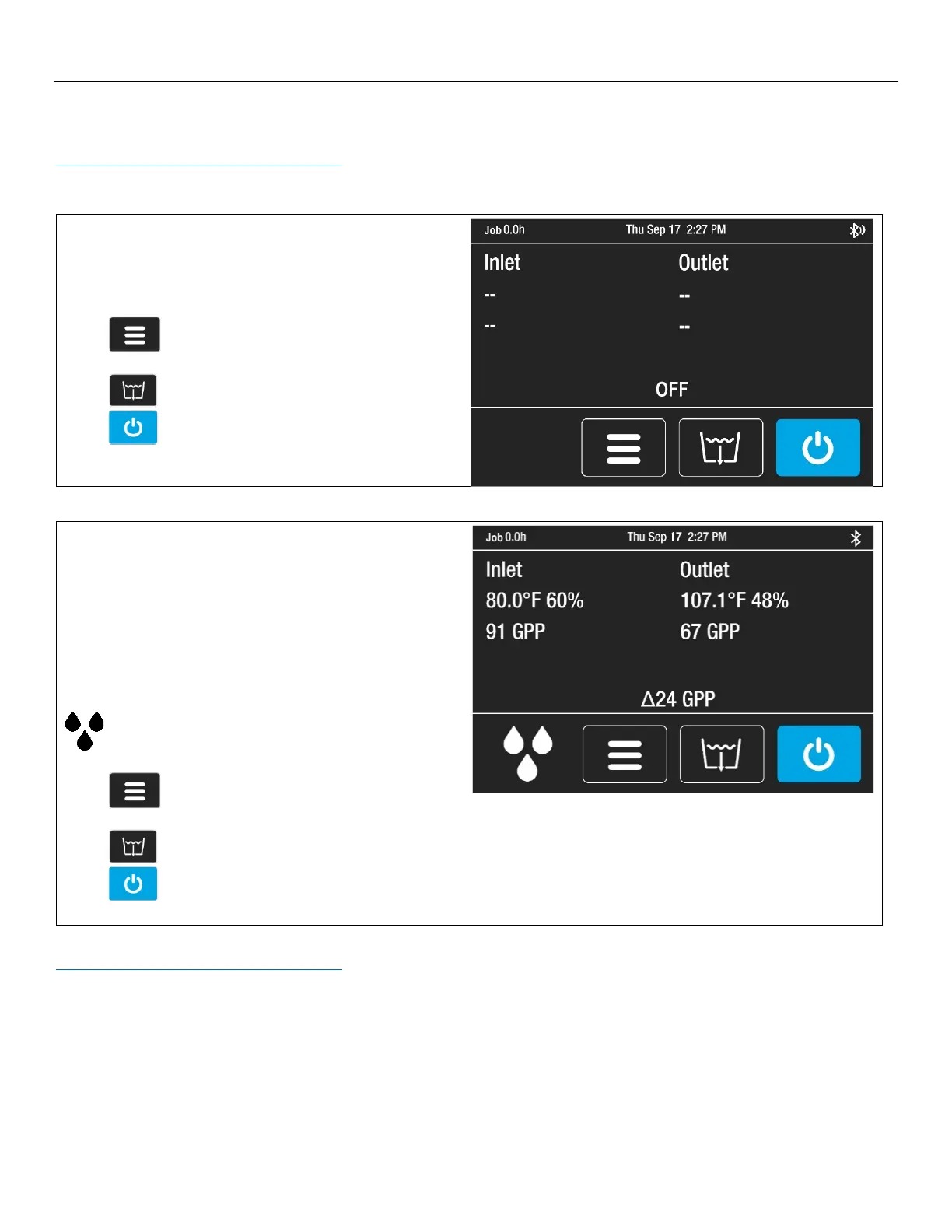
The i-Series Controller provides comprehensive dehumidifier controls and detailed real-time data about the drying
environment as well as job hours, self-diagnosis messages, maintenance reminders and operating status.
For detailed information and additional instructions, please visit the i-Series Controller page at
Controller.LegendBrandsRestoration.com
Home Screen Views
Unit OFF
Unit must be plugged in.
Top display bar:
Job hours, current time
Press MENU to access settings and
configuration controls
Press PURGE to pump out condensate tank
Press ON/OFF to turn unit on.
Unit ON
Press ON/OFF key to switch unit on.
Top display bar:
Job hours, current time
Information display:
Inlet/Outlet temp, %RH and GPP
Current GPP removal
Bottom menu bar:
Quick-Reference Inlet GPP.
1: < 60 GPP; 2: 60–90 GPP; 3: > 90 GPP
Press MENU to access settings and
configuration controls
Press PURGE to pump out condensate tank
Press ON/OFF to turn unit off.
For detailed control panel instructions, please visit the i-Series Controller product page at
Controller.LegendBrandsRestoration.com




 To Next Page