12
PHD 200 Owner's Manual
© 2023 Legend Brands, Inc.
Owner's Manual
1.5 Command Hub
HOW TO USE THE COMMAND HUB
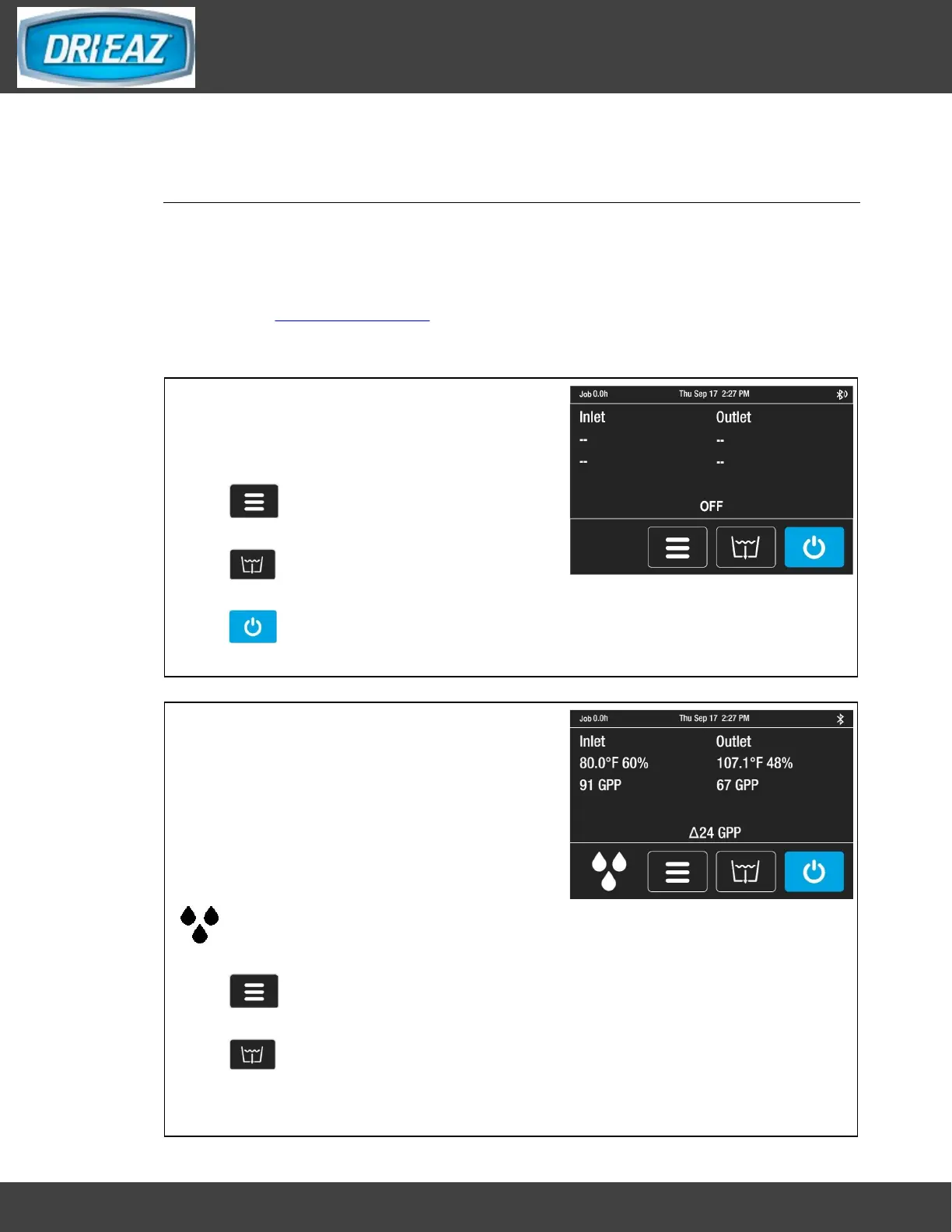
The i-Series Command Hub provides comprehensive dehumidifier controls and
detailed real-time data about the drying environment as well as job hours, self-
diagnosis messages, maintenance reminders and operating status.
For detailed information and additional instructions, please visit the Command Hub
page at LegendBrands.com
HOME SCREEN VIEWS
Unit OFF
Unit must be plugged in.
Top display bar:
Job hours, current time
Press MENU to access settings and
configuration controls
Press PURGE to pump out condensate
tank
Press ON/OFF to turn unit on.
Unit ON
Press ON/OFF key to switch unit on.
Top display bar:
Job hours, current time
Information display:
Inlet/Outlet temp, %RH and GPP
Current GPP removal
Bottom menu bar:
Quick-Reference Inlet GPP.
1: < 60 GPP; 2: 60–90 GPP; 3: > 90 GPP
Press MENU to access settings and
configuration controls
Press PURGE to pump out condensate
tank



 To Next Page