12
PRINTER SETUP
The PC3000 with version 7.0 or higher software is capable
of sending data to a local printer.
The printer must be capable of serial communication (RS-
232).
The PC3000 should work with most serial printers, however
the printers on the following list are strongly recommended.
Compatible printers:
1. Brother M-1109
2. Brother M-1809
3. Star DP 40
4. Epson EP 40
5. C - Itoh model 8510 B
6. Citizen 120-D with serial card
7. Citizen 180-D with serial card
8. Rolland DG PR 1112 with serial card
9. Panasonic KX P1091 I with serial card
10.Mannesman Tally MT81 with serial card
Configuring the Printer
1.Serial interface
2.Baud rate = 2400 (other baud rates may be used but
section [49] must be changed accordingly)
3.Parity = None
4.Character length = 8 bits
5.Auto linefeed = Off
6.American/Canadian character set
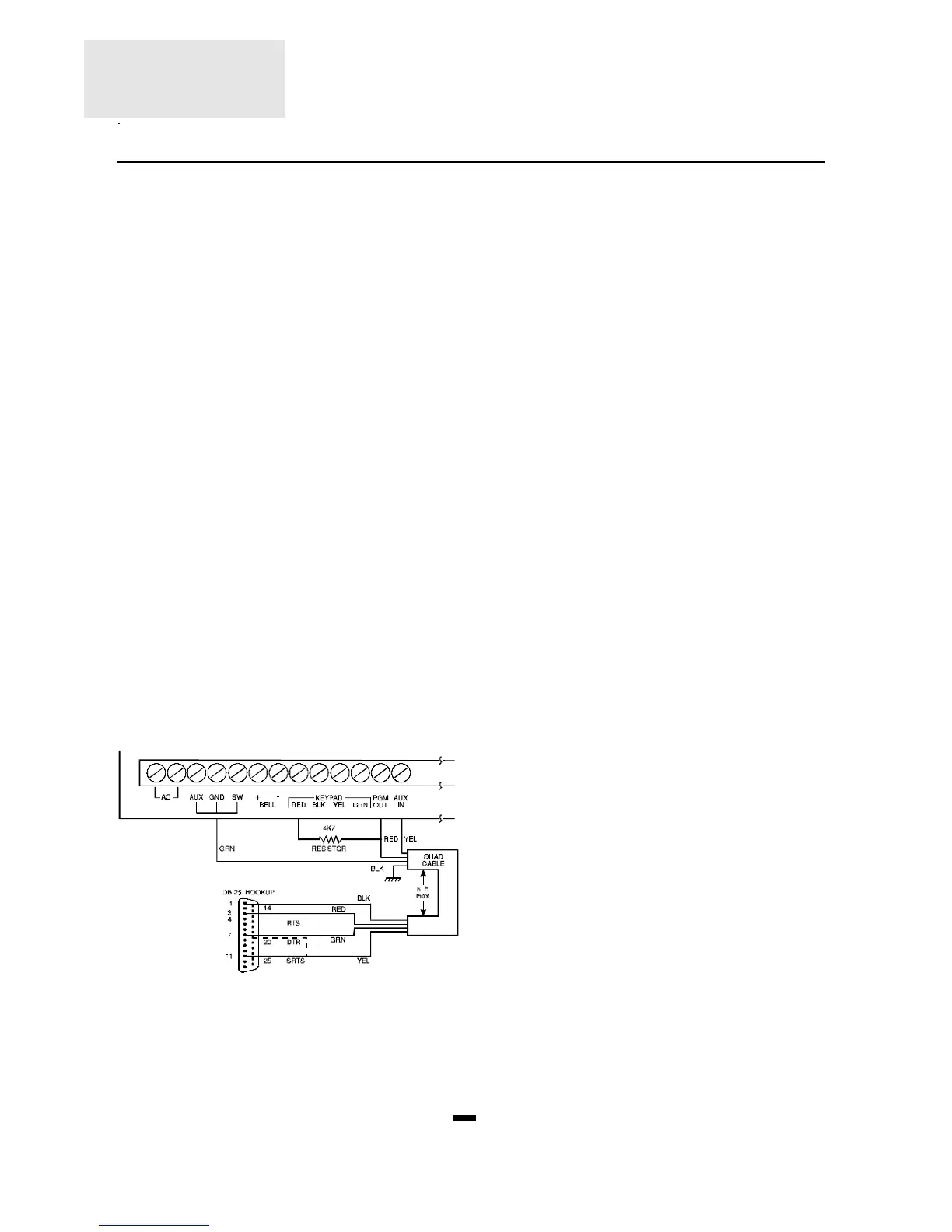
To hook up the printer, start by fully powering down the
panel
and the printer. Using A DB-25 connector, connect the
printer
to the panel as shown below. The maximum cable length
should be 6 feet.
Note: If SRTS is not available turn on light 7 in section
[49] and attach yellow to 4 (RTS) or to 20 (DTR).
Programming the Panel for Use with a
Printer
Section [49] in the panel must be programmed to enable the
printer function. See section [49], page 23. Power up the
panel and program it as described below.
Enter the Installer’s Programming section and edit the
following sections. ([Q]+[8]+[Installer’s Code])
Section Printer Only Monitored and Printer
[01] Do not program Program normally
[02] Program normally Program normally
[03] Do not program Program (see section
[49] zone light 6)
[04] Do not program Program normally
[05] to [15], [45], Program everything
Program everything
[50], [53] and [54] you wish printedyou
wish printed
[16] to [18] Program normally Program normally
[19] Light 4 must be off Light 4 must be off
[20] to [27] Program normally Program normally
[28] Program with “0C” Program with “0C”
[29] to [32] Program normally Program normally
[33] Program all 1's Program normally
[43] to [48] Program normally Program normally
[49] Printer setup Printer setup
[50] to [54] Program normally Program normally
Note: the time of day, day, month and year must be
programmed into the panel using the
[Q]+[6]+[Master Code]+[1] command as described on
page 10.
Plug in the printer, insert paper and turn it on line. Your
serial printer is now ready to use.
The following is a sample of a printout from the serial
printer:
07:33 04\01\91 STATION 2 ACC. # 5678
CLOSING ACCESS 1
12:57 04\01\91 STATION 1 ACC. # 1234
ALARM ZONE 2
ALARM ZONE 12
13:01 04\01\91 STATION 1 ACC. # 1234
RESTORE ZONE 2
RESTORE ZONE 12
18:01 04\01\91 STATION 2 ACC. # 5678
OPENING AFTER ALARM
OPENING ACCESS 1
Notes:
Station 0 is for a local only printer.
Station 1 is telephone number 1.
Station 2 is telephone number 2.









 To Next Page