EasyManua.ls Logo

Dual DC426BT - User Manual

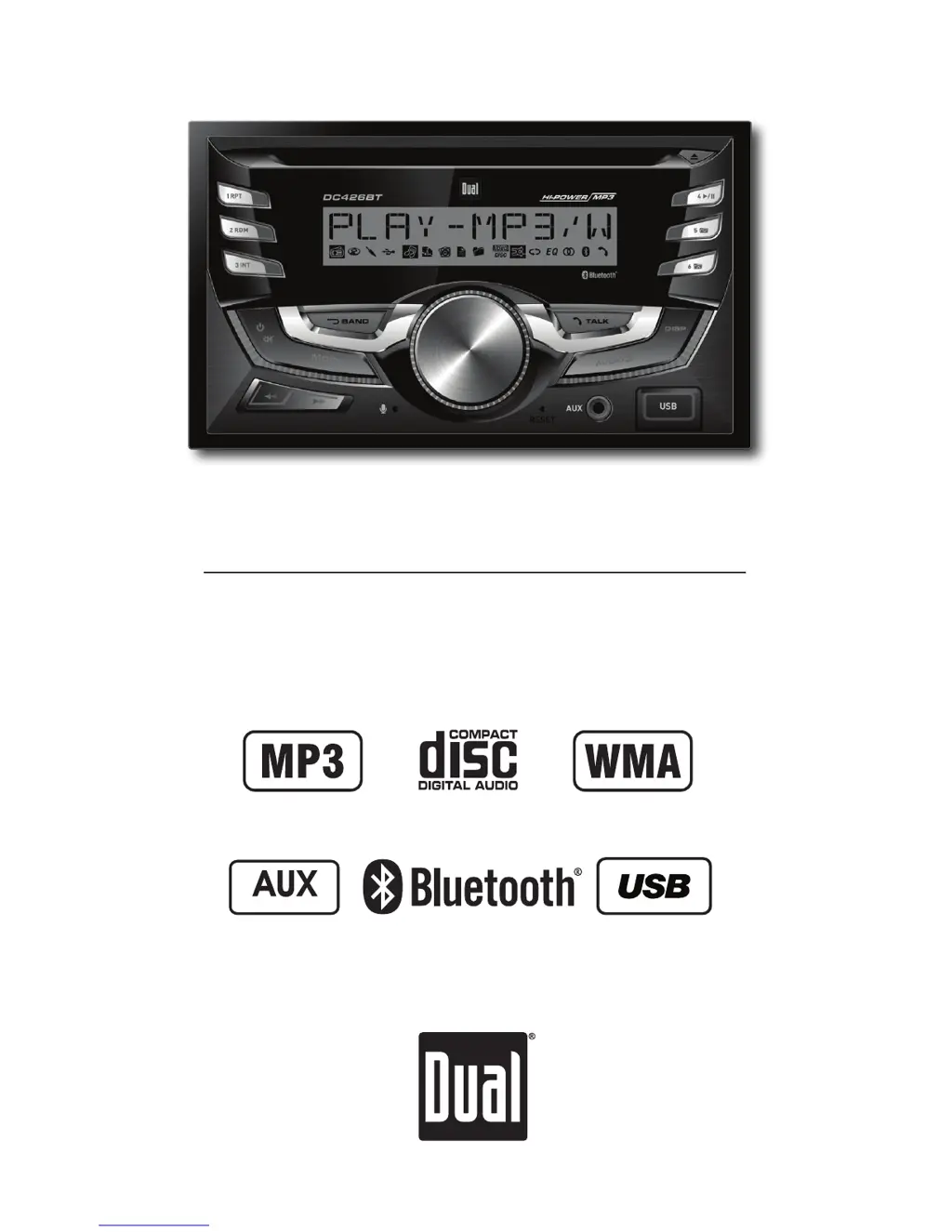
Dual DC426BT
26 pages
Print Icon
To Next Page IconTo Next Page
Loading...
INSTALLATION/OWNER'S MANUAL
AM/FM/CD Receiver with Detachable Face
DC426BT
Front and Rear Inputs
Front Input

Questions and Answers

Summary

Installation Preparation

Pre-Installation Checks

Safety precautions and environmental considerations before installing the unit.

Installation Steps

Step-by-step guide for physically installing and mounting the unit.

Wiring Diagram and Connections

Fuse Details

Information on the type and location of the unit's fuse.

Control Panel Layout

Receiver Button Functions

Identifies and describes the functions of the unit's buttons and knobs.

Basic Unit Operation

Power, Mode, Volume, and Display

Covers power on/off, mode selection, volume adjustment, and display.

Accessing the Setup Menu

Instructions for accessing and navigating the unit's setup menu.

Setup Menu Configuration

Detailed Setup Menu Options

Explains various options within the setup menu for customization.

Audio Settings and EQ

Bass, Treble, Balance, Fader, EQ

Customizing sound settings like Bass, Treble, Balance, Fader, and EQ.

Source-Specific Volume Adjustment

Adjusting volume gain for different audio sources.

Tuner Operation Guide

Tuning and Band Modes

Covers seek tuning, manual tuning, and band selection.

Storing and Recalling Stations

Methods for storing and recalling AM/FM radio stations.

CD Playback Functions

CD Insert, Eject, and Playback

Instructions for inserting, ejecting, and basic playback of CDs.

CD Intro, Repeat, and Random Modes

Details on Intro, Repeat, and Random playback options for CDs.

CD Media Compatibility

Notes on CD-R/CD-RW and incompatible disc types.

MP3;WMA File Playback Details

MP3;WMA Display Information

How song, artist, and folder information is displayed for MP3/WMA files.

Character Display Limits

Information on limits for displaying file and folder names.

MP3;WMA File Navigation

Folder and File Search

Navigating through folders to find and play MP3/WMA files.

Folder Navigation and Playback Modes

Navigating folders and using Repeat/Random modes for MP3/WMA.

MP3;WMA Media and Format Compatibility

Compatible and Incompatible Formats

Lists compatible and incompatible file types and disc formats.

Recording Standards and Settings

Details ISO9660 standards and compatible recording settings.

USB File Playback Technical Details

Additional USB MP3;WMA Information

Covers ESP, file playback priority, filename extensions, and ID3 tag support.

Sampling Rates and Bit Rates

Specifications for MP3 and WMA file encoding.

Recommended Disc Burning Settings

Optimal settings for burning MP3 and WMA discs.

USB Device Music Playback

Connecting and Playing USB Music

How to connect a USB device and start music playback.

USB File Search and Navigation

Methods for finding and selecting files on a USB device.

USB Information and Playback Modes

USB File Information Display

How song, artist, and file information is displayed from USB.

USB Repeat, Random, and Intro Modes

Details on Repeat, Random, and Intro functions for USB playback.

USB Device Compatibility and Requirements

USB Character Support and Media

Limits for file names and compatible media types for USB devices.

USB Playback Capacity and Device Compatibility

File/folder limits and device compatibility requirements for USB.

USB MP3;WMA Technical Specifications

Additional USB MP3;WMA Information

Covers ESP, file playback priority, filename extensions, and ID3 tag support.

Bluetooth Pairing and Connection

Pairing a New Bluetooth Device

Steps to pair a new Bluetooth device with the unit.

Reconnecting Paired Bluetooth Devices

Instructions for reconnecting previously paired Bluetooth devices.

Disconnecting a Bluetooth Device

How to disconnect a paired Bluetooth device.

Bluetooth Phone Call Operations

Making Bluetooth Phone Calls

Dialing, using recent calls, and redialing via Bluetooth.

Receiving and Ending Bluetooth Calls

How to answer, refuse, and end incoming phone calls.

Bluetooth Call Management

Managing Calls During a Phone Call

Adjusting volume, muting mic, and managing call waiting.

Bluetooth Setup Menu Options

Settings for Bluetooth functionality and auto answer.

Bluetooth Audio Streaming

Wireless Audio Streaming Operation

Details on wireless audio streaming via Bluetooth A2DP.

Technical Specifications

CD Player and Tuner Specifications

Frequency response, sensitivity, and separation for CD and tuners.

General and Power Specifications

Speaker impedance, output voltage, dimensions, and power ratings.

Troubleshooting Guide

Common Problems and Solutions

Guides users through common issues and their respective fixes.

One Year Limited Warranty

Warranty Coverage and Exclusions

Details on what the warranty covers and any exclusions.

Warranty Service and Contact

Steps for obtaining warranty service and contact information.

FCC Compliance Information

FCC Regulatory Statement

Device compliance with FCC Rules Part 15 and interference guidelines.

Dual DC426BT Specifications

General IconGeneral
BluetoothYes
USB PortYes
FM TunerYes
AUX InputYes
Display TypeLCD
Frequency Response20Hz - 20kHz
Bluetooth ProfilesA2DP, AVRCP
Preamp OutputsYes
Radio TunerFM
Supported Audio FormatsMP3, WMA

Related product manuals