EasyManua.ls Logo

Dual DV637MB - User Manual

Dual DV637MB
32 pages
Print Icon
To Next Page IconTo Next Page
Loading...
INSTALLATION/OWNER’S MANUAL
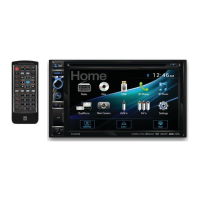
DVD Multimedia Receiver with Bluetooth
featuring a 6.2" Touch Screen Display
DV637MB
The DVD video display of the in-dash unit will not operate while the vehicle is moving. This is a safety feature
to prevent driver distraction. In-dash DVD video functions will only operate when vehicle is in Park and the
parking brake is engaged. It is illegal in most states for the driver to view video while the vehicle is in motion.
Safety Notes:
®
2-Way DualMirror™
Question and Answer IconNeed help?

Do you have a question about the Dual DV637MB and is the answer not in the manual?

Overview

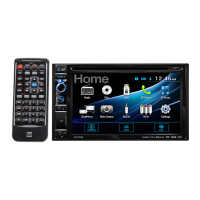
This document describes the DV637MB DVD Multimedia Receiver with Bluetooth®, featuring a 6.2" Touch Screen Display. It is a car audio-video system designed for in-vehicle entertainment and connectivity.

Function Description

The DV637MB is a versatile multimedia receiver that integrates various audio and video playback capabilities with modern connectivity features. Its primary function is to provide in-car entertainment and information through its 6.2-inch touchscreen display. Key functionalities include:
  • DVD/CD Playback: Supports DVD Video, DVD+R/RW, DVD-R/RW, CD-DA, CD-ROM (ISO), CD-R, and CD-RW formats for playing movies and music.
  • USB Playback: Allows playback of MP3 audio files, AVI/MP4 video files, and JPG photos from USB devices connected to the front panel USB port.
  • Bluetooth Connectivity: Enables wireless audio streaming (Bluetooth Music) and hands-free calling (Bluetooth Phone) from compatible devices. It supports auto-pairing and auto-connect features.
  • DualMirror™ Technology: This feature allows mirroring the screen of select Android smartphones, iPhones, iPods, and iPads onto the receiver's display. It supports 2-way control for Android devices (requires specific cables sold separately).
  • AM/FM/RDS Tuner: Provides access to radio broadcasts with AM/FM bands and RDS (Radio Data System) features, including program type (PTY), traffic announcements (TA), and alternative frequencies (AF).
  • Auxiliary Inputs: Includes a front 3.5mm auxiliary input for connecting external audio devices and rear RCA A/V inputs for additional audio/video sources.
  • Rear Camera Input: Supports connection of an optional rear view camera for enhanced safety during parking or reversing. The unit can automatically select camera mode when connected to the reverse lamp circuitry.
  • Steering Wheel Control (SWC) Compatibility: Can be configured to work with existing steering wheel controls for convenient operation.

Important Technical Specifications

  • Display: 6.2" diagonal measurement, 800 (H) x 480 (V) resolution, 250 cd/m² brightness, 500:1 contrast ratio, 1,152,000 pixels.
  • Power Output (CEA-2006 Power Standard): 16 Watts RMS x 4 channels at 4 ohms and ≤ 1% THD+N Signal to Noise Ratio: 80dBA (reference: 1 watt into 4 ohms).
  • FM Tuner:
    • Tuning range: 87.5MHz-107.9MHz
    • Usable sensitivity: 10dBf
    • 50dB quieting sensitivity: 20dBf
    • Stereo separation @ 1kHz: 38dB
    • Frequency response: 30Hz-13kHz
  • AM Tuner:
    • Tuning range: 530kHz-1710kHz
    • Usable sensitivity: 24uV
    • Frequency response: 50Hz-2.3kHz
  • Rear USB (charging only): Output: 5VDC, 1A.
  • Audio Output: Subwoofer preamp audio output (black jacket with green RCA) active in all audio modes. Line output voltage: 4 volt RMS. Line output impedance: 200 ohms.
  • Chassis Dimensions: 7" x 7" x 4" (W x D x H).
  • Compatible Disc/File Types: CD-DA, CD-ROM (ISO), CD-R, CD-RW, DVD Video, DVD+R/RW, DVD-R/RW. AVI, MPEG2, MPEG4, DivX/Xvid (Max video resolution: 720x480, Max video bit rate: 5000 kbps). MP3 (32~320kbps, 32/44.1/48kHz sampling frequency). USB format type: FAT32/FAT.
  • Incompatible Disc/File Types: Discs recorded with Track At Once or packet writing, MP3 PRO format, MP3 playlists, RMP format, WAV format, WMA format, AAC, protected AAC, M4A format.

Usage Features

  • Intuitive Touchscreen Interface: The 6.2-inch display provides easy navigation through menus and controls for various functions.
  • Main Menu Access: A house icon in the top left corner allows quick access to the main menu from any operational mode.
  • Volume Control: A rotary knob on the front panel allows for easy adjustment of volume and mute function.
  • Mode Selection: A dedicated MODE button cycles through available input modes (Radio, Disc, USB, Bluetooth Phone, Bluetooth Music, DualMirror, Camera, Auxiliary Input, AV In).
  • Parking Brake Lock-out Feature: For safety, video playback is restricted unless the vehicle is in "Park" and the parking brake is fully engaged. This feature requires proper installation of the parking brake detect wire.
  • Customizable Settings: Users can adjust various settings including animation, key beep, radio region, wallpaper, camera icon display, Bluetooth auto-connect, dimmer levels, and display calibration.
  • Remote Control: A wireless remote control is included for convenient operation from a distance. It uses a CR2025 battery.
  • DualMirror™ 2-Way Control (Android only): Allows for interactive control of the mirrored smartphone screen directly from the receiver's display.
  • File Browsing: For USB and disc playback, users can browse folders and files directly on the screen.
  • Audio Options: Includes EQ, Fader/Balance, Subwoofer/Loudness, and ASP (Audio Sound Processing) settings for audio customization.

Maintenance Features

  • Reset Function: A small reset button is available to restore the main processor to default settings in case of malfunction.
  • Cleaning: The monitor should be cleaned with a dry silicone cloth or soft cloth. Avoid stiff cloths or volatile solvents like paint thinner and alcohol, as they can damage the screen surface or printing.
  • Fuse Replacement: The unit uses a 15 amp blade-style fuse. When replacing, ensure the correct type and amperage are used, and disconnect the wiring harness first to prevent short circuits.
  • Battery for Remote Control: The remote control uses a 3-volt Lithium CR2025 battery. It should be removed if the remote will not be used for an extended period (month or longer).
  • Troubleshooting Guide: The manual includes a comprehensive troubleshooting section to help users diagnose and resolve common issues such as no power, no sound, video display problems, or remote control malfunction.
  • Professional Installation Recommended: Due to the technical nature of the product, professional installation by an authorized dealer is highly recommended to prevent damage and ensure proper functionality, especially concerning safety features like the parking brake lock-out.

Dual DV637MB Specifications

General IconGeneral
BrandDual
ModelDV637MB
CategoryReceiver
LanguageEnglish

Related product manuals