EasyManua.ls Logo

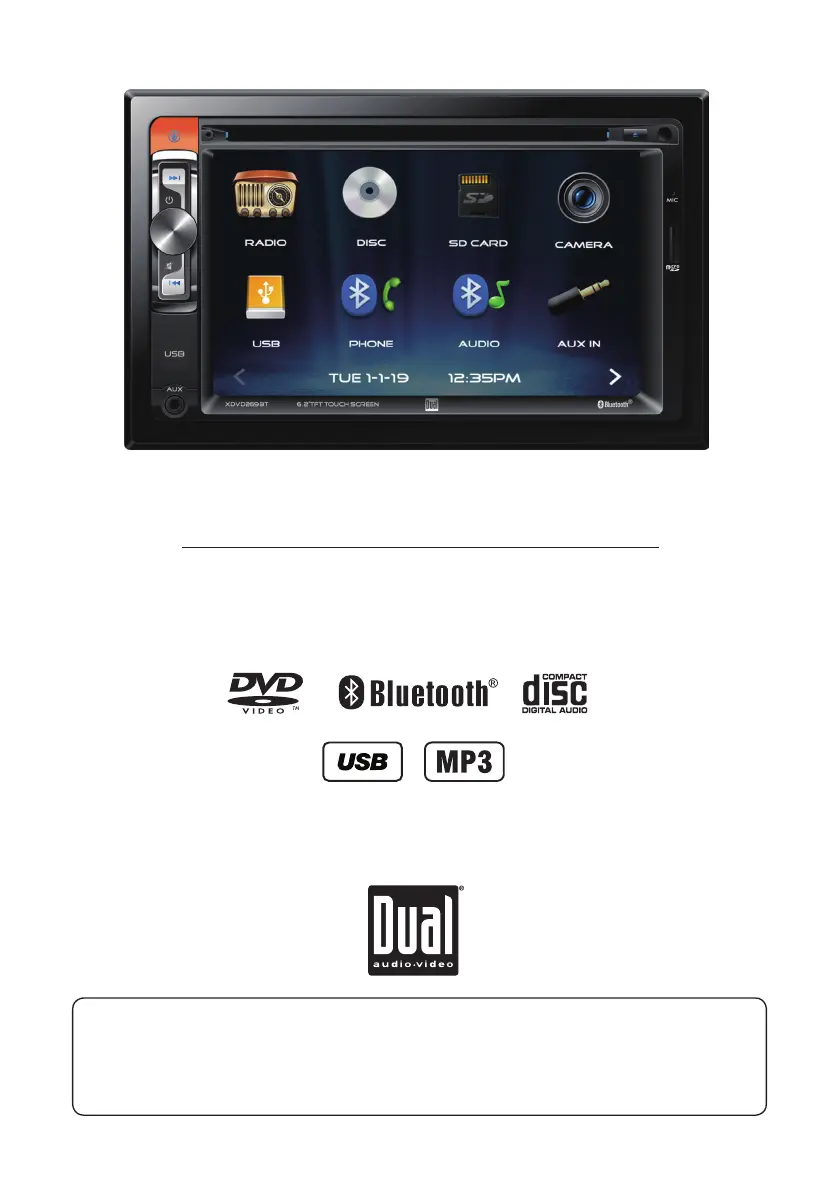
Dual XDVD269BT - User Manual

Dual XDVD269BT
24 pages
Print Icon
To Next Page IconTo Next Page
Loading...
INSTALLATION/OWNER’S MANUAL
Multimedia Receiver with Bluetooth®
featuring a 6.2" Touch Screen Display
XDVD269BT
The DVD video display of the in-dash unit will not operate while the vehicle is moving. This is a safety feature
to prevent driver distraction. In-dash DVD video functions will only operate when vehicle is in Park and the
parking brake is engaged. It is illegal in most states for the driver to view video while the vehicle is in motion.
Safety Notes:

Questions and Answers

  • J
    Joshua YuAug 13, 2025
    What to do if my Dual Receiver will not turn on?
    • K
      Katherine SandovalAug 13, 2025
      If your Dual Receiver isn't powering on, there could be several reasons. First, check the yellow and red wires to ensure they are properly connected and receiving the correct voltage (11~16VDC). Next, verify the black wire is securely connected to ground. Finally, inspect the fuse(s) and replace them if they are blown.
  • B
    Bradley MartinezAug 17, 2025
    Why does my Dual XDVD269BT have power but no sound?
    • P
      phillipskristenAug 17, 2025
      If your Dual Receiver has power but no sound, begin by checking the speaker wire connections at the speakers. Also, make sure that bare speaker wires are insulated from each other and the chassis ground.
  • H
    hcunninghamAug 21, 2025
    What to do if my Dual XDVD269BT Receiver blows fuses?
    • J
      Jeremy MillerAug 21, 2025
      If your Dual Receiver is blowing fuses, first check the yellow and red wires for any pinching that may cause them to touch the chassis ground. Next, inspect the speaker wires to ensure they are not touching the chassis ground. Finally, make sure you are using fuses with the correct rating.
  • C
    Christopher GeorgeAug 25, 2025
    What to do if my Dual XDVD269BT has audio but no video?
    • K
      Karen ButlerAug 25, 2025
      If your Dual Receiver has audio but no video, check the connections at the parking brake to ensure the parking brake safety circuit is properly connected. Also, make sure the parking brake is applied.
  • C
    Cheryl JamesAug 29, 2025
    Why is there no video display when reversing with my Dual XDVD269BT?
    • S
      Stephen JohnsonAug 29, 2025
      If there's no video display when reversing with your Dual Receiver, check the connections at the reverse lamp to ensure the reverse circuit is properly connected. Ensure that the vehicle is in reverse gear.
  • K
    Kim GregorySep 1, 2025
    What to do if my Dual XDVD269BT DVD does not start playback?
    • J
      John CarpenterSep 1, 2025
      If your Dual Receiver DVD does not start playback, check the disc for scratches or other physical defects. Also, make sure you are using discs labeled "Region 1" or "All" only.
  • M
    Mark ZimmermanSep 5, 2025
    Why does my Dual XDVD269BT Receiver have excessive skipping?
    • R
      Robert HernandezSep 5, 2025
      If your Dual Receiver is experiencing excessive skipping, check the mounting sleeve to ensure the unit is mounted correctly. You should also inspect the disc for scratches or other physical defects.
  • B
    Bailey BarrettSep 9, 2025
    Why does 'Disc Region Incorrect' appear on my Dual XDVD269BT Receiver display?
    • N
      nortoncollinSep 9, 2025
      If 'Disc Region Incorrect' appears on your Dual Receiver display, it indicates a region code error. Use discs labeled "Region 1" or "All" only.

Summary

Safety Warnings

General Operational and Installation Safety

Crucial safety guidelines for installing and operating the unit to prevent injury and damage.

Safety Information

Preventing Damage or Injury

Instructions to prevent unit damage and personal injury during use and maintenance.

Wiring Diagram and Connections

Input;Output Connections

Detailed diagram showing all inputs and outputs for unit connectivity.

AM;FM Tuner Operation

Basic Tuner Controls

Explains how to select radio, navigate menus, and change bands.

Tuning and Presets

Details frequency tuning, local/distance, scan presets, and stereo/mono settings.

CD;USB;microSD Playback

Media Playback Controls

Explains how to play files from disc, USB, or microSD and use playback functions.

Media Compatibility - CD;DVD

Compatible File Types and Formats

Lists supported file types, systems, formats, sampling frequencies, and bitrates for CD/DVD.

Media Compatibility - USB;microSD

Supported USB;microSD Formats

Details compatible file types, systems, formats, sampling frequencies, and bitrates for USB/microSD.

General Media Compatibility

Compatible and Incompatible Media

Lists supported and unsupported disc/file types for the unit.

DVD Operation

Bluetooth Operation - Phone

Pairing and Connecting Bluetooth Devices

Steps for pairing new devices and auto-connecting previously paired devices.

Bluetooth Operation - Music

Advanced Features

SWC Input Operation

Troubleshooting

Common Unit Problems and Solutions

Lists common issues like no power, no sound, blown fuses, and their solutions.

Dual XDVD269BT Specifications

General IconGeneral
Screen Size6.2 inches
BluetoothYes
USB PortYes
Auxiliary InputYes
RCA Preamp OutputsYes
AM/FM TunerYes
DVD/CD PlaybackYes
TouchscreenYes
Resolution800 x 480
Max Power Output50 watts x 4 channels
InputsUSB, AUX, Rear Camera
CompatibilityMP3, WMA, JPEG

Related product manuals