EasyManua.ls Logo

Dual xdvd136bt - User Manual

Dual xdvd136bt
28 pages
Print Icon
To Next Page IconTo Next Page
Loading...
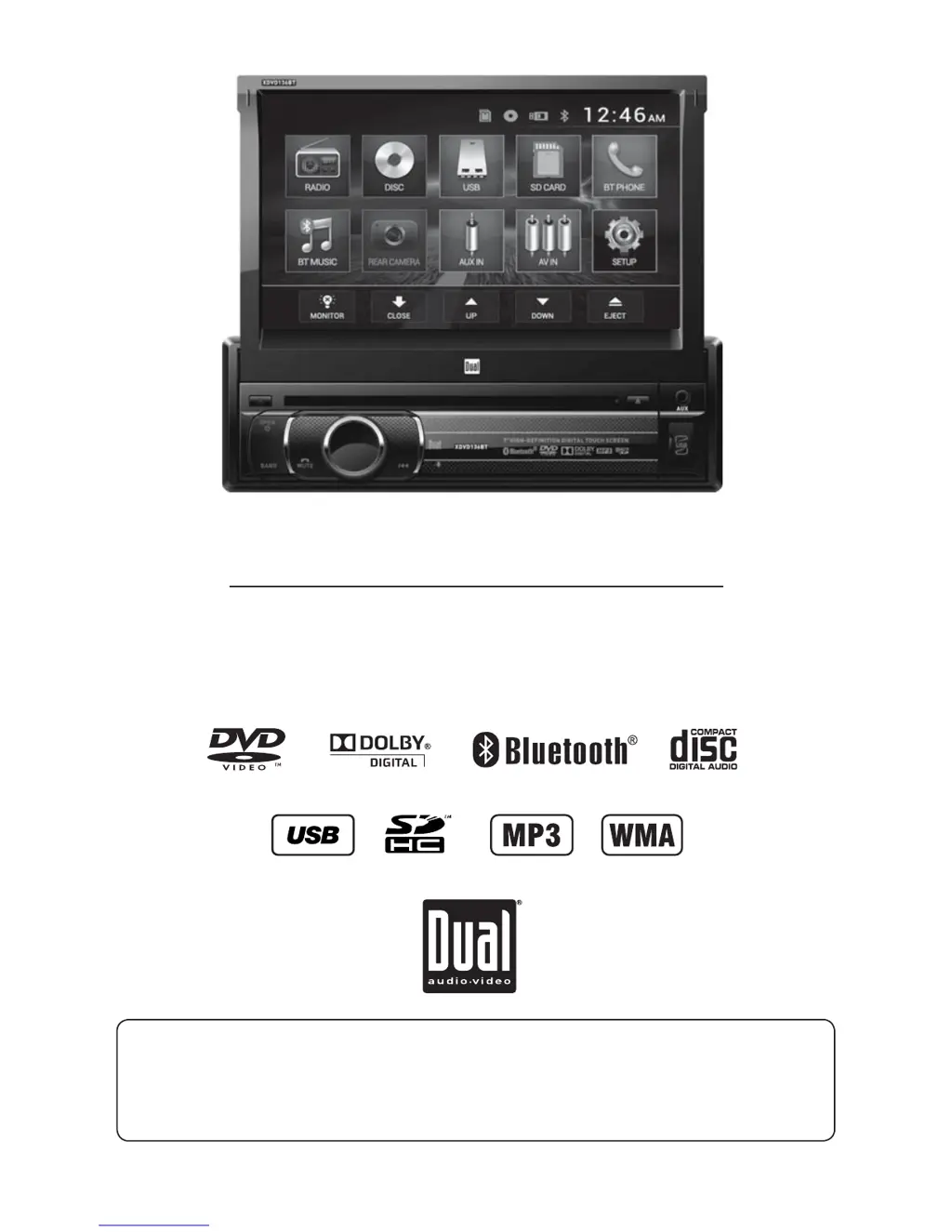
INSTALLATION/OWNER’S MANUAL
DVD Multimedia Receiver with Bluetooth
featuring a 7" Touch Screen Display
XDVD136BT
The DVD video display of the in-dash unit will not operate while the vehicle is moving. This is a safety feature
to prevent driver distraction. In-dash DVD video functions will only operate when vehicle is in Park and the
parking brake is engaged. It is illegal in most states for the driver to view video while the vehicle is in motion.
Safety Notes:
®

Other manuals for Dual xdvd136bt

Questions and Answers

  • D
    Daniel JonesAug 15, 2025
    Why does my Dual Car Video System have power but no sound?
    • C
      Christine ClaytonAug 15, 2025
      If your Dual Car Video System has power but no sound, here are a couple of things to check: * Speaker wires may not be connected. Ensure all speaker wires are properly connected at the speakers. * One or more speaker wires might be touching each other or the chassis ground. Insulate all bare speaker wires from each other and from the chassis ground.
  • M
    Melissa PattonAug 18, 2025
    What to do if my Dual Car Video System won't turn on?
    • J
      Jay WhiteAug 18, 2025
      If your Dual Car Video System is not turning on, there are several possible causes: * The yellow or red wire may not be connected, or the voltage may be incorrect. Check the connections to ensure they are properly connected and have the correct voltage (11~16VDC). * The black wire may not be connected. Verify the connection to the ground. * The fuse may be blown. Replace the fuse(s) with a new one.
  • K
    Karen GardnerAug 21, 2025
    What to do if my Dual Car Video System keeps blowing fuses?
    • B
      benjamin02Aug 21, 2025
      If your Dual Car Video System is blowing fuses, consider these potential issues: * The yellow or red wire may be touching the chassis ground. Check for any pinched wires. * Speaker wires may be touching the chassis ground. Inspect for pinched wires. * The fuse rating may be incorrect. Use fuses with the correct rating.
  • L
    Leah KaneAug 25, 2025
    Why does my Dual Car Video System have audio but no video?
    • D
      Dustin Anderson PhDAug 26, 2025
      If your Dual Car Video System has audio but no video, it might be due to: * The parking brake safety circuit not being connected or the parking brake not being applied. Check the connections at the parking brake and apply the parking brake.
  • H
    hugheschristopherAug 28, 2025
    What to do if my Dual Car Video System shows no video display when in reverse?
    • G
      gibsonjuanAug 28, 2025
      If there's no video display on your Dual Car Video System when in reverse, it could be: * The reverse circuit isn't connected, or the vehicle isn't in reverse. Check the connections at the reverse lamp and make sure the vehicle is in reverse gear.
  • J
    jeffrey03Aug 31, 2025
    Why does my Dual Car Video System DVD not start playback?
    • B
      Brandon CampbellAug 31, 2025
      If your Dual Car Video System DVD does not start playback, it could be due to: * A physical defect in the media or the wrong region. Check the disc for scratches and use discs labeled "Region 1" or "All" only.
  • G
    Gary KleinSep 3, 2025
    How to fix a Dual Car Video System IR remote that does not work?
    • M
      Matthew Kline IIISep 3, 2025
      If the IR remote for your Dual Car Video System is not working, the most likely cause is a dead battery. Replace the battery.
  • M
    Michael JonesSep 7, 2025
    Why does my Dual Car Video System have excessive skipping?
    • J
      jonesmorganSep 7, 2025
      If your Dual Car Video System is skipping excessively, there are a couple of potential reasons: * The unit may not be mounted correctly. Check the mounting sleeve. * There may be a physical defect in the media. Inspect the disc for scratches.
  • E
    Eric ToddSep 12, 2025
    What does 'Disc Region Incorrect' mean on my Dual Car Video System?
    • S
      Steven McgrathSep 12, 2025
      If your Dual Car Video System displays 'Disc Region Incorrect', it means there is a region code error. Use discs labeled "Region 1" or "All" only.

Summary

Copyright and Safety Information

Copyright Notes

Legal information regarding copyright protection and licensing.

A WARNING

Critical safety warnings regarding driver distraction and video playback.

Safety Information

General safety precautions for installation and unit operation.

Installation Guide

Preparation

Steps and considerations before beginning the unit installation process.

Wiring Diagram

Visual representation of the unit's input and output connections and wiring.

Device Operation Overview

Control Locations

Identifies and explains the buttons and functions on the unit and remote control.

Remote Control Preparation

Instructions for installing and preparing the remote control battery.

General Operation

Basic functions like faceplate installation, power, volume, mute, and mode selection.

Setup Menu

Configuring unit settings like General, Time, Video, Language, Calibration, and SWC.

Audio Settings

Adjusting audio parameters including EQ, Fader/Balance, Subwoofer, and ASP.

Source and Media Operations

AM;FM;RDS Tuner Operation

How to tune, scan, and operate the radio functions (AM, FM, RDS).

CD;USB;microSD Card Operation

Playing audio and video files from discs, USB drives, and microSD cards.

DVD Operation

Steps for inserting, ejecting, and controlling DVD playback.

Bluetooth Operation

Pairing, connecting, and using Bluetooth for phone calls and music streaming.

Auxiliary and AV Inputs

Connecting external audio/video sources via 3.5mm and RCA inputs.

Rear Camera Operation

Connecting and using an optional rear-view camera.

Media Compatibility

Support and Troubleshooting

Limited One Year Warranty

Details of the product warranty coverage and exclusions.

Troubleshooting

Common problems, their causes, and solutions for the unit.

Dual xdvd136bt Specifications

General IconGeneral
Display TypeLCD
Screen Size6.2 inches
BluetoothYes
USB PortYes
Subwoofer OutputYes
SD Card SlotYes
AUX InputYes
Steering Wheel Control CompatibleYes
DVD PlayerYes
AM/FM TunerYes
Audio Formats SupportedMP3, WMA
Video Formats SupportedMPEG-4
Peak Power Output200 Watts
Resolution800 x 480
CompatibilityAndroid
RMS Power Output50 watts x 4 channels

Related product manuals