EasyManua.ls Logo

Dual XDVD770BT - User Manual

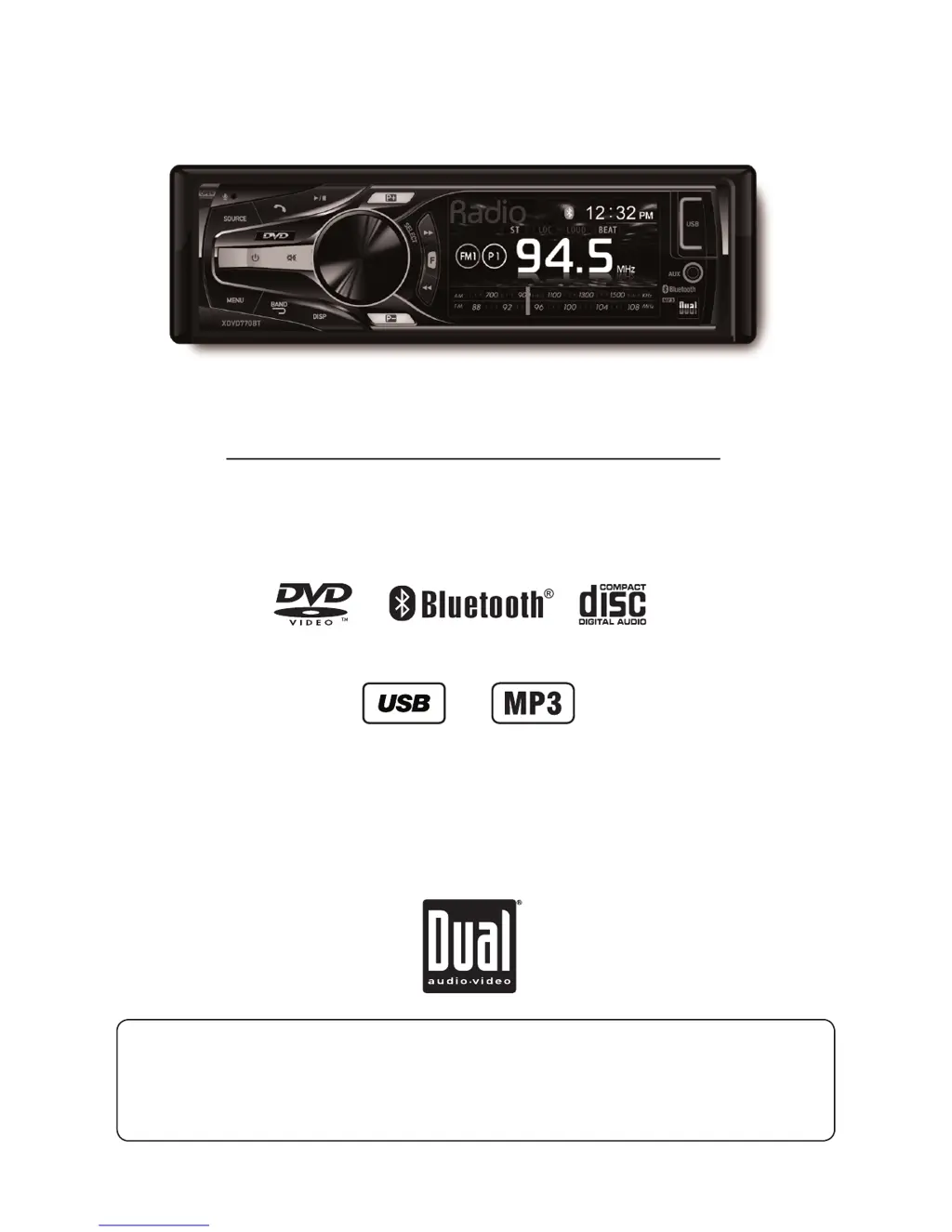
Dual XDVD770BT
28 pages
Print Icon
To Next Page IconTo Next Page
Loading...
INSTALLATION/OWNER’S MANUAL
DVD Multimedia Receiver with Bluetooth
featuring a 3" Touch Screen Display
XDVD770BT
The DVD video display of the in-dash unit will not operate while the vehicle is moving. This is a safety feature
to prevent driver distraction. In-dash DVD video functions will only operate when vehicle is in Park and the
parking brake is engaged. It is illegal in most states for the driver to view video while the vehicle is in motion.
Safety Notes:
®

Questions and Answers

  • A
    amandavelazquezAug 14, 2025
    How to fix a Dual Receiver that will not turn on?
    • B
      Brian FranklinAug 14, 2025
      If your Dual Receiver unit has no power, there could be a few reasons. First, check if the yellow wire is not connected or has incorrect voltage (it should be 11~16VDC). Also, make sure the black wire is properly connected to ground. Finally, check if the fuse is blown and replace it if necessary.
  • A
    arianakennedyAug 17, 2025
    What to do if my Dual XDVD770BT has audio but no video?
    • T
      Taylor NewtonAug 18, 2025
      If your Dual Receiver unit has audio but no video, it might be due to the parking brake safety circuit not being connected properly; check the connections at the parking brake. Also, ensure that the parking brake is applied as described.
  • N
    Nancy WardAug 21, 2025
    Why is there no sound coming from my Dual XDVD770BT?
    • C
      Charles PooleAug 21, 2025
      If your Dual Receiver unit has power but no sound, start by checking the speaker wire connections at the speakers. Also, ensure that none of the speaker wires are touching each other or the chassis ground; if they are, insulate all bare speaker wires from each other and the chassis ground.
  • E
    eallenAug 25, 2025
    Why does my Dual XDVD770BT unit keep blowing fuses?
    • T
      Tara MooreAug 25, 2025
      If your Dual Receiver unit blows a fuse, it could be due to a few reasons. Check for pinched yellow or red wires touching the chassis ground, or speaker wires making contact with the chassis ground. Another possibility is that you are using a fuse with an incorrect rating, so ensure you are using fuses with the correct rating.
  • T
    Tabitha PetersonAug 27, 2025
    How to stop excessive skipping on Dual Receiver?
    • A
      alandaughertyAug 27, 2025
      If you're experiencing excessive skipping on your Dual Receiver, it could be due to incorrect mounting of the unit; in that case, check the mounting sleeve. It may also be caused by physical defects in the media; check the disc for scratches.
  • K
    Kimberly KhanAug 30, 2025
    Why is there no video display when reversing with my Dual XDVD770BT?
    • B
      Benjamin SmithAug 30, 2025
      If there is no video display when the vehicle is in reverse with your Dual Receiver, check the connections at the reverse lamp to ensure the reverse circuit is properly connected. Also, make sure the vehicle is actually in reverse gear.
  • R
    Rhonda MarquezSep 3, 2025
    Why won't my DVD play on my Dual XDVD770BT Receiver?
    • H
      Haley Lowery MDSep 3, 2025
      If your DVD does not start playback on your Dual Receiver, first check the disc for any scratches or physical defects. Also, ensure that you are using discs labeled "Region 1" or "All" only, as using discs from other regions may cause playback issues.
  • S
    Scott PerrySep 6, 2025
    What to do if the IR remote does not work on Dual XDVD770BT Receiver?
    • J
      John MartinSep 6, 2025
      If your Dual Receiver's IR remote is not working, the first thing you should do is replace the battery.
  • R
    Rebecca FosterSep 9, 2025
    What does 'Disc Region Incorrect' mean on my Dual XDVD770BT Receiver?
    • G
      Gregory MccallSep 10, 2025
      If the message 'Disc Region Incorrect' appears on your Dual Receiver's display, it indicates a region code error. To resolve this, use discs labeled "Region 1" or "All" only.

Summary

Safety Notes

Copyright Notes

XDVD770 BT Preparation

Warning Statement

Critical warnings regarding driver distraction and safe operation of the unit.

Safety Information and Precautions

Guidelines for safe installation and operation to prevent injury and damage.

Preparation and Mounting

Steps for preparing and physically mounting the unit in the vehicle.

Wiring Diagram

Visual representation of connections for inputs and outputs.

Control Locations

Identification and description of controls on the head unit and remote.

Remote Control Preparation

Instructions for inserting and replacing the battery in the remote control.

General Operation

Basic Controls and Connectivity

Covers power, volume, mute, source selection, auxiliary input, and USB port operations.

System Setup Configuration

Guides through accessing and adjusting Audio, General, Gain, Screen, and Disc setup menus.

AM;FM Tuner Operation

Tuning and Station Presets

Instructions for manual tuning, seek tuning, band selection, and managing station presets.

CD;MP3 Operation

Disc Playback and Controls

Inserting, ejecting, and controlling playback of CDs and MP3s.

MP3 File Management

Playing, displaying, repeating, randomizing, and intro-playing MP3 files and folders.

Media Compatibility (CD;DVD)

Lists compatible file types, systems, formats, sampling, and bitrates for CD/DVD media.

Media Compatibility (USB)

Lists compatible file types, systems, formats, sampling, and bitrates for USB media.

DVD Operation

DVD Playback and Controls

Inserting, ejecting, and controlling playback of DVDs.

Bluetooth Operation

Device Pairing and Connection

Steps for pairing new and existing devices, and auto-connecting Bluetooth devices.

Call and Audio Functions

Managing phone calls, redialing, and controlling Bluetooth audio streaming.

Auxiliary and Rear Camera Inputs

Audio;Video Input Connections

Connecting external audio/video sources via front 3.5mm and rear RCA inputs.

Rear Camera Integration

Connecting and using a rear camera for viewing while parking.

Limited One Year Warranty

Warranty Terms and Service

Details on coverage, exclusions, obtaining service, and contact information.

Specifications

Technical Performance Data

Technical details for amplifier, tuners, monitor, USB, and general unit specifications.

Troubleshooting Guide

Common Issues and Solutions

Lists common problems, their causes, and recommended actions for resolution.

Dual XDVD770BT Specifications

General IconGeneral
DisplayLCD
Resolution800 x 480 pixels
BluetoothYes
USB PortYes
AUX InputYes
AM/FM TunerYes
DVD PlayerYes
CD PlayerYes
MP3 PlaybackYes
WMA PlaybackYes
iPod CompatibilityYes
iPhone CompatibilityYes
Remote ControlYes
Video OutputYes
Preamp Outputs3 pairs
Audio Formats SupportedMP3, WMA
Screen Size6.2 inch
Max Power Output50 watts x 4 channels
Power Output50 watts x 4 channels

Related product manuals