11
CD/USB/microSD
CD/USB/microSD
Operation
Main Menu
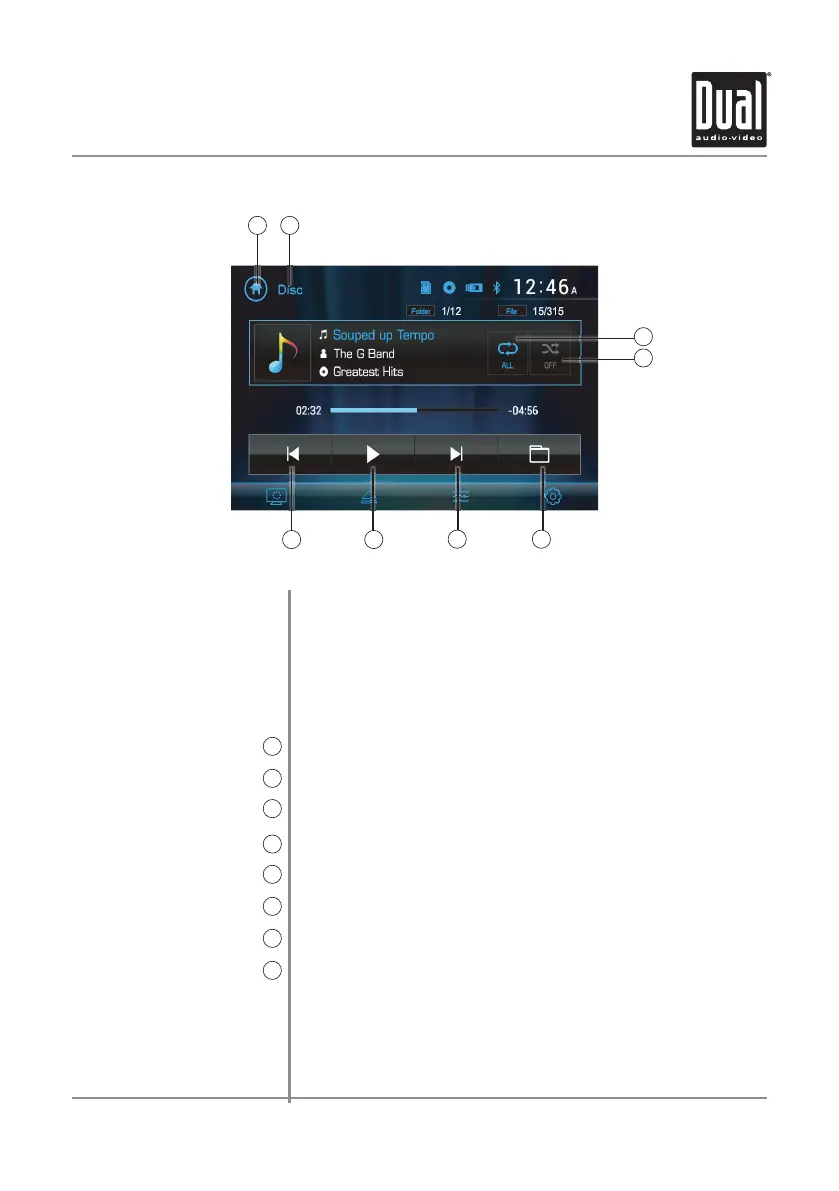
1
Current Mode Indicator
2
Repeat
3
Random
4
Previous File / Track
5
Play / Pause
6
Next File / Track
7
Folder Access
8
To play audio files from a disc or MP3 files from a disc or USB/microSD device,
insert disc or device and playback will begin automatically. To return
to disc or USB/microSD playback from another mode of operation,
corresponding icon from the Main Menu.
• Disc Playback - Insert disc into the slot, and playback will begin
automatically.
• USB/microSD Playback - Insert a USB/microSD device into the USB slot.
Press to return to Main Menu screen.
Displays current mode of operation.
Press to select a repeat option: Repeat 1, Repeat Folder or Repeat Off.
Press to enable or disable random playback.
Press to go back to the previous file or track.
Press to pause or resume playback.
Press to advance to the next file or track.
Press to access all folders on device.
2
3
4
5 6
7 8
1
DV622 OPERATION
select the



 To Next Page