EasyManua.ls Logo

Dual MXD420 - User Manual

Dual MXD420
26 pages
Print Icon
To Next Page IconTo Next Page
Loading...
INSTALLATION/OWNER'S MANUAL
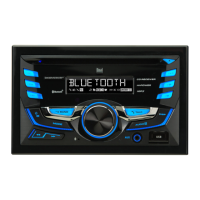
AM/FM/CD Receiver with Detachable Face
MXD420
Front and Rear Inputs

Questions and Answers

  • J
    Jason LopezAug 13, 2025
    How to fix Dual MXD420 Car Receiver that won't turn on?
    • T
      Tammy WardAug 13, 2025
      If your Dual Car Receiver won't turn on, start by checking the yellow wire connection to ensure it has the correct voltage (11~16VDC). Also, verify the black wire is properly connected to ground. Lastly, inspect the fuse and replace it if it's blown.
  • N
    Natalie MartinezAug 17, 2025
    Why does my Dual MXD420 Car Receiver keep blowing fuses?
    • D
      Debra PowellAug 17, 2025
      If your Dual Car Receiver is blowing fuses, check the yellow or red wire to see if it's touching the chassis ground, looking for any pinched wires. Also, inspect the speaker wires for the same issue. Finally, ensure you are using a fuse with the correct rating.
  • M
    michaelcastilloAug 21, 2025
    What to do if my Dual MXD420 Car Receiver has power but no sound?
    • C
      Chelsea PerezAug 21, 2025
      If your Dual Car Receiver has power but no sound, first check the speaker wire connections at the speakers. Then, make sure that none of the bare speaker wires are touching each other or the chassis ground; insulate them if they are.
  • L
    lorimckinneyAug 25, 2025
    How to fix 'ERR FILE' on Dual Car Receiver?
    • H
      Hayley BraunAug 25, 2025
      If your Dual Car Receiver displays 'ERR FILE', try pressing the eject button or the reset button. If that doesn't work, the WMA file might be copy-protected by DRM. Try writing the disc using WMA files that are not copy-protected.
  • G
    Gregory CastilloAug 28, 2025
    Why is my Dual MXD420 skipping a lot?
    • N
      Nathan MathisAug 28, 2025
      If your Dual Car Receiver is skipping excessively, check the mounting sleeve and backstrap support to ensure the unit is mounted correctly and the backstrap is secure. Also, inspect the media (CD, CD-R, or CD-RW) for any physical defects like scratches.
  • F
    Fernando WilliamsSep 1, 2025
    What does 'NO FILE' mean on my Dual MXD420 Car Receiver?
    • H
      Heather CastroSep 1, 2025
      If your Dual Car Receiver displays 'NO FILE', it means that no playable MP3/WMA files were found on the device. Check the device to ensure it contains valid MP3/WMA files.
  • M
    Michael JensenSep 5, 2025
    How to fix Dual MXD420 that won't accept a disc?
    • J
      Jason KlineSep 5, 2025
      If your Dual Car Receiver will not accept a disc, press the EJECT button to reset the CD mechanism position. Also, remove the two transit screws located on top of the unit.
  • M
    Matthew DiazSep 8, 2025
    What does 'NO SUPPORT' mean on my Dual MXD420 display?
    • M
      Miss Kelly LynchSep 8, 2025
      The Dual Car Receiver displays 'NO SUPPORT' because an invalid ID3 tag version is present. The receiver supports version 1.0 to 2.0 ID3 tags.

Summary

Wiring Diagram Explained

Electrical Connections

Illustrates the electrical connections required for the MXD420 unit, including power, ground, and speaker outputs.

Receiver Controls Overview

Front Panel Layout

Identifies and describes the function of each button, knob, and port on the front panel of the MXD420 receiver.

Remote Control Functions

Remote Button Guide

Details the buttons and their functions on the remote control for operating the MXD420 unit.

Audio Settings

Adjusting Audio Parameters

Guides on how to adjust Bass, Treble, Balance, and Fader settings for optimal audio output.

Bluetooth Pairing and Connection

Pairing and Connecting Bluetooth Devices

Guides on how to pair new and existing Bluetooth devices, connect, and disconnect them from the head unit.

Bluetooth Phone Call Operations

Managing Bluetooth Calls and Settings

Bluetooth Audio Streaming

Troubleshooting Guide

Common Issues and Solutions

Provides solutions for common problems encountered with the unit, listing issues, their causes, and recommended actions.

Dual MXD420 Specifications

General IconGeneral
BrandDual
ModelMXD420
CategoryCar Receiver
LanguageEnglish

Related product manuals