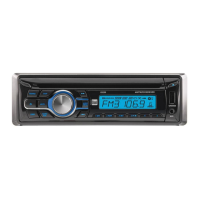
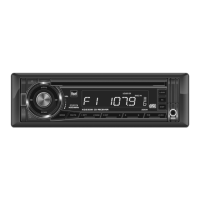
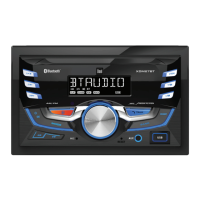
The device described in the manual is the Dual XD28BT AM/FM Receiver with Bluetooth. It is a car audio head unit designed to provide entertainment and connectivity features in a vehicle.
Function Description:
The XD28BT is an AM/FM receiver that supports various audio sources, including MP3 files via USB, auxiliary input, and Bluetooth streaming. It allows users to listen to radio stations, play music from USB devices, connect external audio players, and stream audio wirelessly from Bluetooth-enabled mobile devices. The unit also features voice activation for Siri® or Google Assistant™ via Bluetooth, enabling hands-free control and interaction with a smartphone assistant.
Important Technical Specifications:
- FM Tuner:
- Tuning range: 87.5MHz-107.9MHz
- Usable sensitivity: 8.5dBf
- 50dB quieting sensitivity: 10dBf
- Stereo separation @ 1kHz: >30dB
- Frequency response: 30Hz-13kHz
- AM Tuner:
- Tuning range: 530kHz-1710kHz
- Usable sensitivity: <42dBu
- Frequency response: 30Hz-2.2kHz
- General:
- Speaker output impedance: 4 ohms
- Line output voltage: 1.2 Volts RMS
- Dimensions: 7" x 3.9" x 2.5" (178 x 99 x 63.5 mm)
- CEA-2006 Power Standard Specifications:
- Power Output: 14 Watts RMS x 4 channels at 4 ohms and < 1% THD+N
- Signal to Noise Ratio: 75dBA (reference: 1 watt into 4 ohms)
- Reference: 14.4VDC +/- 0.2V, 20Hz~20kHz
Usage Features:
- General Operation:
- Power On/Off: Press the power button to turn the unit on or off.
- Changing Modes: Press SOURCE to select between Radio, USB, Auxiliary Input, and Bluetooth.
- Volume Control: Adjust volume using the volume knob.
- Mute: Press the mute button to silence or resume audio.
- Display: Press DISP to toggle between various displayed information.
- Dimmer: Press DIM to select dimmer levels (HI/MED/LOW).
- Auxiliary Inputs: Front AUX port for 3.5mm cable connection.
- Setting the Clock: Press DISP to display clock time, then press and hold DISP to set hours and minutes using the volume knob.
- Audio / Menu: Use the volume knob to select audio functions or press and hold for more than two seconds to select menu functions. Rotate the knob to adjust or activate functions.
- Reset: Press the RESET button (located on the front panel) to restore factory settings in case of abnormal operation.
- AM/FM Tuner Operation:
- Seek Tuning: Press and hold TUNE up or down for two seconds to auto-seek strong stations.
- Manual Tuning: Press TUNE up or down momentarily for single-step frequency changes, or press and hold for three seconds to advance quickly.
- Band Selection: Press BAND to select between FM1, FM2, FM3, AM1, and AM2 bands.
- Storing Presets: Select a band and station, then press and hold a preset button (1-6) for more than two seconds. Up to 18 FM and 12 AM stations can be stored.
- Recalling Presets: Press the corresponding preset button to recall stored stations.
- Automatically Store: Press and hold the volume knob for more than two seconds, then press DISP to automatically store 18 FM and 12 AM stations.
- Preset Scan Stations (PS): Touch PS to recall each preset station (available with Dual Smart Remote App only).
- USB Operation:
- Playing MP3 Files: Insert a USB device containing MP3 files.
- Track Select: Use TUNE up or down to skip to the next or previous track.
- Fast Forward/Reverse: Press and hold TUNE up or down to fast forward or reverse.
- Pause/Play: Press the play/pause button to temporarily stop or resume playback.
- Folder Access: Use Folder Up or Folder Down to navigate folders. Playback begins with the first file in the selected folder.
- Repeat (RPT): Toggle between RPT ALL (plays all tracks), RPT FLR (repeats current folder), and RPT ONE (continuously repeats selected track).
- Random (RDM): Play tracks in random order; press again to cancel.
- Intro (INT): Play the first 10 seconds of each track; press again to cancel.
- Bluetooth Operation:
- Pairing: Ensure Bluetooth is activated on your device. The head unit constantly broadcasts a pairing signal when no devices are connected. The device name is "Dual Media Player" with a passcode of "1234" (or "0000" if "1234" doesn't work). Pairing can be performed in any mode of operation.
- Streaming Audio (A2DP): Supports wireless streaming from a Bluetooth mobile device.
- Music Control: Use TUNE up or down to skip tracks, and play/pause button to toggle playback.
- Dual iPlug P2 Smart App Remote Control:
- Allows control of the receiver (mode, station, song, volume, settings) via Bluetooth from an Apple or Android smartphone.
- Downloadable from Apple App Store or Google Play Store (QR code provided in manual).
- Voice Activation:
- Features an easy-access voice activation button to use Siri® or Google Assistant™ via the car's Bluetooth.
- Requires Bluetooth pairing between smartphone and receiver. Pressing the button switches the receiver to Bluetooth mode and activates the smartphone assistant.
Maintenance Features:
- Troubleshooting Guide: The manual includes a troubleshooting section to help diagnose and resolve common issues such as no power, no sound, blown fuses, or display errors.
- Fuse Replacement: Provides guidance on replacing the 10 amp ATC fuse, emphasizing the importance of using the correct type and amperage to prevent damage.
- Wiring Diagram: A detailed wiring diagram is provided for proper installation and connection of power, ground, accessory, remote turn-on, antenna, and speaker wires.
- Warranty: A limited one-year warranty covers defects in material and workmanship. It outlines who is covered, what is covered (excluding software, installation costs, misuse, etc.), and steps for obtaining service.
- FCC Compliance: Information regarding FCC compliance is provided, including conditions for operation and warnings about unauthorized modifications. It also offers advice on resolving interference issues.


 To Next Page
 General