Need help?
Do you have a question about the Ducky One 3 and is the answer not in the manual?
Enumerates all 12 available RGB lighting modes and explains how to adjust speed and color.
Controls for cycling through and recording custom zone colors for CM1 and CM2.
Step-by-step instructions for remapping keys using Fn, Alt, and CapsLock.
How to map keys to multimedia functions using Fn+Windows key combinations.
Mapping keys to various functions like profile switching and lighting modes.
Demonstrations of setting up Macros for key output, continuous output, and specific functions.
Steps for removing keycaps and switches using pullers.
Guide on aligning and inserting switches correctly.
 General
| Numeric keypad | Yes |
|---|---|
| Keyboard layout | QWERTY |
| Pointing device | No |
| Device interface | USB |
| Keyboard language | Nordic |
| Recommended usage | Gaming |
| Keyboard key switch | Mechanical |
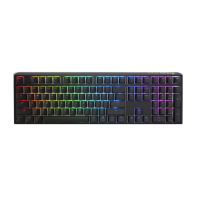
| Keyboard form factor | Full-size (100%) |
| Keyboard key switch technology | Cherry MX Blue |
| Number of products included | 1 pc(s) |
| Product color | Pink, Navy |
| Keyboard style | Straight |
| Surface coloration | Monochromatic |
| USB connector type | USB Type-C |
 Weight and Dimensions
| Keyboard weight | 1123 g |
|---|---|
| Keyboard dimensions (WxDxH) | 450 x 140 x 40 mm |

 To Next Page