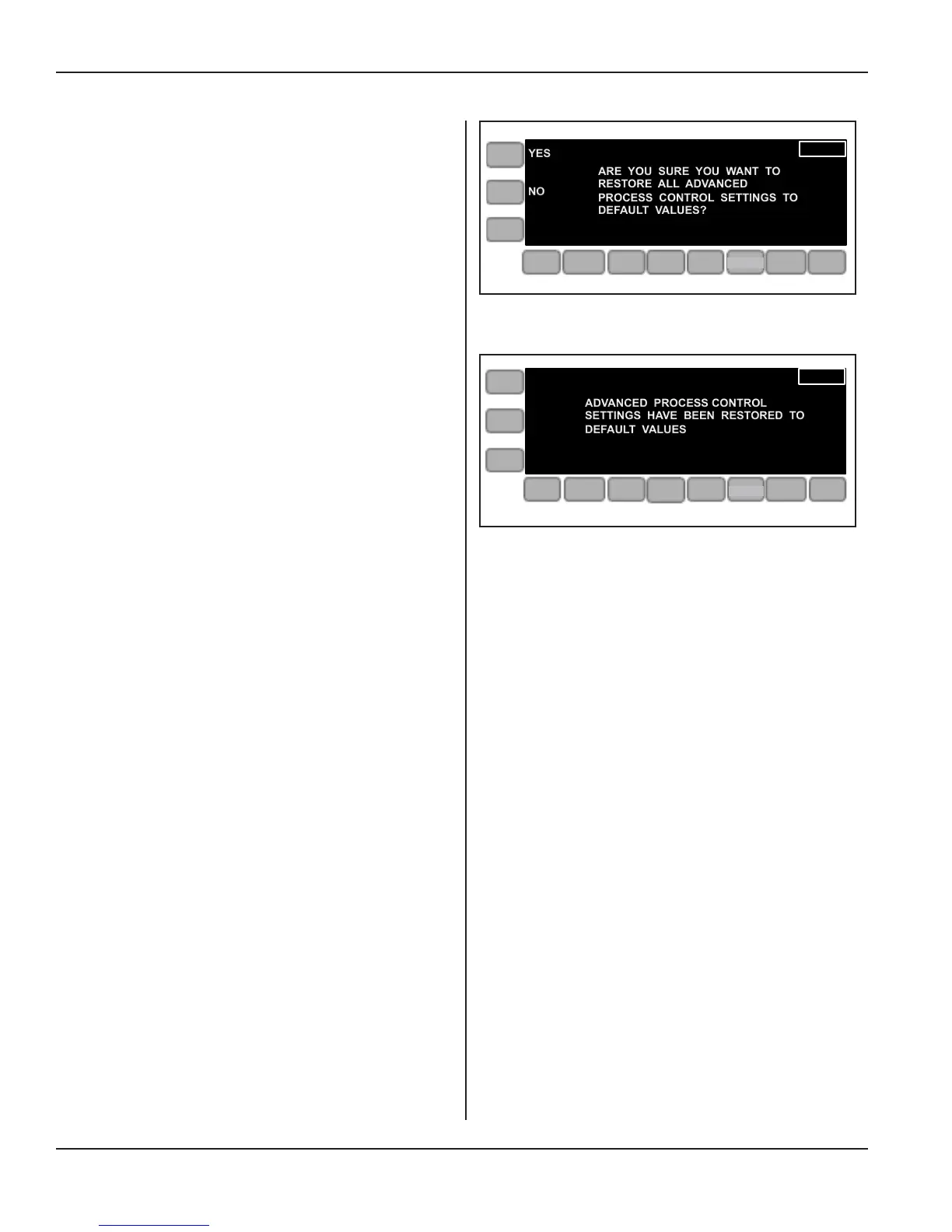
If the RESTORE DEFAULTS key is pressed while
the Adv Process Control menu is displayed, the
screen shown at right (Figure 5-39) is seen.
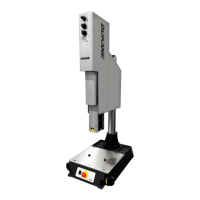
If the defaults are restored, the display with the con-
rmation message shown in Figure 5-40 at right is
shown for 5 seconds.
After that, the display will once again appear as it
does in Figure 5-38.
Continued
Continued from Previous Page
Figure 5-39 Restore Defaults, Adv Process Controls
Figure 5-40 Restore Defaults, Conrmed,
Advanced Process Control
YES
NO
ARE YOU SURE YOU WANT TO
RESTORE ALL ADVANCED
PROCESS CONTROL SETTINGS TO
DEFAULT VALUES?
AMP
PRE
WELD
WELD
POST
WELD
LIVE
SETUPS
LIMITS
OPERATE
ADVANCED PROCESS CONTROL
SETTINGS HAVE BEEN RESTORED TO
DEFAULT VALUES
AMP
PRE
WELD
WELD
POST
WELD
LIVE
SETUPS
LIMITS
OPERATE
SETUP
SETUP
Page 64
iQ Series Ultrasonic Integrated Press System i 220 User’s Manual
Dukane Manual Part No. 403-594-02


 To Next Page