SVENSKA DANSK SUOMEKSI ENGLISH DEUTSCH FRANÇAIS ESPAÑOL ITALIANO POLSKINEDERLANDSNORSK
1.8 Sealing parameter settings
P0. Press POWER to start the machine. The left monitor will display the
counter and the right monitor will display the temperature.
P1. Press SET for the P1 setting – TEMPERATURE.
Use the UP and DOWN buttons to increase or decrease the set
temperature. A typical recommended value is 100-160 °C.
P2. Press SET for the P2 setting – COUNTER MODE.
Use the UP and DOWN buttons to change the counter mode between
“LOK” and “OPN”. If “LOK” is selected, the counter cannot be reset with
the RESET COUNT button. When the “OPN” mode selected, the RESET
COUNT button will reset the counter to zero.
P3. Press SET for the P3 setting – SEALING TIME.
Use the UP and DOWN buttons to increase or decrease the sealing
time. One unit corresponds to 0,1 seconds. A typical recommended
value is between 005 and 020 (0,5-2,0 seconds).
P4. Press SET for the P4 setting – AUTO START DELAY.
Use the UP and DOWN buttons to increase or decrease the automatic
start delay time (delay in time from placing the container in the cassette
to the automatic start of the sealing process). One unit corresponds to
0,1 seconds. This setting is only applied when automatic sealing mode
is being used. A typical recommended value is between 005 and 010.
P5. Press SET for the P5 setting – FILM REWINDING TIME.
Use the UP and DOWN buttons to increase or decrease the film
rewinding time. If using a film with sensor marks, set the value to 000.
If film with sensor marks is not being used, set the value to a suitable
number which will be long enough to provide enough film before each
new cycle. A typical recommended value is between 015 and 035.
P6. Press SET to close the setting mode and return to the normal display.
The left monitor will display “YF” and the right monitor will display
“LCC”.
7
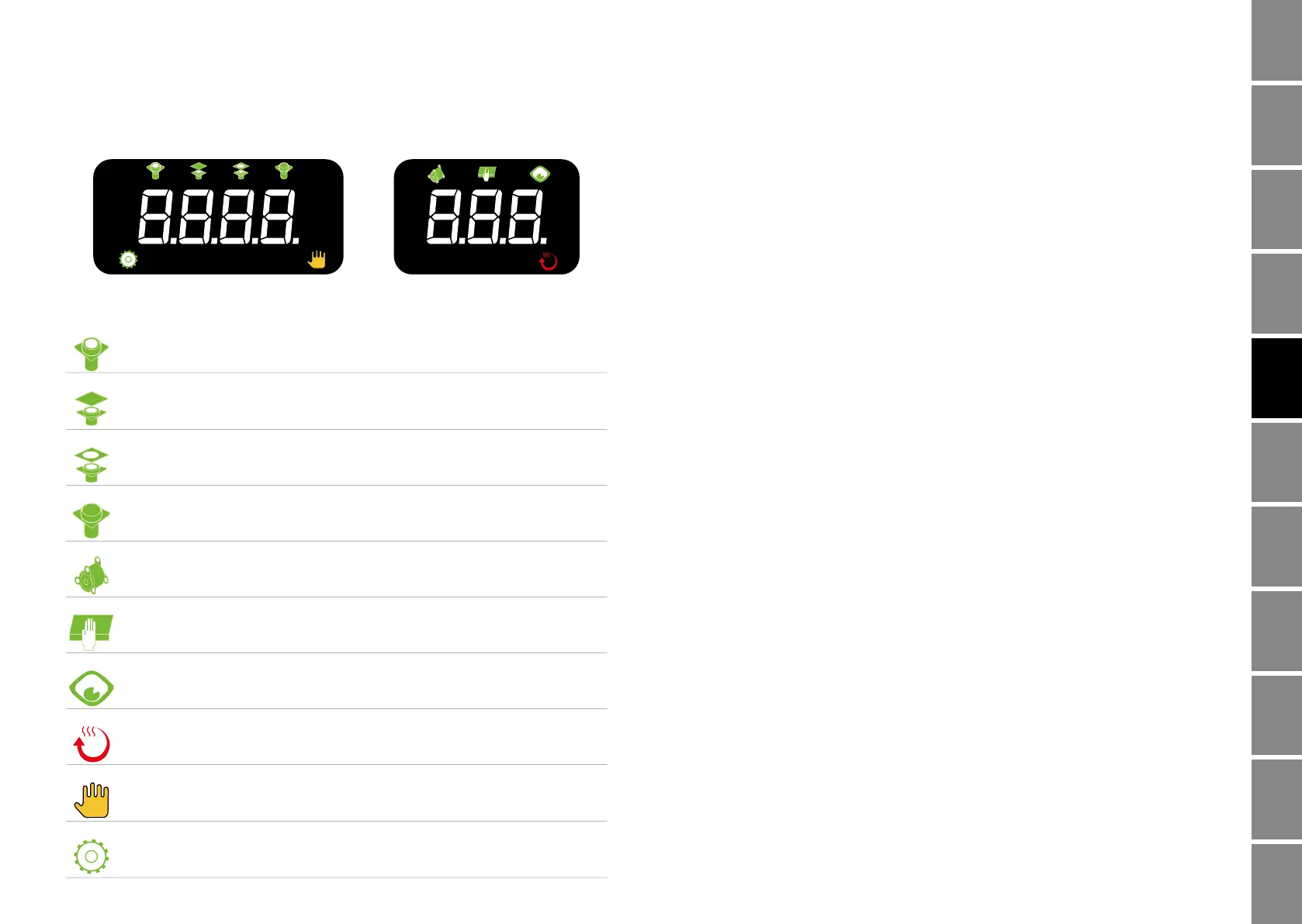
1.7 Digital display indicators & symbols
The cassette is moving into the machine.
The heating plate and knife are moving down.
The heating plate and knife are moving up.
The cassette is moving out from the machine.
The sealing film is automatically rewinded.
The safety cover has been touched.
The film sensor is detecting the sensor mark.
The heating plate is being heated up.
The machine is set in manual sealing mode.
The machine is set in automatic sealing mode.
H1
H1
6


 To Next Page
 Loading...