37
9 -2 User Interface
9.3 Program Boiler Control
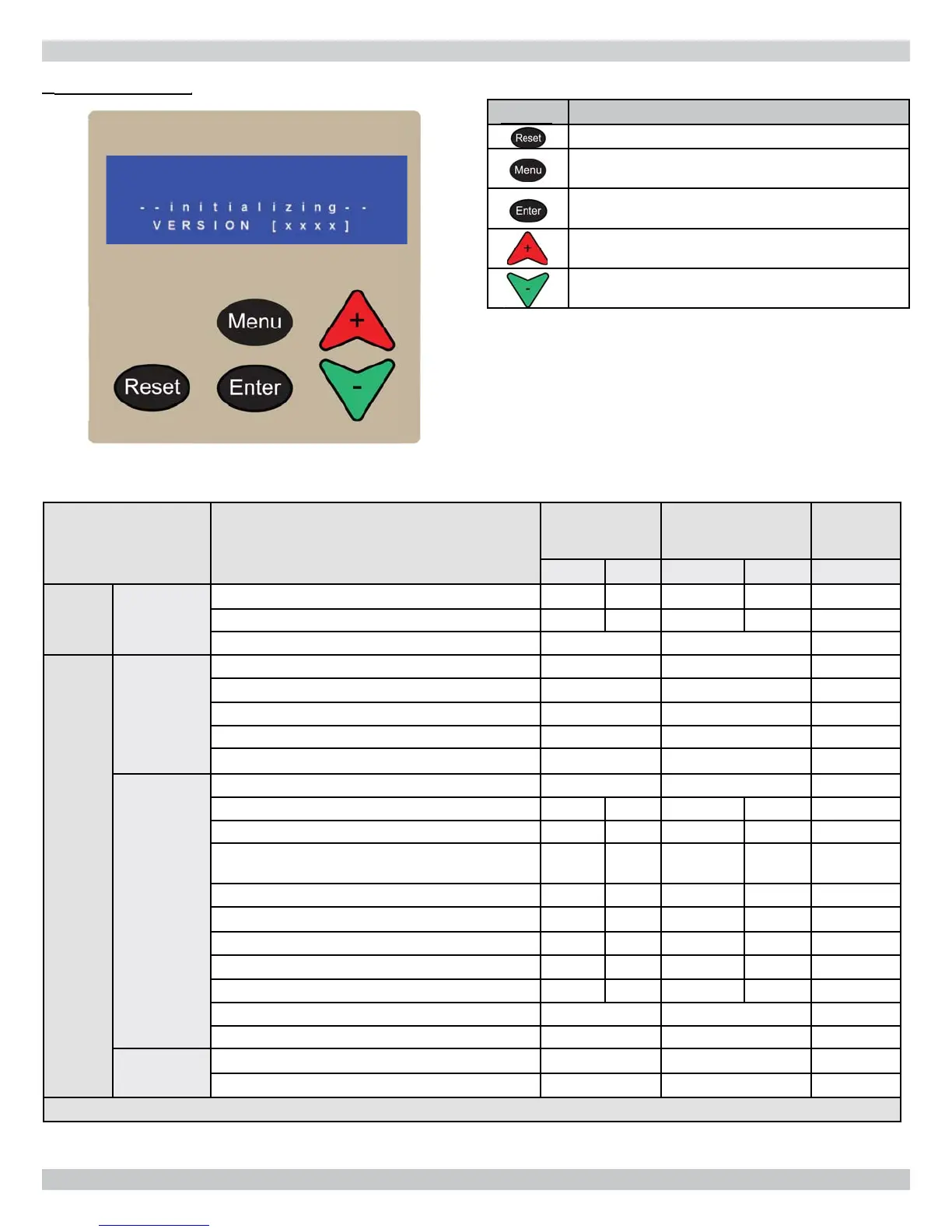
Key Description
- Manual Lockout Reset
- Enter/Exit user menu
- Go to previous screen
- Select a menu item
- Confi rm new parameter value
- Scroll up to next menu item
- Increase value
- Scroll down to next menu item
- Decrease value
Boiler is factory programmed with following factory
default settings, Table 11.
Parameters can be adjusted to suit particular application
using the user interface. See fi gure 9-2.
Detailed explanation of each can be found in Appendix
A - Control Module.
List parameters in event of factory default parameters are
changed.
9-3 Default Table
Control Parameter
Factory Default
Setting
Setting Range
*Actual
Parameter
Settings
Standard Metric Standard Metric
User
Menu
Settings
Central Heating Setpoint 140°F 60°C 104-195°F 40-91°C
DHW Setpoint 180°F 82°C 104-195°F 40-91°C
Temperature Units °F °F/°C
Installer
Menu
Boiler
Confi guration
Boiler Address 0 0-15
Low Water Cutoff Enabled Enable/Disabled
Pump Mode 0 0 & 4
Service Reminder Status On ON/OFF
Service Reminder Days 365 Days 1- 999 Days
CH Settings
CH Mode 1 0, 1, 2, 3
Warm Weather Shutdown 70°F 21°C 35-100°F 2-38°C
Reset Curve Design Temperature - Boiler 180°F 82°C 60-195°F 40-91°C
Reset Curve Design Temperature - Outdoor 25°F -4°C -60-32°F -51-
25°C
Reset Curve Mild Weather Temperature - Boiler 100°F 37°C 35-120°F 2-49°C
Reset Curve Mild Weather Temperature - Outdoor 70°F 21°C 35-85°F 2-29°C
Reset Curve Boiler Minimum Temperature 70°F 21°C 40-180°F 4-82°C
Reset Curve Boiler Maximum Temperature 180° 82°C 80-195°F 27-91°C
Boost Function Temperature 0°F 0°C 0-36°F 0-20°C
Boost Function Time 20 Minutes 1-120
Maximum Power CH 100% 1-100%
DHW Mode 0 0/2
DHW Maximum Priority Time 30 Minutes 1-60 minutes
* List parameters in event of Control Module Failure to reprogram your settings.
-2
er Interfac
9 - START UP PROCEDURE


 To Next Page