73
1.5 Theory of Operation
User Interface Display
Explanation
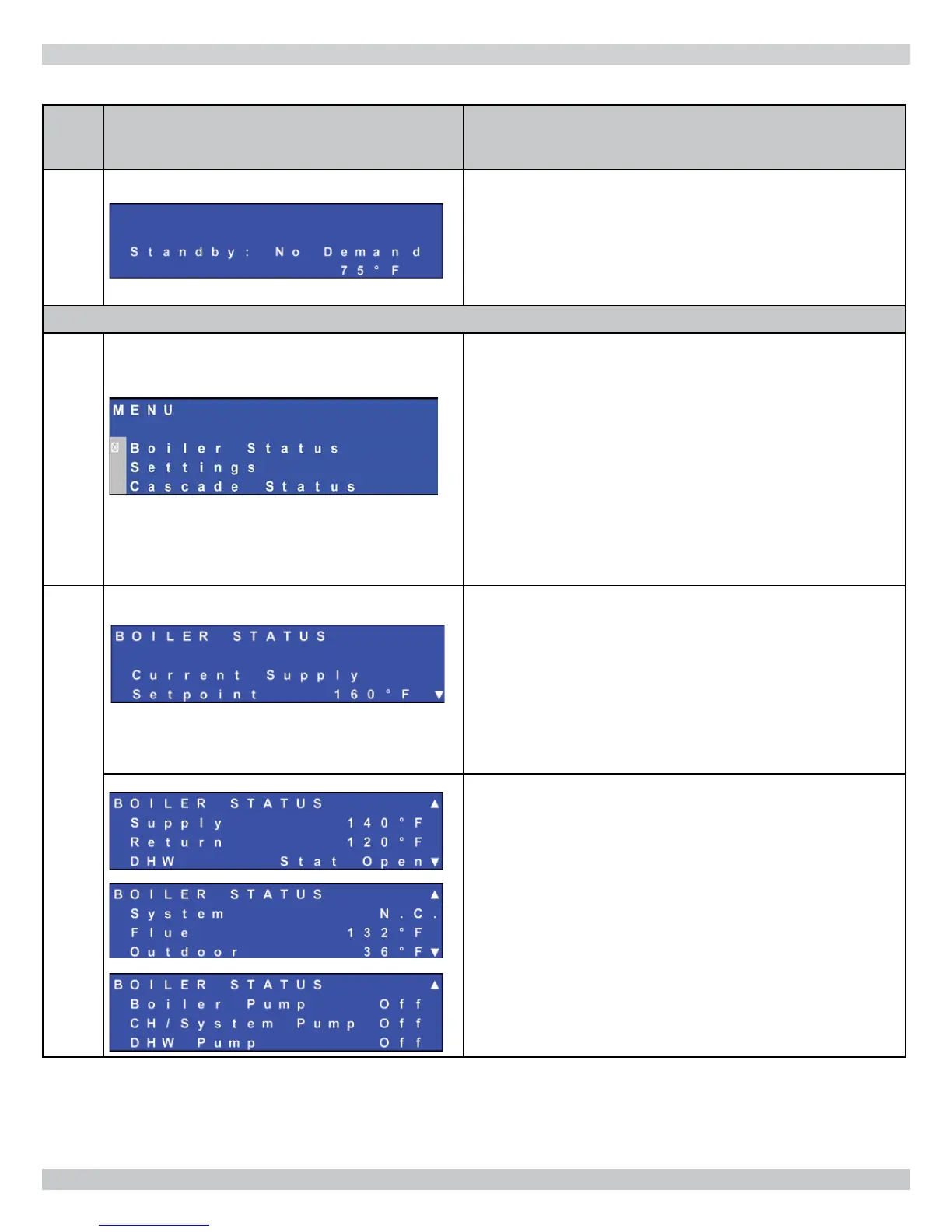
STANDBY
Boiler operates in standby mode until demand for Central Heat
(CH) or Domestic Hot Water (DHW) is detected.
User Menu
User Menu
User Menu structure includes:
• ‘Boiler Status’ submenu– User can monitor general boiler
status parameters such as sensor temperatures and
pump operation.
• ‘Settings’ submenu – User can view CH , adjust DHW
supply water set points and also select control language.
• ‘Cascade Status’ submenu – Boiler set to function as
part of multiple boiler installation; submenu used to view
runtime parameters. See Multiple Boiler Manual.
Boiler Status
Supply Temperature set point displayed.
If boiler running in CH mode, CH set point displayed.
Note:
• While running in Outdoor Reset mode, this value may
change in proportion with the outdoor temperature.
• If the boiler is running in DHW mode, the DHW supply set
point is displayed.
Several boiler runtime parameters can be viewed while in ‘Boiler
Status’ submenu.
Operational status of pump system also shown.
Information available during all states of boiler operation.
Sensor values with troubleshooting tree used to diagnose
typical problems.
APPENDIX A - CONTROL MODULE


 To Next Page