101
6
2
1
Troubleshooting
Cleaning Sheet : How to use
The scanning section inside ADF can be cleaned by using Cleaning sheet.
○○○○○○○○○○○○○○○○○○○○○○○○○○○○○○○○○
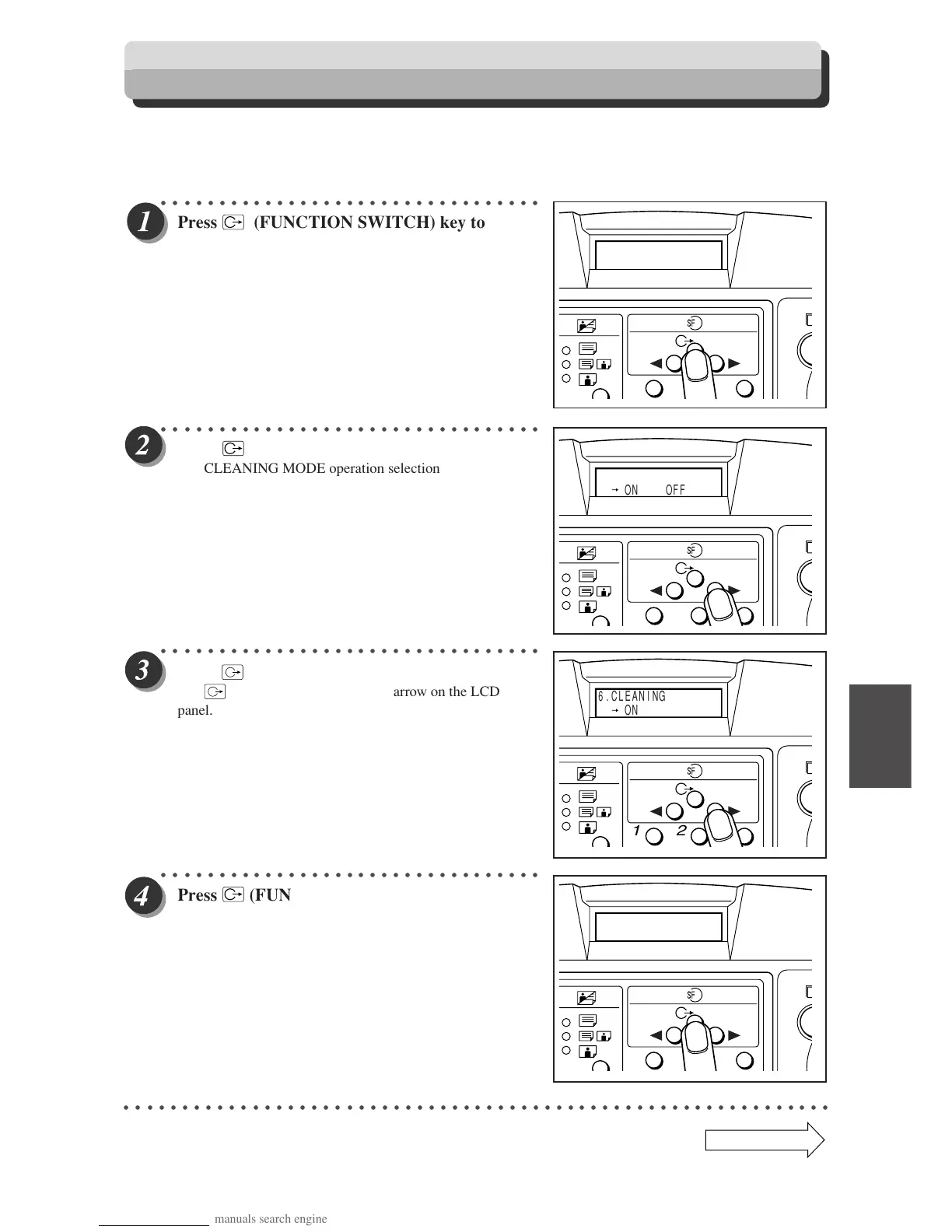
Press
(FUNCTION SWITCH) key to show
the screen at right.
○○○○○○○○○○○○○○○○○○○○○○○○○○○○○○○○○
Press
(FUNCTION SWITCH) key.
The CLEANING MODE operation selection screen appears.
○○○○○○○○○○○○○○○○○○○○○○○○○○○○○○○○○
Press
(SELECT) key and select "ON."
Use
(SELECT) key to move the arrow on the LCD
panel.
○○○○○○○○○○○○○○○○○○○○○○○○○○○○○○○○○
Press
(FUNCTION SWITCH) key to show
the screen at right.
○○○○○○○○○○○○○○○○○○○○○○○○○○○○○○○○○○○○○○○○○○○○○○○○○○○○○○○○○○○○○
6.CLEANING
1 2 3
Continue Page
•••
1 2 3
6.CLEANING
ON OFF
1 2 3
6.CLEANING
ON OFF
CLEANING MODE
1 2 3


 To Next Page
 Loading...