60
○○○○○○○○○○○○○○○○○○○○○○○○○○○○○○○○○
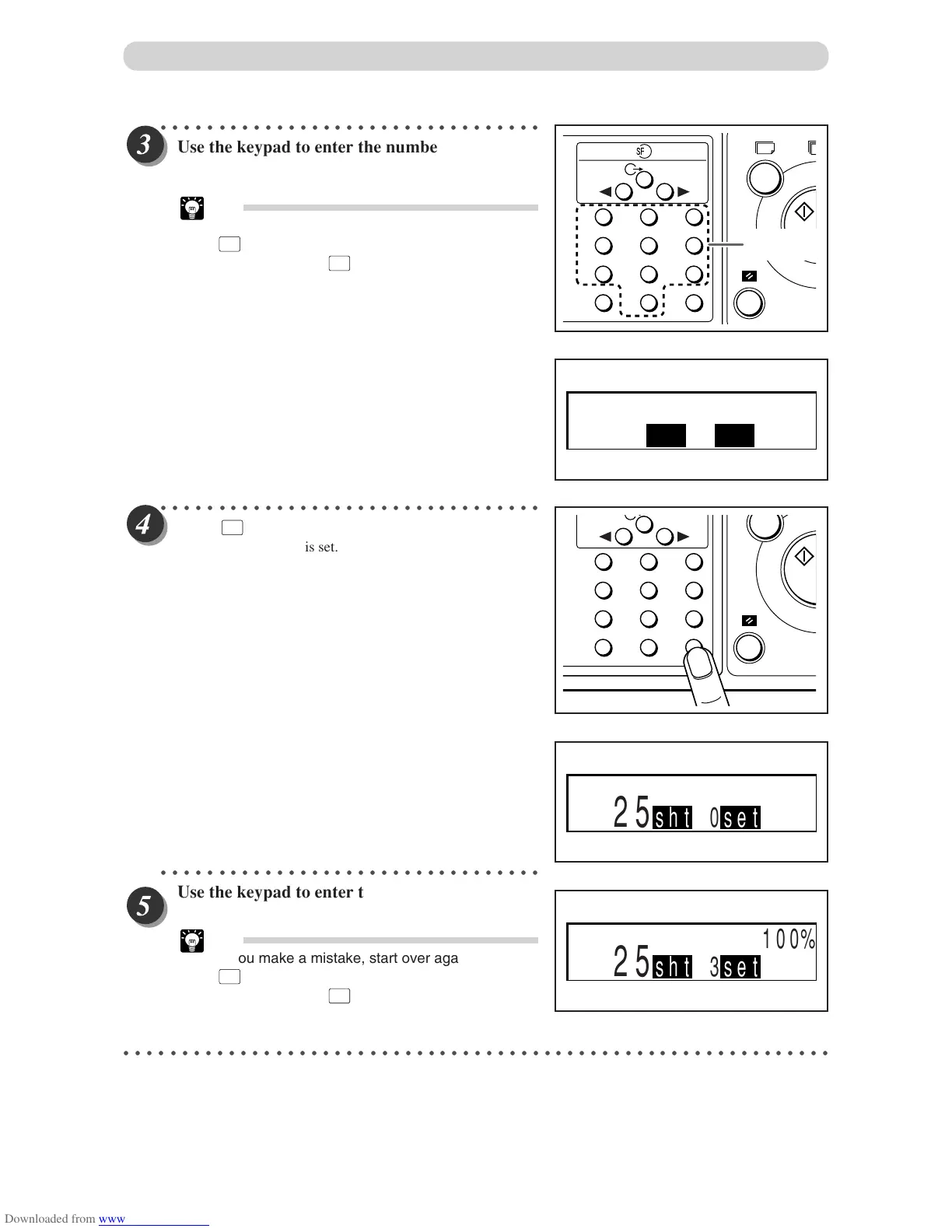
Use the keypad to enter the number of prints.
Example: 25
Tip
• If you make a mistake, start over again by press
C
(CLEAR) key and start from the beginning.
When you press
C
(CLEAR) key, both the
number of prints and the number of sets are
cancelled.
○○○○○○○○○○○○○○○○○○○○○○○○○○○○○○○○○
Press
X
=
key.
The number of prints is set.
○○○○○○○○○○○○○○○○○○○○○○○○○○○○○○○○○
Use the keypad to enter the number of sets.
Example: 3 sets
Tip
• If you make a mistake, start over again by press
C
(CLEAR) key and start from the beginning.
When you press
C
(CLEAR) key, both the
number of prints and the number of sets are
cancelled.
○○○○○○○○○○○○○○○○○○○○○○○○○○○○○○○○○○○○○○○○○○○○○○○○○○○○○○○○○○○○○
Batch Printing
1
4
7
C
2
5
8
0
3
6
9
X
=
T
Key pad
1
4
7
C
2
5
8
0
3
6
9
X
=
100%
25sht 1set
100%
25sht 0set
100%
25sht 3set


 To Next Page
 Loading...