Mobile App Commissioning Manual
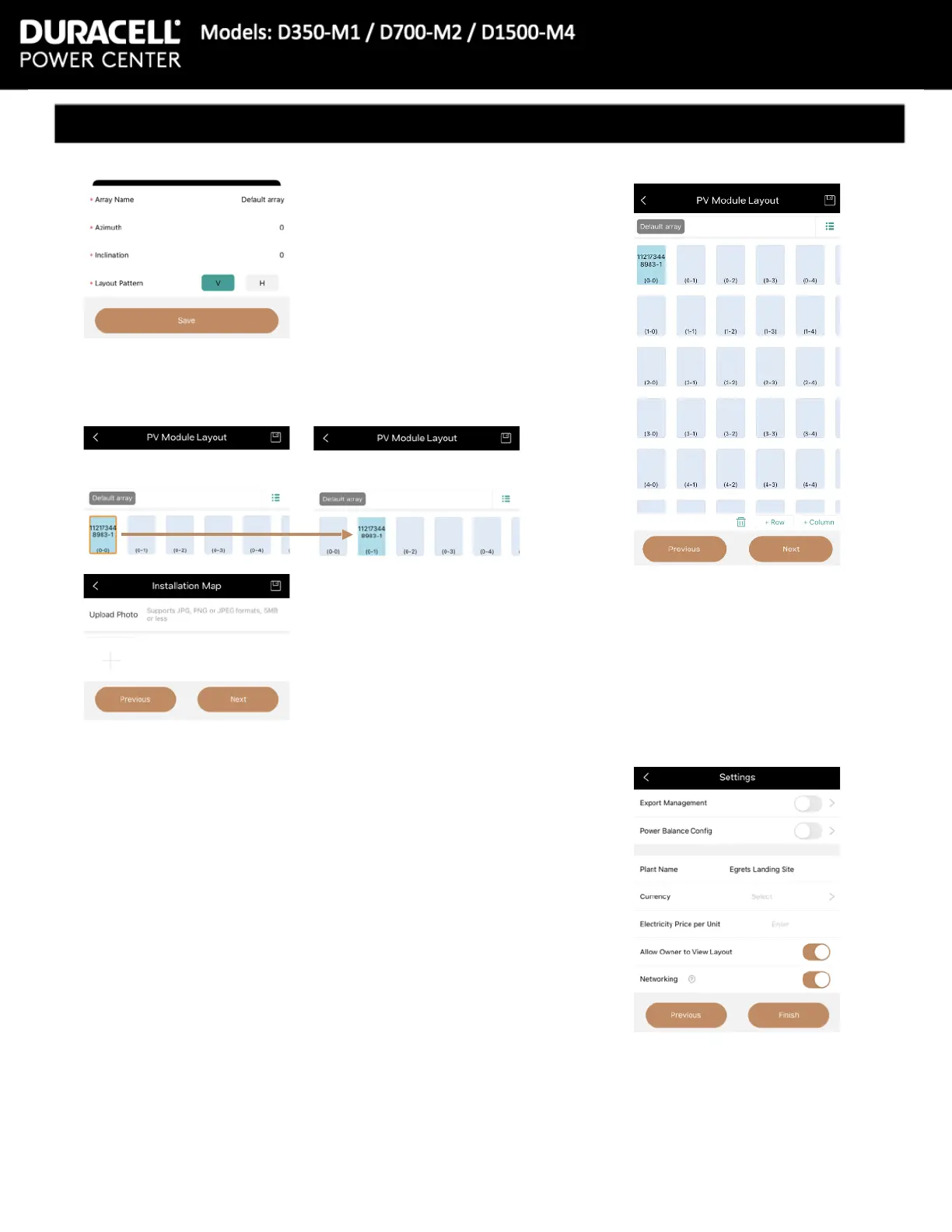
19 The app will ask for the site’s:
Array Name, Azimuth, Inclination, and
Layout pattern (Vertical or Horizontal)
24 Export Management and Power Balance Cong can both be
turned on.
Please verify the Plant Name, then enter:
Currency (meaning USD, CAD, etc)
Electricity Price per Unit (price per kWh)
23 The following screen will ask for an Installation photo. This is
not required, press the [Next] button on the bottom right
20 Press the [Save] button on the
bottom right
21 Clicking a specic microinverter, then an empty location, that
microinverter’s location will move. Using this method, the array
can be placed according to the site map created during
installation
22 Press the [Next] button on the bottom right
25 Allow Owner to View Layout, and Networking both default to
on but can be turned o
26 Press Finish in the bottom right
27 Commissioning Complete


 To Previous Page