EasyManua.ls Logo

Duracell POWERPACK 600 - Page 17

Duracell POWERPACK 600
63 pages
Print Icon
To Next Page IconTo Next Page
To Previous Page IconTo Previous Page
Loading...
Duracell®
Powerpack
600
Features
How
to
...
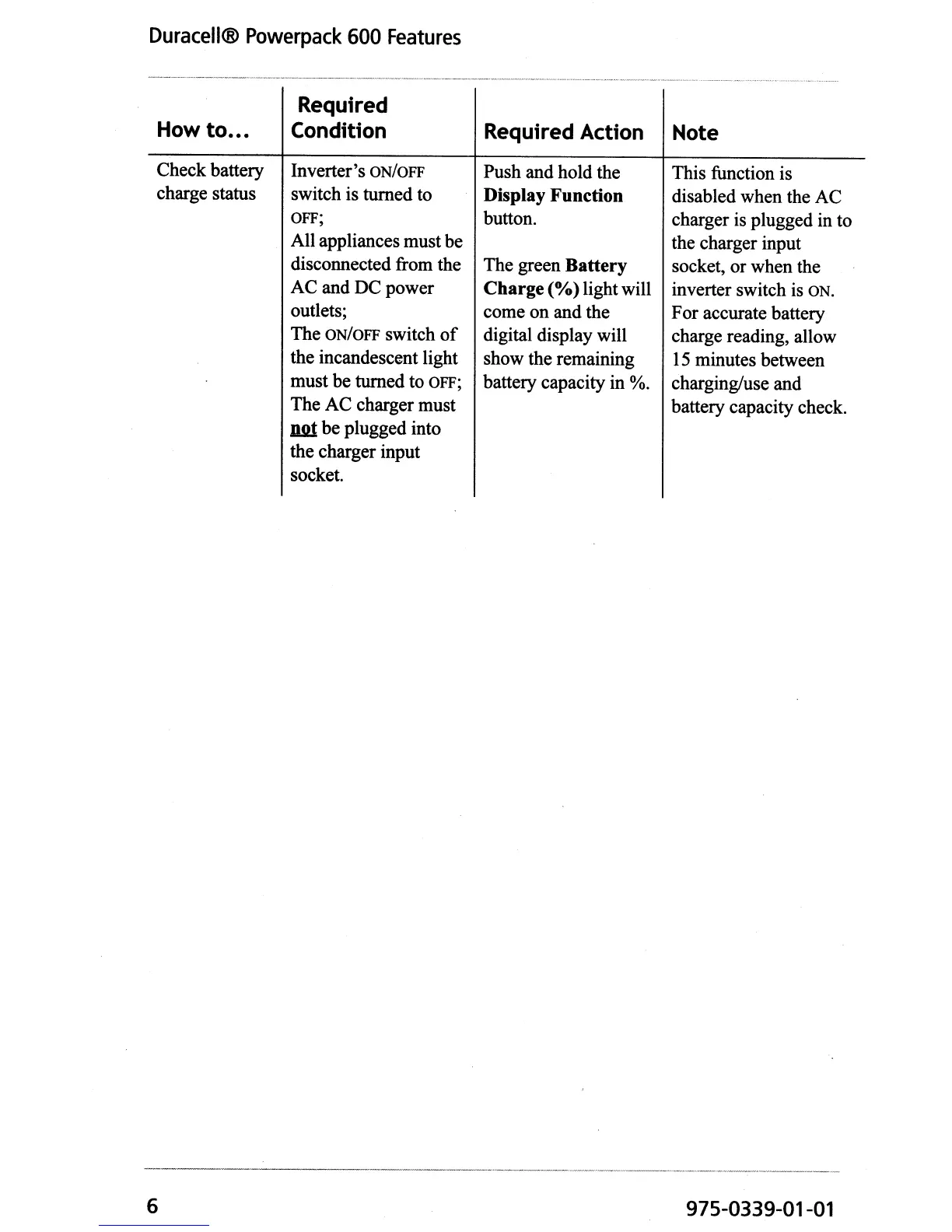
Check battery
charge status
6
Required
Condition
Inverter's ON/OFF
switch is turned to
OFF;
All appliances must be
disconnected from the
AC and DC power
outlets;
The
ON/OFF switch
of
the incandescent light
must be turned to
OFF;
The AC charger must
W!t
be plugged into
the charger input
socket.
Required Action
Push and hold the
Display Function
button.
The green Battery
Charge
(%)
lightwill
come on and the
digital display will
show the remaining
battery capacity in %.
Note
This function is
disabled when the AC
charger is plugged in to
the charger input
socket, or when the
inverter switch is
ON.
For accurate battery
charge reading, allow
15
minutes between
charging/use and
battery capacity check.
975-0339-01-01

Other manuals for Duracell POWERPACK 600

Related product manuals