Troubleshooting
Reference
Table
5-1
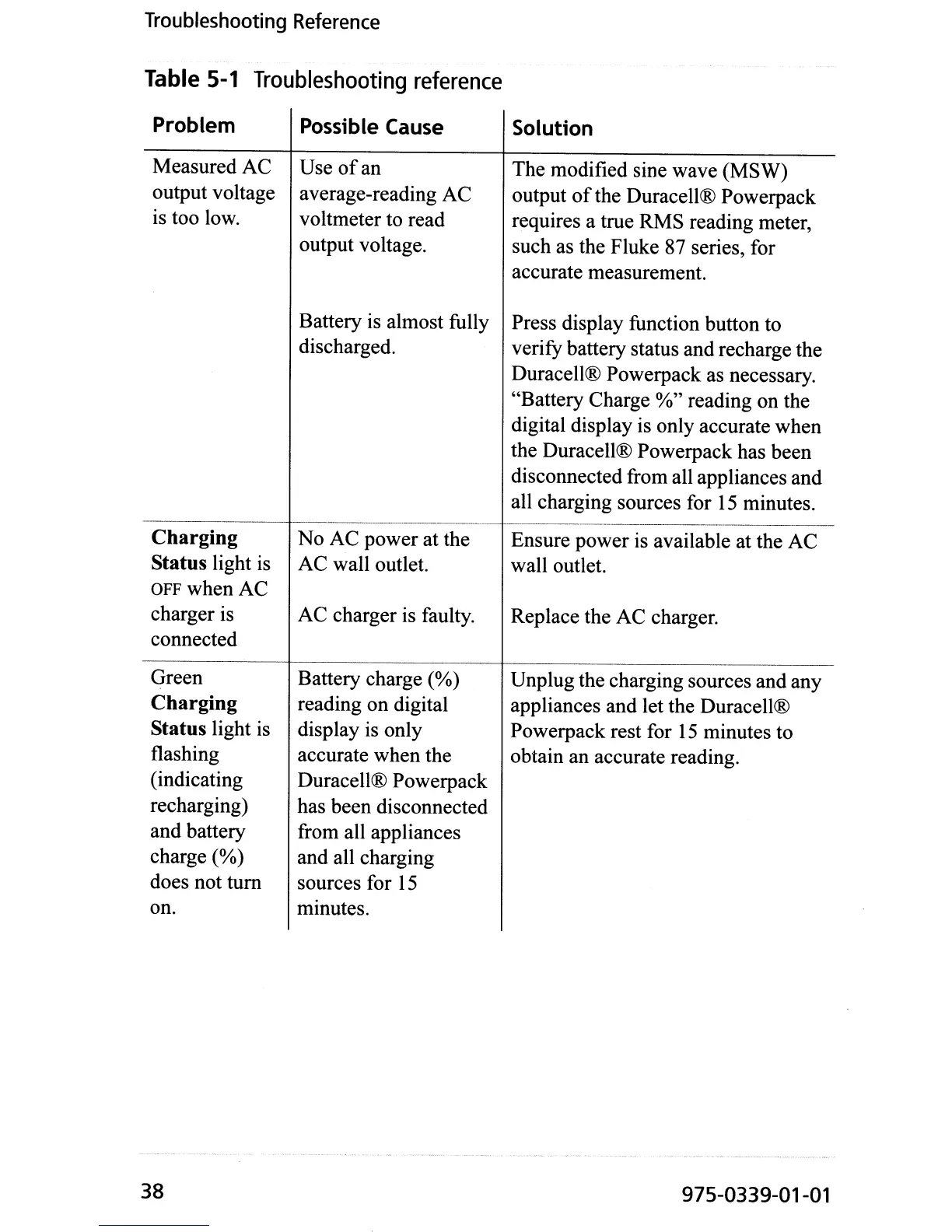
Troubleshooting
reference
Problem
Measured AC
output voltage
is too low.
Charging
Status light
is
OFFwhenAC
charger is
connected
Green
Charging
Status light is
flashing
(indicating
recharging)
and battery
charge
(%)
does not
tum
on.
38
Possible
Cause
Use
of
an
average-reading AC
voltmeter to read
output voltage.
Battery is almost fully
discharged.
No
AC power at the
AC wall outlet.
AC
charger is faulty.
Battery charge
(%)
reading on digital
display is only
accurate when the
Duracell® Powerpack
has been disconnected
from all appliances
and all charging
sources for
15
minutes.
Solution
The modified sine wave (MSW)
output
of
the Duracell® Powerpack
requires a true RMS reading meter,
such as the Fluke 87 series, for
accurate measurement.
Press display function button to
verify battery status and recharge the
Duracell® Powerpack as necessary.
"Battery Charge
%" reading on the
digital display is only accurate when
the Duracell® Powerpack has been
disconnected from all appliances and
all charging sources for
15
minutes.
Ensure power is available at the
AC
wall outlet.
Replace the AC charger.
Unplug the charging sources and any
appliances and let the Duracell®
Powerpack rest for
15
minutes to
obtain an accurate reading.
975-0339-01-01


 To Next Page