52
1
2
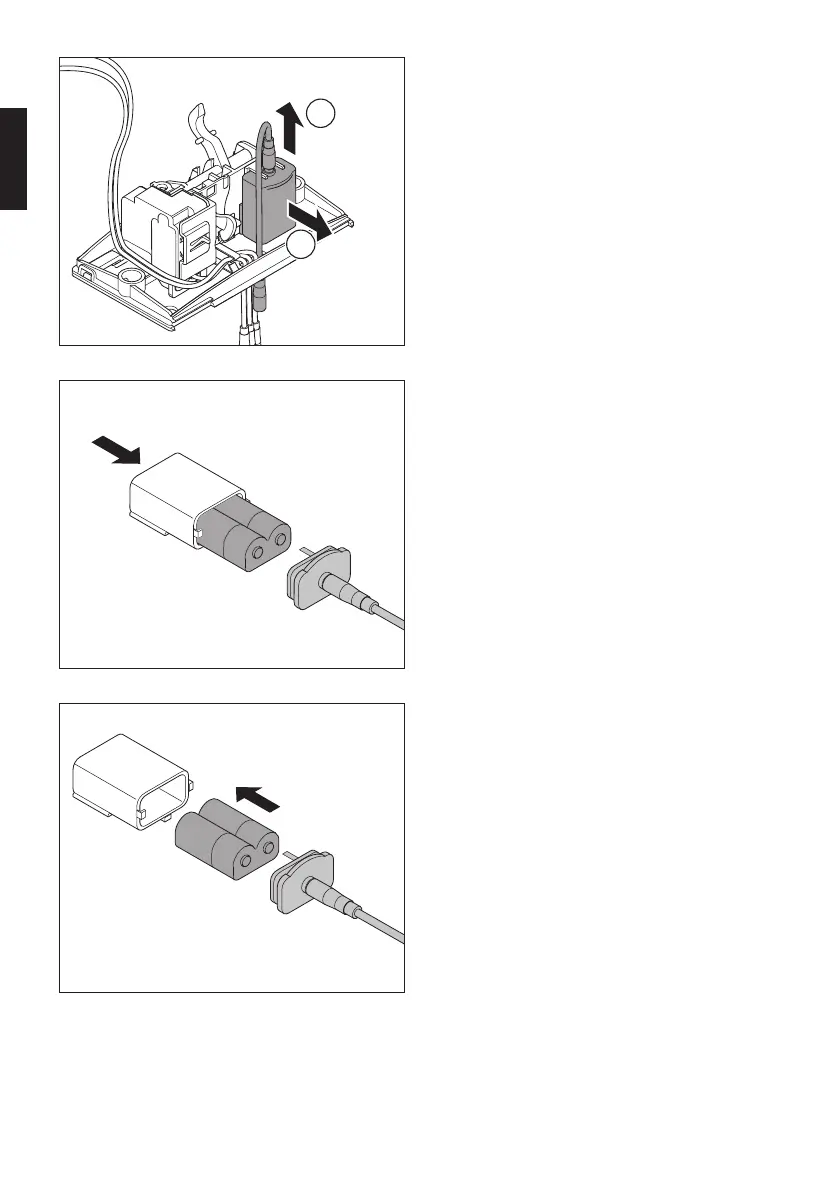
Releasing the battery compartment
> Pull the battery compartment carefully
backwards away from the plate while
you release it at the front by pulling it
upwards away from the plate.
> Remove the battery compartment and
cable.
Removing the old battery
> Open the battery compartment.
> Remove the old battery by lightly tapping
it if necessary.
> Dispose of the old battery properly
(see 10. Disposal).
Inserting a new battery
> Insert the new battery. Make sure that
you insert the battery in the correct way,
i.e. the pin in the cover must engage in
the battery recess.
> Put the battery compartment back
together again. PAY ATTENTION TO THE
POLARITY WHEN ATTACHING THE COVER.
en


 To Next Page
 Loading...