CMS
3
35
5 Setting up a standard PA
5.1 Cabling
The mains supply cord comes with the CMS. The quality
of all other cables lies in your responsibility. Carefully
chosen high quality cables are the best precaution to pre-
vent later problems during live operation. The following
wiring alternatives are recommended to provide trouble
free operation of your system.
LF-C
ABLES - BALANCED OR UNBALANCED?
For LF-cabling – all the low current wiring – your best
choice are balanced cables (2 signal conductors + ground
shielding) with XLR-type connectors or stereo phone
plugs. The cables should be step-on proof, shielded, and
never longer than really needed. Too many too long ca-
bles mostly lead to confusion and generate unnecessary
problems. Of course, connecting unbalanced cables with
monaural phone plugs to the CMS’s in- and outputs is
also possible and in most cases no interference will occur
because of its superb grounding managing system. Gen-
erally spoken, if you have the choice, a balanced LF-cable
is always the better solution. Today’s modern audio
equipment – like amplifiers, equalizers, FX units, mixing
consoles, and even some keyboards – offers balanced in-
and outputs. In a balanced signal path the cable screen
provides gapless connection of all metal parts, offering
efficient shielding against the induction of external noise.
The balanced cabling in conjunction with the common-
mode rejection of the CMS’s input stage effectively elim-
inates even existing artifacts of interference. All inputs of
the CMS provide balanced audio connections and high
common-mode rejection. The mixing stage outputs – FX,
AUX, MASTER, MON, etc. – are laid out in GND-SENSING
technology – a special pin assignment of the output jacks,
offering all advantages of the balanced signal transmis-
sion, but lets you also connect monaural phone plugs
without a problem. Nevertheless – as mentioned above –
when longer cables are involved, using stereo phone
plugs and balanced cables are the better alternative. The
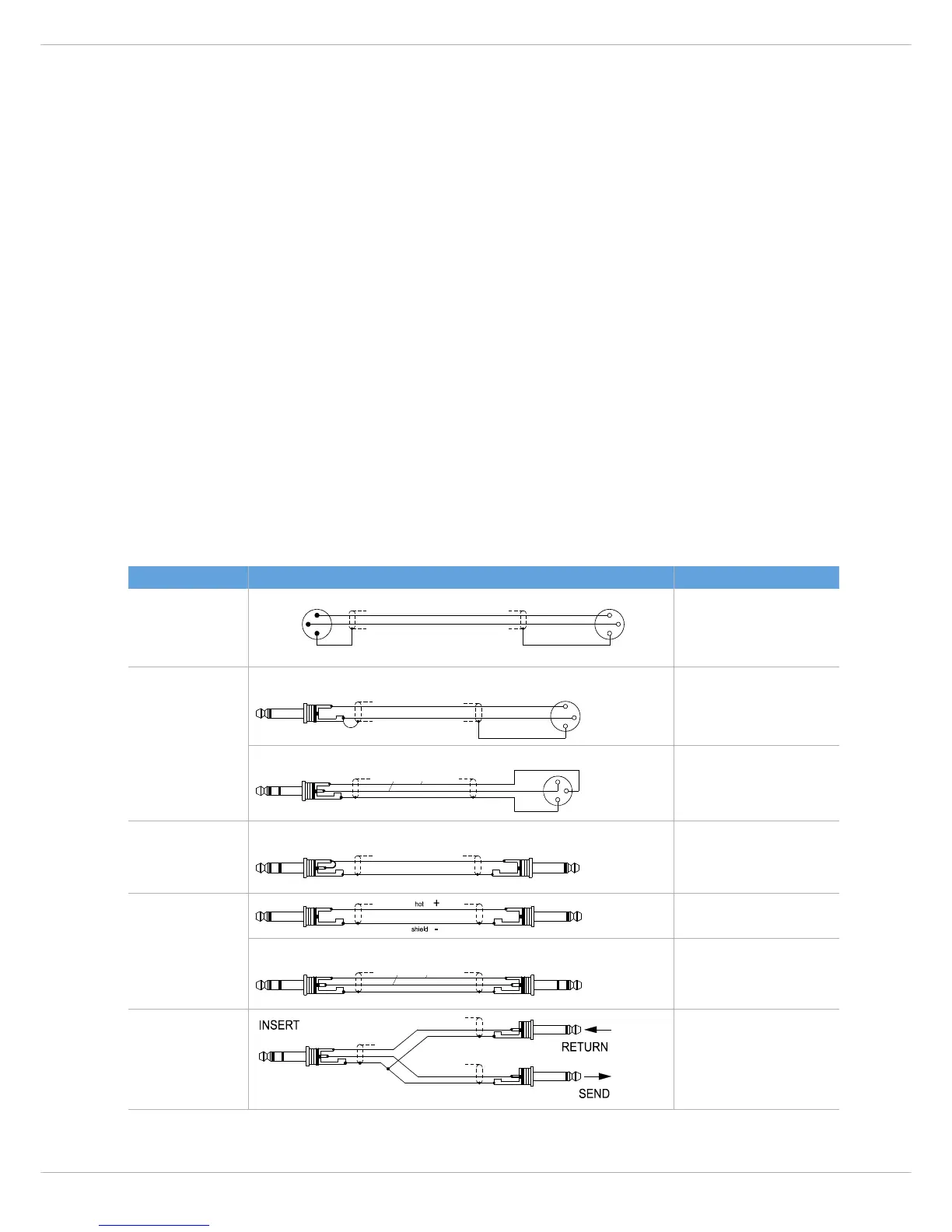
diagrams below show the pin assignments of plugs and
cables that are used with the CMS.
CMS Cable Application
MIC INPUT balanced connection of micro-
phones
All phone jack in/outputs
(except PHONES)
unbalanced external equipment with
XLR-type in/output jacks
balanced external equipment with
XLR-type in/output jacks
Channel Insert Direct OUT via INSERT, uninter-
rupted signal path
All phone jack in/outputs
(except PHONES)
unbalanced external equipment with
phone jack in/output jacks
balanced external equipment with
phone jack in/output jacks
Channel Insert Y-type cable for the connection of
external FX units and signal proces-
sors with phone jacks



 To Next Page