-The same situation occurs when
DHW
sensor measures
less
than 6
oc.
The
boiler starts
and
when the water temperature goes
above
15
oc,
the boiler will turn stand-by
mode
~Information
The appliance
must
be
on
stand-by
mode
to activate frost
protection system.
[]]
Pump Anti-Seize Function
Anti-seize protection's function prevents the
pump
from
probable
blocking when the
pump
stays inactive for a
long
period
of
time.
This
function goes
on
automatically if the
pump
has
been
inactive for
at
least 24 hours
and
runs
the
pump
for 5
sn.
in
CH
mode.
In
monothermic
types,
pump
anti-seize function
and
3-way valve protection
becomes
active together
and
the
3-way valve
changes
his
position against blocking.
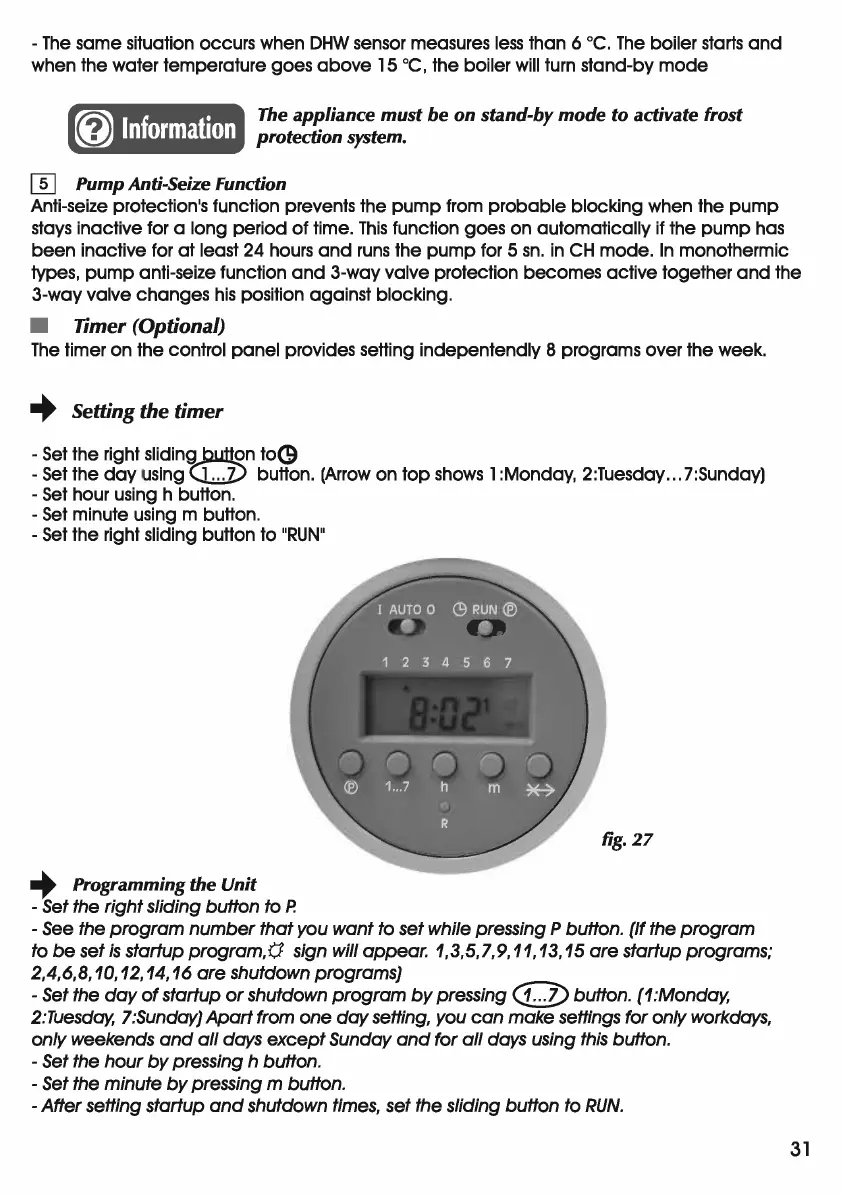
• Timer (Optional)
The
timer
on
the control
panel
provides setting
indepentendly
8 programs over the week.
+ Setting the
timer
-
Set
the right slidingjl.utt2n
to(9
-Set
the
day
using <..L.J) button. (Arrow
on
top
shows 1 :Monday, 2:Tuesday ... 7:Sunday)
-Set
hour using h button.
-
Set
minute using m button.
-
Set
the right sliding button
to
"RUN"
fig.
27
+ Programming the Unit
- Set the right sliding button to
P.
- See the
program
number
that
you want to set while pressing P button. (If the
program
to
be
set
is
startup
progrom,(J
sign will appear. 1,3,5,7,9,
11,
13,15
are
startup programs;
2,4,6,8,
10, 12,
14,16
are
shutdown programs}
- Set the
day
of
startup
or
shutdown
program
by
pressing
([;])button.
(1
:Monday,
2:Tuesday, l:Sunday}
Apart
from one
day
setting, you
can
make settings for only workdays,
only weekends
and
all
days
except
Sunday
and
for
all
days using this button.
- Set the
hour
by
pressing h button.
- Set the minute
by
pressing m button.
- After setting startup
and
shutdown times, set the sliding button to
RUN.
31



 To Next Page