This document serves as a Quick Guide for the e-Vision SMART series IP cameras, providing essential information for installation, setup, and general usage. The guide is available in both Italian ("Guida Rapida") and English ("Quick Guide").
Function Description
The e-Vision SMART series IP cameras are designed for surveillance and security applications, offering high-quality video recording and advanced features. These cameras are capable of delivering excellent frame rates and utilize H.264+ compression algorithms, making them efficient for network bandwidth and storage. They are equipped with user-friendly interfaces and functionalities, suitable for both professional installers and end-users. The cameras support various resolutions, including 1080p, 720p, D1, CIF, and QCIF, allowing flexibility in stream management.
The product line includes different camera models:
- DOME cameras: BCM300, BCM500, BUTDMX302, DCV300, DCM300, DCM500. These are typically used for indoor or outdoor surveillance where a discreet appearance is preferred.
- BULLET cameras: BUTBMX304, BUTBMX308, BCV300, BUTBMX305. These are generally used for outdoor applications and are often more visible.
The cameras offer various functionalities accessible through a web-based interface, including live preview, playback, record management, file access, and configuration settings. They also feature controls for brightness, contrast, and preset management.
Important Technical Specifications
- Video Compression: H.264+ algorithms for efficient video encoding.
- Resolutions Supported: 1080p, 720p, D1, CIF, QCIF.
- Power Supply: PoE 802.3af or DC 12V ±10%. A stabilized power unit supplying more than 1A is recommended. The use of power units for burglar alarm systems is explicitly warned against as it may cause irreparable damage.
- IP Protection Class: Guaranteed only if the camera is installed according to the technical manual's instructions.
- Network Interface: RJ45 connector for network connectivity.
- Audio Input/Output: Analogue video output, audio input, and wired inputs are available on some models.
- RS-485 Serial Line: Available for certain models, likely for PTZ control or other serial communications.
- SD Card Slot: Available on some models for local storage.
- Operating Temperature: The manual does not explicitly state the operating temperature range, but general guidelines for outdoor installation and silica gel usage suggest consideration for environmental conditions.
Usage Features
- Web-based Interface: Access to camera software is achieved by opening a web browser and entering the camera's IP address. The default username is "admin" with no default password.
- Stream Management: Users can manage primary and secondary streams, adjusting bandwidth and resolution for optimal viewing and recording.
- Image Controls: Brightness, contrast, and preset settings can be adjusted through the web interface.
- Intercom and Alarm Functions: Features like Voice Intercom, Capture, Full Screen, StopAll, and Alarm Info are available.
- PTZ Controls: Available on some models (though explicitly stated as "NOT SUPPORTED" for certain areas in the interface description, implying it might be model-dependent or require specific setup).
- Motorized Lenses: Some bullet cameras feature motorized lenses, allowing adjustment of the objective via the web page.
- Internal Lens Adjustment: For bullet cameras with internal adjustment, an access panel allows manual adjustment of optics, focus, and zoom using a suitable screwdriver. A trimmer is also available for IR power adjustment.
Maintenance Features
- Silica Gel Packets: The manual emphasizes the importance of using Silica Gel packets inside the camera body, especially for devices transported or stored in humid conditions. These packets help prevent fogging, internal glass cloudiness, and damage to electronic parts caused by humidity.
- Usage Instructions: A new Silica Gel packet must be inserted into the camera body after opening it for installation or maintenance. The packet should be replaced if it appears saturated or if the camera is opened again.
- Storage Instructions: Silica Gel packets should be stored in an intact, sealed box in a dry, humidity-protected place. They remain effective for up to 12 months when stored properly.
- Cleaning: While not explicitly detailed, the emphasis on protecting cable passages and ensuring proper sealing during installation implies that maintaining the camera's IP protection is crucial for long-term reliability.
- Disposal Instructions: The device must be disposed of separately from ordinary waste products, in accordance with Directive 2012/19/EU on the Waste of Electric and Electronic Equipment (WEEE). The product was commercialized after August 13, 2005.
- Firmware Updates: Although not explicitly mentioned as a maintenance feature, the web interface typically allows for firmware updates, which are essential for security and functionality improvements.
Installation Notes:
- DOME Cameras: Involves removing the fixing ring, separating the camera body from the base, fixing the base to the wall/ceiling using provided screws and dowels, protecting cable passages with a conduit and cable gland, and reassembling the camera. For varifocal/motorized models, the transparent dome is removed to access adjustment screws.
- BULLET Cameras: Involves drilling holes, fixing the base to the wall/ceiling, adjusting the three-axis movement of the camera body and joint, and for models with internal adjustments, opening a panel to access lens controls.
- Cable Management: Proper routing and protection of cables are crucial to maintain the camera's IP rating and prevent damage.
- Power Supply: Always use the recommended power units (TLC/ALVS2 or TLC/AL4) and ensure the power supply meets the specified voltage and current requirements.
The document also includes a CE Declaration of Conformity, indicating compliance with relevant EU directives concerning electromagnetic compatibility, low voltage security, radio equipment, and hazardous substances.

 Need help?
 General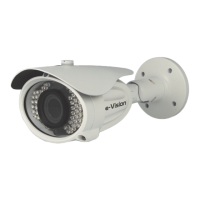

 To Next Page