EX4 Operation Manual
--- 5 ---
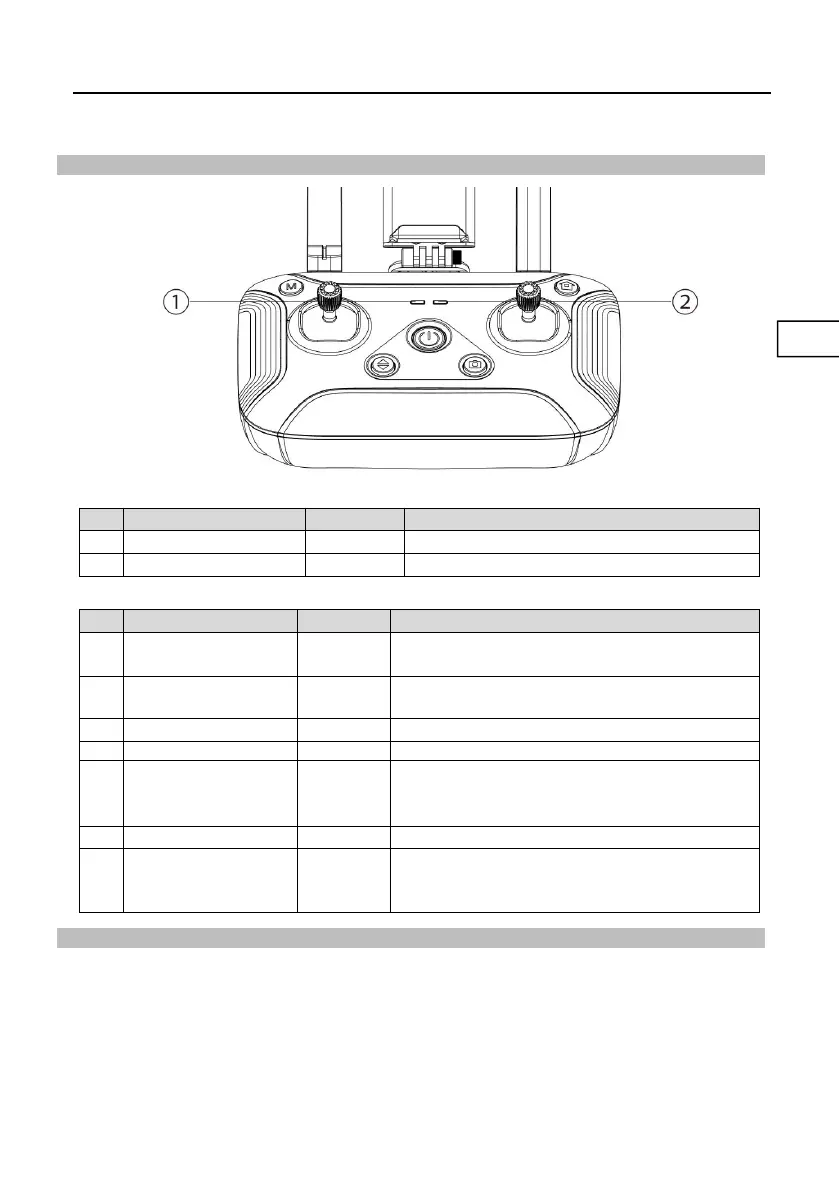
Remote Controller Status Indicator
Flight Mode Indicator -- LED①
Power Indicator -- LED
②
Flashing green light
during charging
Solidgreen light during
charging
The remote controller is working normally
Low battery alarm; please charge immediately
Red light flashes quickly
Severe low battery alarm; the remote controller will shut
down automatically after the light flashes and the sound
stops
Green light flashes doubly
The remote controller is idle for more than 5 minutes
after power-on; the prompt disappears automatically
once operate the remote controller again
Return to Home (RTH)
Aircraft has Return-to-Home (RTH) function, and there are 3 types of RTH: one-key RTH, low
battery RTH and lose control RTH. When the GPS signal is good and the aircraft successfully
records the return point, if the user turns on One-key RTH, or the aircraft triggers low battery RTH,
or the communication signal between the remote controller and the aircraft is lost, the aircraft will
automatically return to the return point and land.
Before the aircraft takes off, when the aircraft status indicator turns green and the GPS mode is
displayed on the APP, the current position of the aircraft will be recorded as the return point.


 To Next Page