EC5000
- 36 - - 37 -
Operation keypad Panel
EC5000
Operation Keypad Panel
4
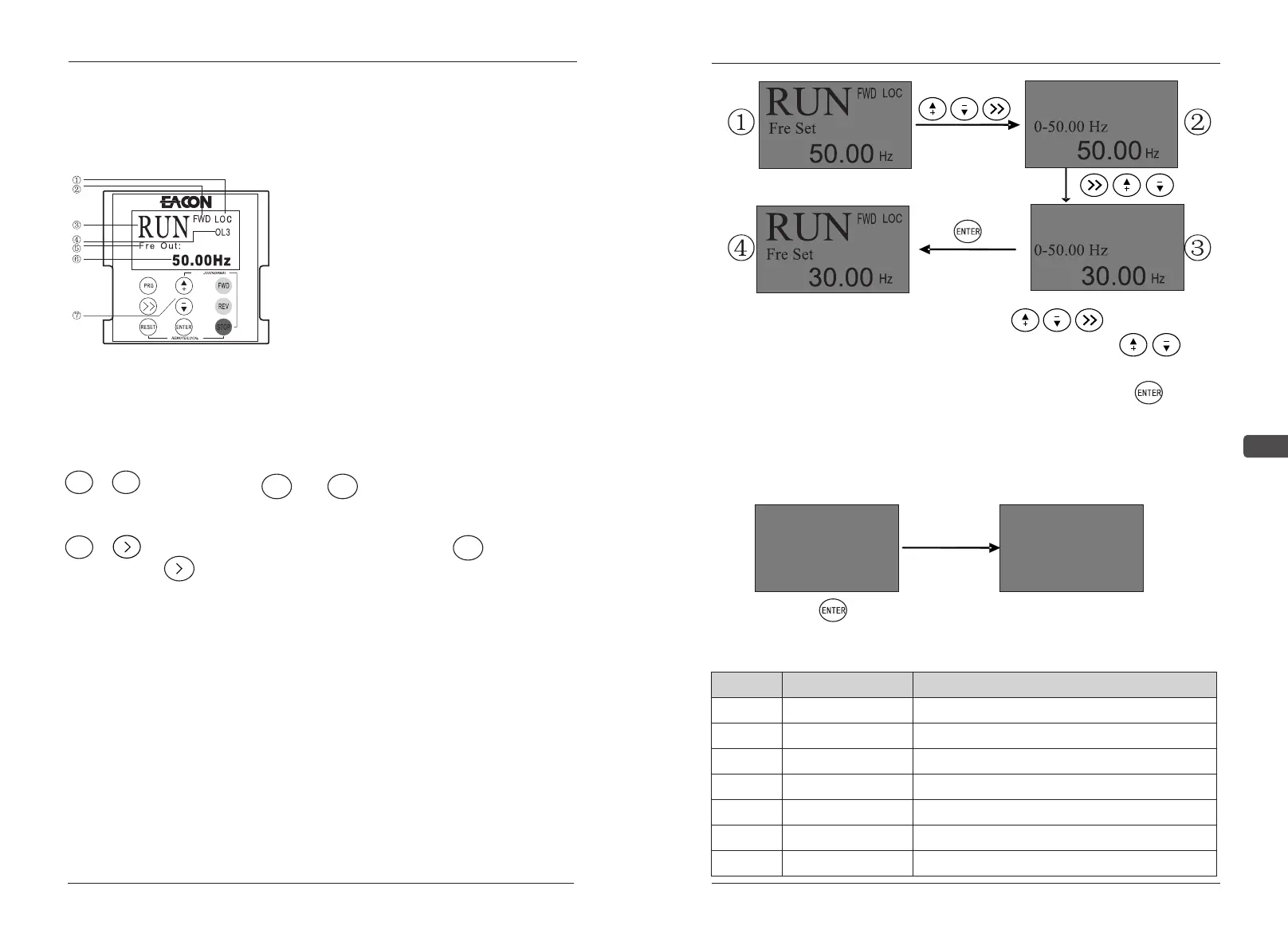
4.2.1 LCD Keyboard Panel Appearance
① LOC, REMx shows an effective source
of control.
② FWD, REV shows the direction of
rotation at run time.
③ RUN, STOP indicates the running
status of AC drives.
④ OL3 display the fault/alarm code, and
display the status of the point.
⑤ Fre Out displays the monitored
parameters.
⑥ 50.00Hz Displays the specific value of
the monitoring parameter.
⑦ Operation area of touch buttons
Functions of key combinations:
STOP + ESC :
STOP + :
Hold down the STOP and ESC keys at the same time to LOCAL
(LOCAL) and REMOTSwitch between (remote).
In the state of LOC panel, hold down the STOP key and the
key to enter or exit the JOG state.
4.2.2 Operation Procedure of LCD Keypad Panel
The data on the panel are arranged in the menu and sub-menu, and the
general operation can be conducted in the following way.
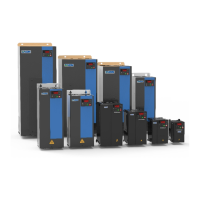
Setting of main frequency of panel
(e.g. the main frequency is altered to: 30.00Hz)
The frequency set
The frequency set
Press enter under the initial screen ① to the frequency
setting screen ② . In the frequency setting screen ② Press the keys
to select the modify bit and change the frequency from 5 to 3 according to the
encoder setting, as shown in figure ③ . Set the frequency Press to
complete the setup, as shown in figure ④.
Switch of the monitored parameters
(e.g. the monitored parameter is altered to: output current)
RUN
FWD
LOC
CUR OUT:
41.6
RUN
FWD
LOC
FRE OUT:
50.00
Hz
A
① ②
Press the buttons on screen ① to switch monitoring content, as
shown in figure ②.
CODE
LCD display
MEANING
0
Frequency output value
1
Current output value
2
Voltage output value
3
Power output value
4
DC circuit voltage
5
feedback value
6
Fre Out
Cur Out
Vol Out
Pow Out
EDC
PID
Fre Set
frequency setted


 To Next Page