!
Product Manual Oria Thermostat
EAE KNX Oria Thermostat Oria Thermostat PM R1.0
©EAE!Technology!! ! ! ! www.eaetechnology.com!! ! ! Sayfa!43!/!50!
!
!
4.4.5.5.2' Communication'Objects'
Visible if “Send On/Off at Control Mode Switchover” parameter enabled. This communication object is not a
control object, it will send “True” when control mode is “Cool” and “False” when control mode is “Heat” and
can be used to enable split unit.
Visible if “Communication Error Object” parameter enabled. “True” telegram causes the thermostat to enter
“Protect Mode” with error and thermostat stay in this state until “False” telegram received.
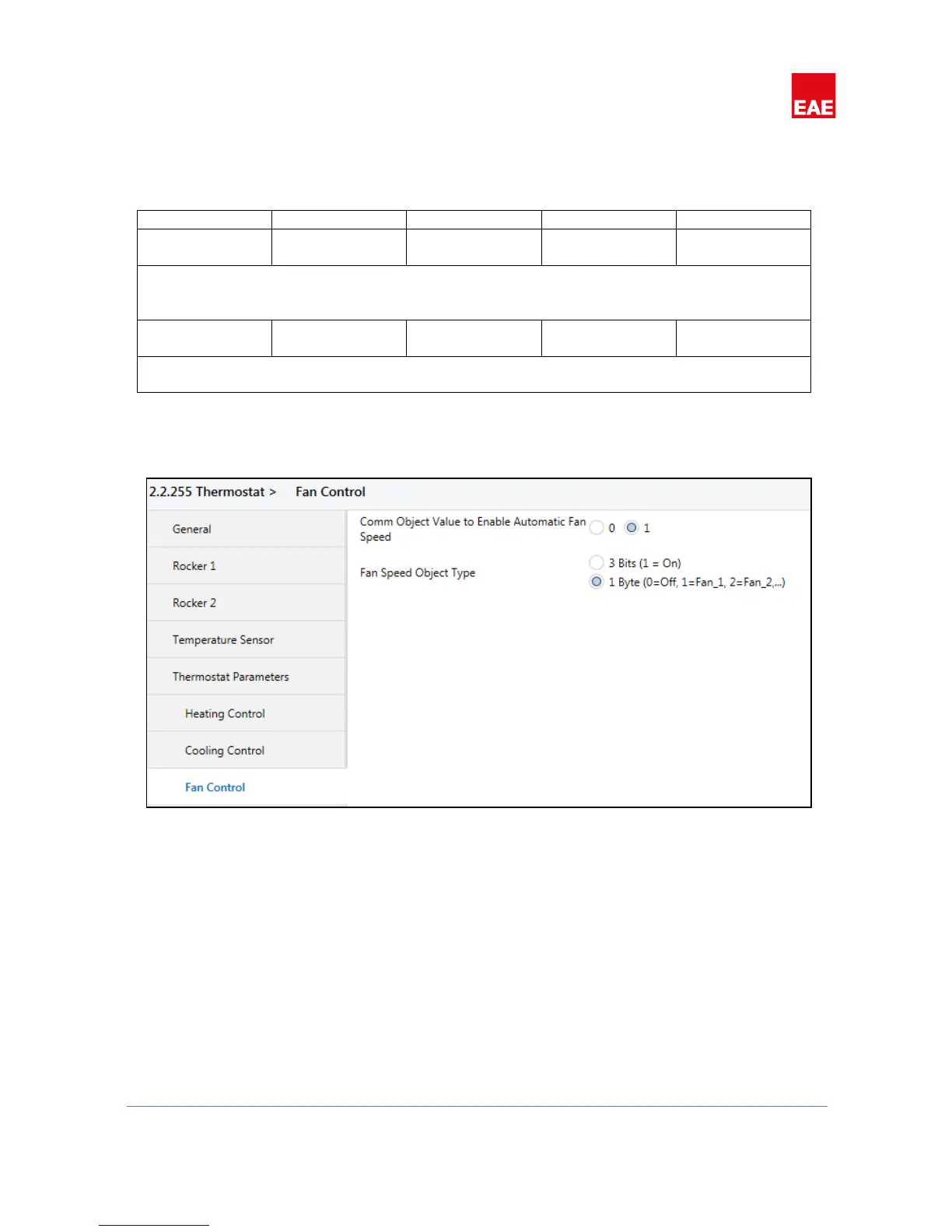
4.4.6, Fan,Control,
!
Figure 24
When heating control or cooling control selected as “Fan Coil” or “Split Unit”, “Fan Control” tab will be visible.
Note that, if both heat and cool controllers configured as “Fan Coil” or “Split Unit”, only one set of
communication objects and parameters for fan control will be enabled.
When fan control enabled, “Fan Speed” parameters of different operating modes in “Setpoints” tab will also be
visible and “LCD Fan Speed” icons will be activated. Since fan speed communication objects are used as control
objects and status objects, change in fan speed will be visible from LCD Fan Speed icons.


 To Next Page