!
Product Manual Oria Thermostat
EAE KNX Oria Thermostat Oria Thermostat PM R1.0
©EAE!Technology!! ! ! ! www.eaetechnology.com!! ! ! Sayfa!10!/!50!
!
!
If window status enabled, this communication object will be used to detect window status. If window
detected as open thermostat will enter protect mode and will not response mode change commands (over
Table 3
4.2, Rockers,and,Push,Buttons,
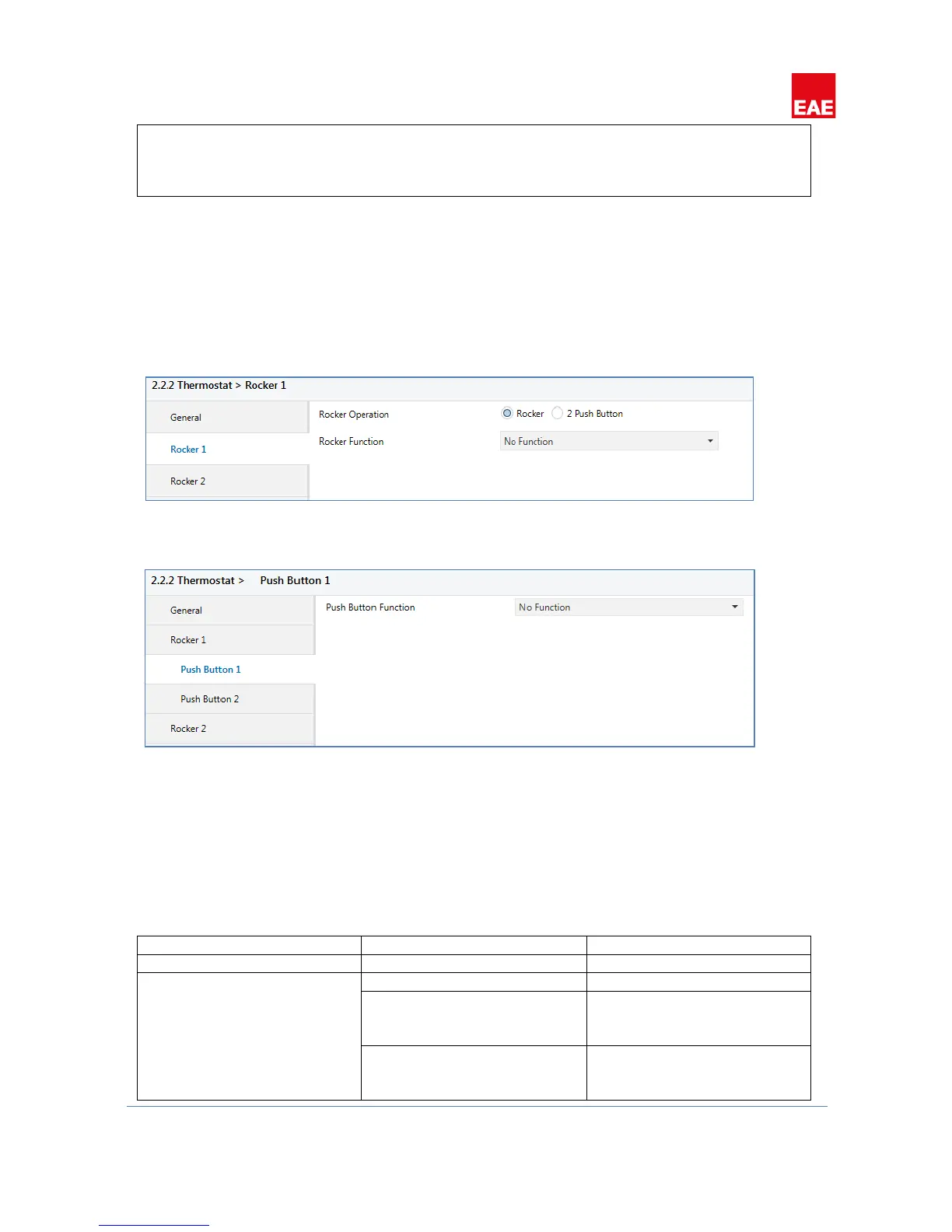
Total number of rockers can be selected through “Rocker Count” parameter in “General” tab. Buttons on the
thermostat can be used as rockers or push buttons. Select the desired operation from the “Rocker N” (N:
Rocker number) tab (Figure 2). If configured as push buttons, 2 push button tabs will be visible under “Rocker
N” tab (Figure 3). Both rockers and push button have 5 functions, no function, switch, switch and dim, shutter
and value operation.
Figure 2
Figure 3
4.2.1, Rockers
,
Number of rockers should be selected in “General” tabs in parameters and should be chosen as compatible
with the device that will be configured. Rockers are numbered from top to bottom, topmost rocker as Rocker 1,
below it Rocker 2, and so on. Rockers can be configured as 4 different operations and 1 function to disable
rocker (No Function). Operation selection can be configured with “Rocker Function” parameter. Every function
enables different parameters and communication objects that will be explained in the following chapters.


 To Next Page