TRANSDUCER CONE ANGLES
range, press
the ON/CLEAR
key
to clear the
display.
If
you
wait a few
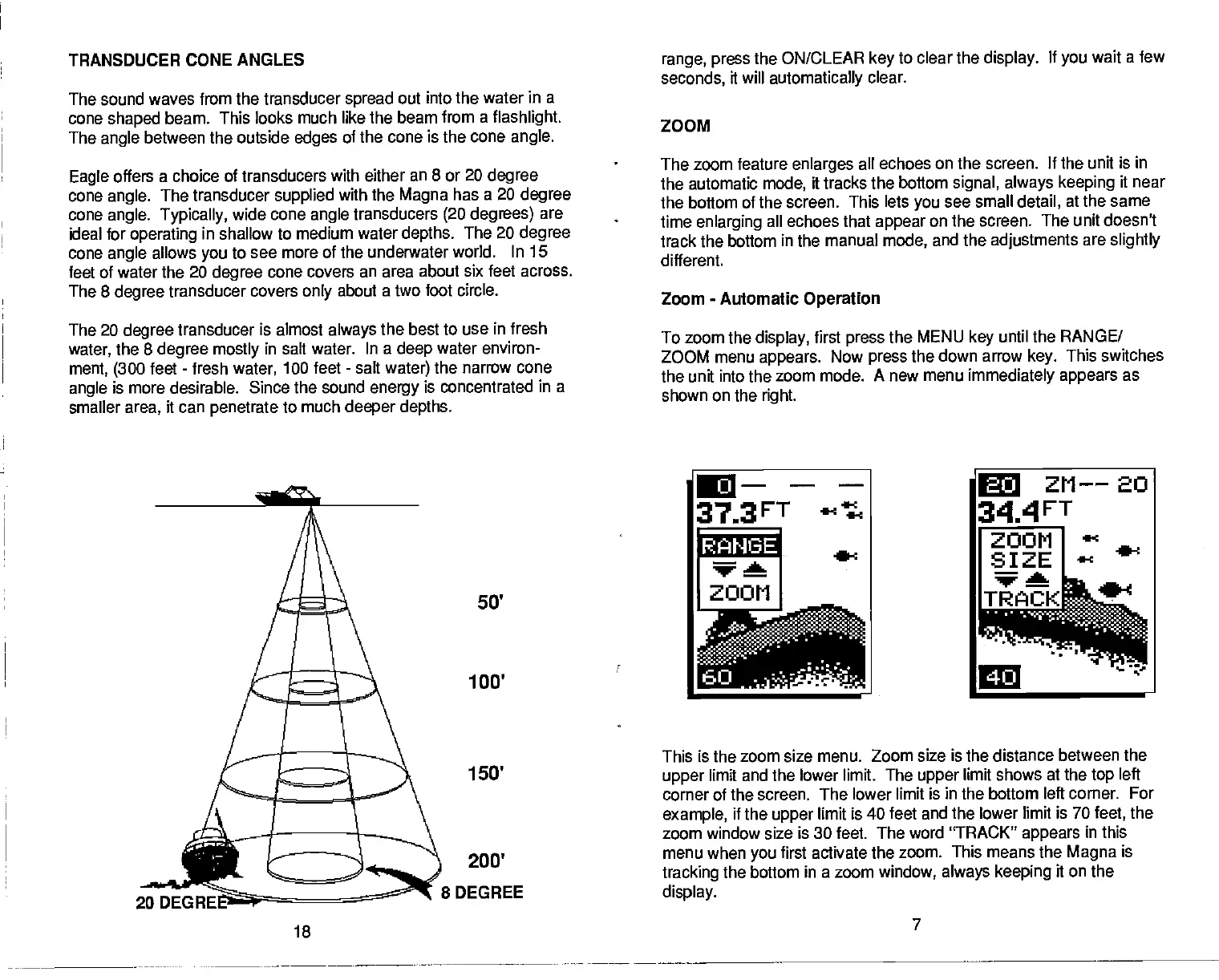
The sound
waves from the transducer
spread
out into the water in a
cone
shaped
beam. This looks much like the beam from a
flashlight.
The
angle
between the outside
edges
of the cone is the cone
angle.
Eagle
offers a choice of transducers with either an 8 or 20
degree
cone
angle.
The transducer
supplied
with the
Magna
has a 20
degree
cone
angle. Typically,
wide cone
angle
transducers
(20 degrees)
are
ideal for
operating
in shallow to medium water
depths.
The 20
degree
cone
angle
allows
you
to see more of the underwater world.
In 15
feet of water the 20
degree
cone covers an area about
six feet across.
The 8
degree
transducer covers
only
about a two foot circle.
The 20
degree
transducer is almost
always
the best to use
in fresh
water,
the 8
degree mostly
in salt water. In a
deep
water environ-
ment, (300
feet
-
fresh
water,
100 feet
-
salt
water)
the
narrow cone
angle
is more desirable. Since the sound
energy
is concentrated
in a
smaller
area,
it can
penetrate
to much
deeper depths.
seconds,
it will
automatically
clear.
ZOOM
The zoom feature
enlarges
all echoes on the screen.
If the unit is in
the automatic
mode,
it tracks the bottom
signal, always keeping
it near
the bottom of the screen. This
lets
you
see small
detail,
at the same
time
enlarging
all
echoes that
appear
on the screen. The unit doesn't
track the bottom in the manual
mode,
and the
adjustments
are
slightly
different.
Zoom
-
Automatic
Operation
To zoom the
display,
first
press
the
MENU
key
until the RANGE/
ZOOM menu
appears.
Now
press
the
down arrow
key.
This switches
the unit into the zoom mode.
A new menu
immediately appears
as
shown on the
right.
This is the zoom size menu.
Zoom size is the distance between the
upper
limit and the lower limit.
The
upper
limit shows at the
top
left
corner of the screen. The lower
limit is in the bottom left corner. For
example,
if the
upper
limit is
40 feet and the lower limit is 70
feet,
the
zoom window size is 30 feet. The
word "TRACK"
appears
in this
menu when
you
first activate the zoom. This means the
Magna
is
tracking
the bottom in a zoom
window,
always keeping
it on the
display.
7
RANGE
50'
100'
200'
8 DEGREE
150'
20 DEGRE:
18
PDF compression, OCR, web-optimization with CVISION's PdfCompressor



 To Next Page