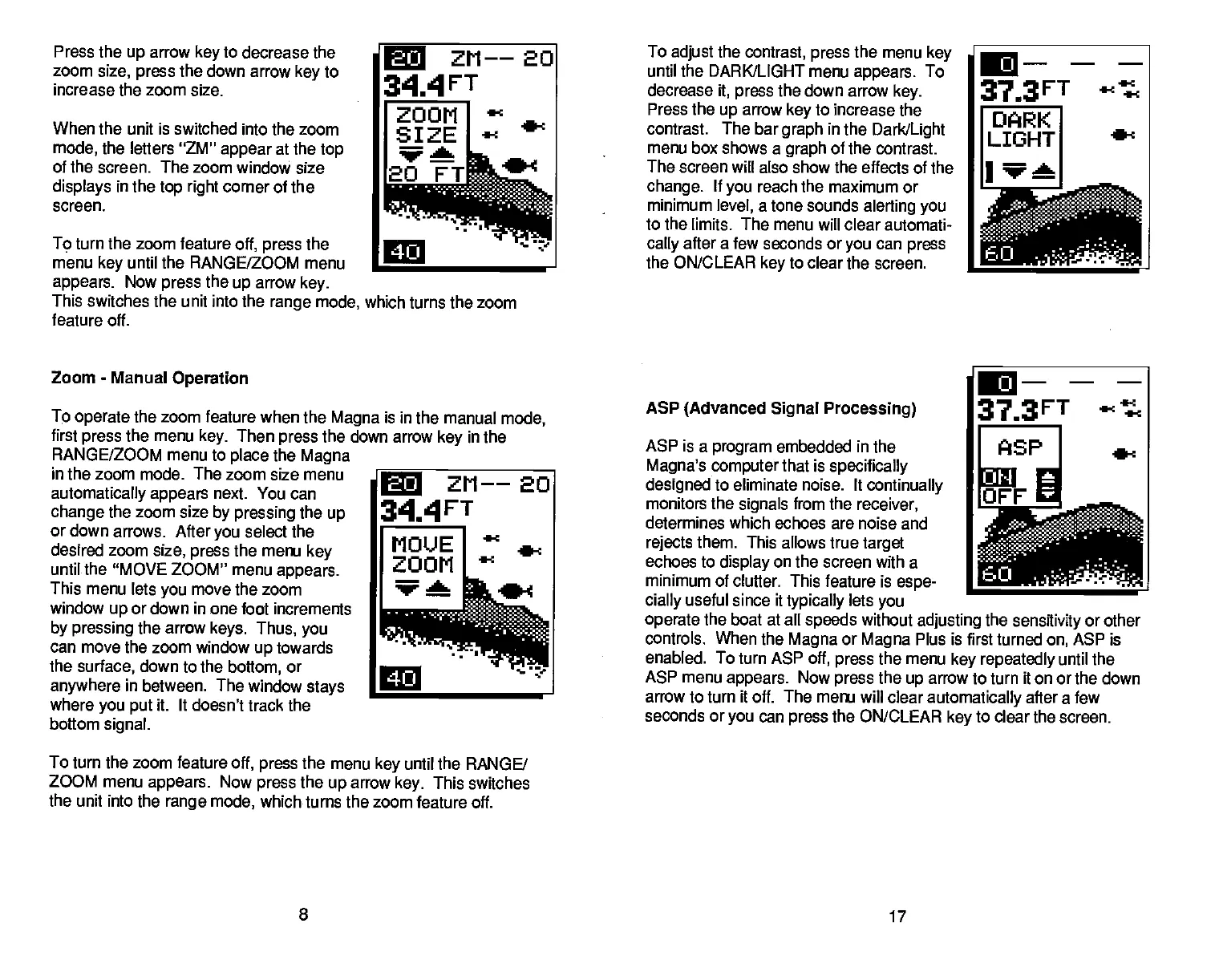
Press the
up
arrow
key
to decrease the
zoom
size,
press
the down arrow
key
to
increase the zoom size.
When the unit is switched into the
zoom
mode,
the letters "ZM"
appear
at the
top
of the screen. The zoom window size
displays
in the
top right
corner of the
screen.
To turn the zoom feature
off,
press
the
menu
key
until the
RANGE/ZOOM menu
C
ZM-—2O
3IAFT
ZOOM
SIZE
•-
wa
2OFT
C
appears.
Now
press
the
up
arrow
key.
This switches the unit into the
range
mode,
which turns the zoom
feature off.
Zoom
-
Manual
Operation
To
operate
the zoom feature
when the
Magna
is in the manual
mode,
first
press
the menu
key.
Then
press
the down arrow
key
in the
RANGE/ZOOM menu to
place
the
Magna
__________________
in the zoom mode. The zoom size menu
automatically appears
next. You can
change
the zoom size
by pressing
the
up
or down arrows. After
you
select the
desired zoom
size,
press
the menu
key
until the
"MOVE ZOOM" menu
appears.
This menu lets
you
move the zoom
window
up
or down in one foot increments
by
pressing
the arrow
keys.
Thus,
you
can move the zoom window
up
towards
the
surface,
down to the
bottom,
or
anywhere
in between. The window
stays
____________________
where
you put
it. It doesn't track
the
bottom
signal.
To
adjust
the
contrast, press
the menu
key
until the DARK/LIGHT menu
appears.
To
decrease
it,
press
the down arrow
key.
Press the
up
arrow
key
to increase the
contrast. The bar
graph
in the
Dark(Light
menu box shows a
graph
of the contrast.
The screen will also show the effects of the
change.
If
you
reach the maximum or
minimum
level,
atone sounds
alerting you
to the
limits. The menu will clear automati-
cally
after a few seconds or
you
can
press
the ON/CLEAR
key
to
clear the screen.
ASP
(Advanced Signal Processing)
ASP is a
program
embedded in the
Magna's
computer
that is
specifically
designed
to eliminate noise. It
continually
monitors
the
signals
from the
receiver,
determines which echoes are noise and
rejects
them.
This allows true
target
echoes to
display
on the screen with a
minimum of clutter. This feature is
espe
___________________
cially
useful
since it
typically
lets
you
operate
the boat at all
speeds
without
adjusting
the
sensitivity
or other
controls. When
the
Magna
or
Magna
Plus is first turned
on,
ASP is
enabled. To turn ASP
off,
press
the menu
key repeatedly
until the
ASP menu
appears.
Now
press
the
up
arrow to turn it on or the down
arrow
to turn it off. The menu will clear
automatically
after a few
seconds or
you
can
press
the ON/CLEAR
key
to clear the screen.
To turn the zoom feature
off,
press
the
menu
key
until the RANGE/
ZOOM menu
appears.
Now
press
the
up
arrow
key.
This switches
the unit into the
range
mode,
which turns the zoom
feature off.
8
17
C
ZM——EO
344FT
.i—
—J;;
C
PDF compression, OCR, web-optimization with CVISION's PdfCompressor



 To Next Page