EasyManua.ls Logo

Eagle Magna - DISPLAY MODE; MAGNA ONLY; MAGNA PLUS ONLY

Eagle Magna
16 pages
Print Icon
To Previous Page IconTo Previous Page

Loading...
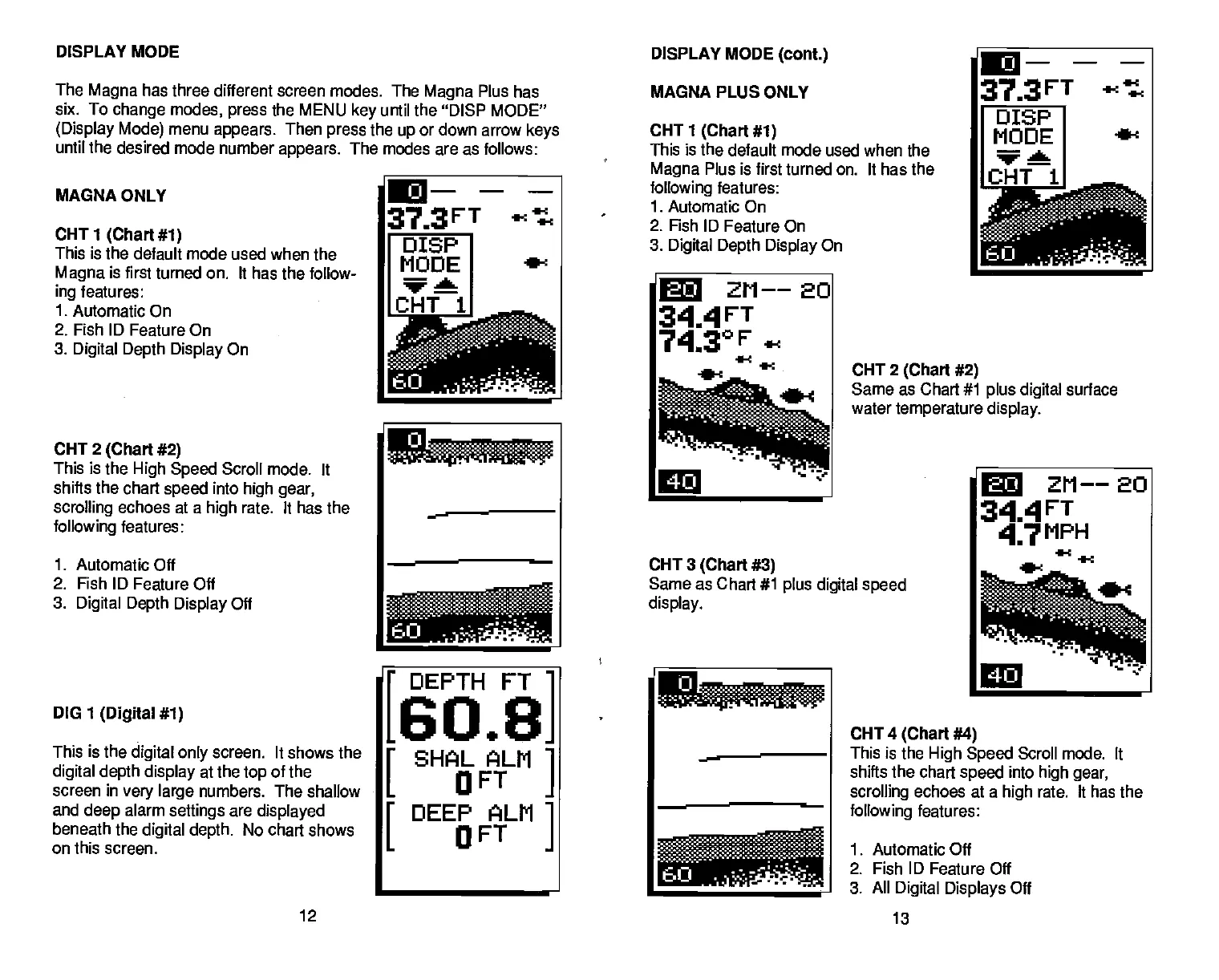
MACNA ONLY
CHT
1
(Chart #1)
This is the default mode
Magna
is
first turned on.
ing
features:
1.
Automatic On
2. Fish ID Feature On
3.
Digital Depth Display
On
CHT 2
(Chart #2)
This is the
High Speed
Scroll mode, It
shifts the chart
speed
into
high gear,
scrolling
echoes at a
high
rate. It has the
following
features:
1.
Automatic Off
2. Fish ID
Feature Off
3.
Digital
Depth Display
Off
DIG 1
(Digital #1)
This is the
digital only
screen.
It shows the
digital depth display
at the
top
of the
screen in
very
large
numbers. The shallow
and
deep
alarm
settings
are
displayed
beneath
the
digital
depth.
No chart shows
on this screen.
CHT 2
(Chart #2)
Same as Chart #1
plus digital
surface
water
temperature display.
CHT
4
(Chart #4)
This is the
High Speed
Scroll mode. It
shifts the chart
speed
into
high gear,
scrolling
echoes at a
high
rate. It has the
following
features:
1. Automatic Off
2. Fish ID Feature Off
3.
All
Digital Displays
Off
DISPLAY MODE
DISPLAY MODE
(cont.)
The
Magna
has three different screen
modes. The
Magna
Plus has
six. To
change
modes,
press
the MENU
key
until the "DISP MODE"
(Display Mode)
menu
appears.
Then
press
the
up
or down arrow
keys
until the desired mode number
appears.
The modes are as follows:
used when the
It has the follow-
37_3FT
t.ct
oIsP
MODE
CHT1
MACNA PLUS ONLY
CHT 1
(Chart #1)
This is the default mode
used when the
Magna
Plus is first turned on. It has the
following
features:
1. Automatic On
2. Fish ID
Feature On
3.
Dig'dal Depth
Display
On
373FT
tt
oIsP
MODE
e-c
211——
3IAFT
743°F
t4.c
-.
n'%fl 'r
-
CHT 3
(Chart #3)
Same
as Chart #1
plus digital speed
display.
C
ZM——20
3III4FT
47MPH
DEPTH FT
[60+8.
I
SHAL ALM
I.
OFT
I
DEEP ALM
L
OFT
C
60
, ____
12
13
PDF compression, OCR, web-optimization with CVISION's PdfCompressor

Related product manuals