narrow or no
gray
line. A hard
bottom returns a
strong signal
that DEPTH
ALARMS
causes a wide
gray
line.
If
you
have two
targets
of
equal size,
one
with
gray
and the other
without,
the
target
with
gray
is the
stronger
echo. This
helps
distin-
guish
fish from
structure,
or the
larger
fish from
a smaller one.
Grayline®
is
adjustable.
Since it shows the difference between
strong
and weak
echoes,
changing
the level
may require
a different
sensitivity
setting.
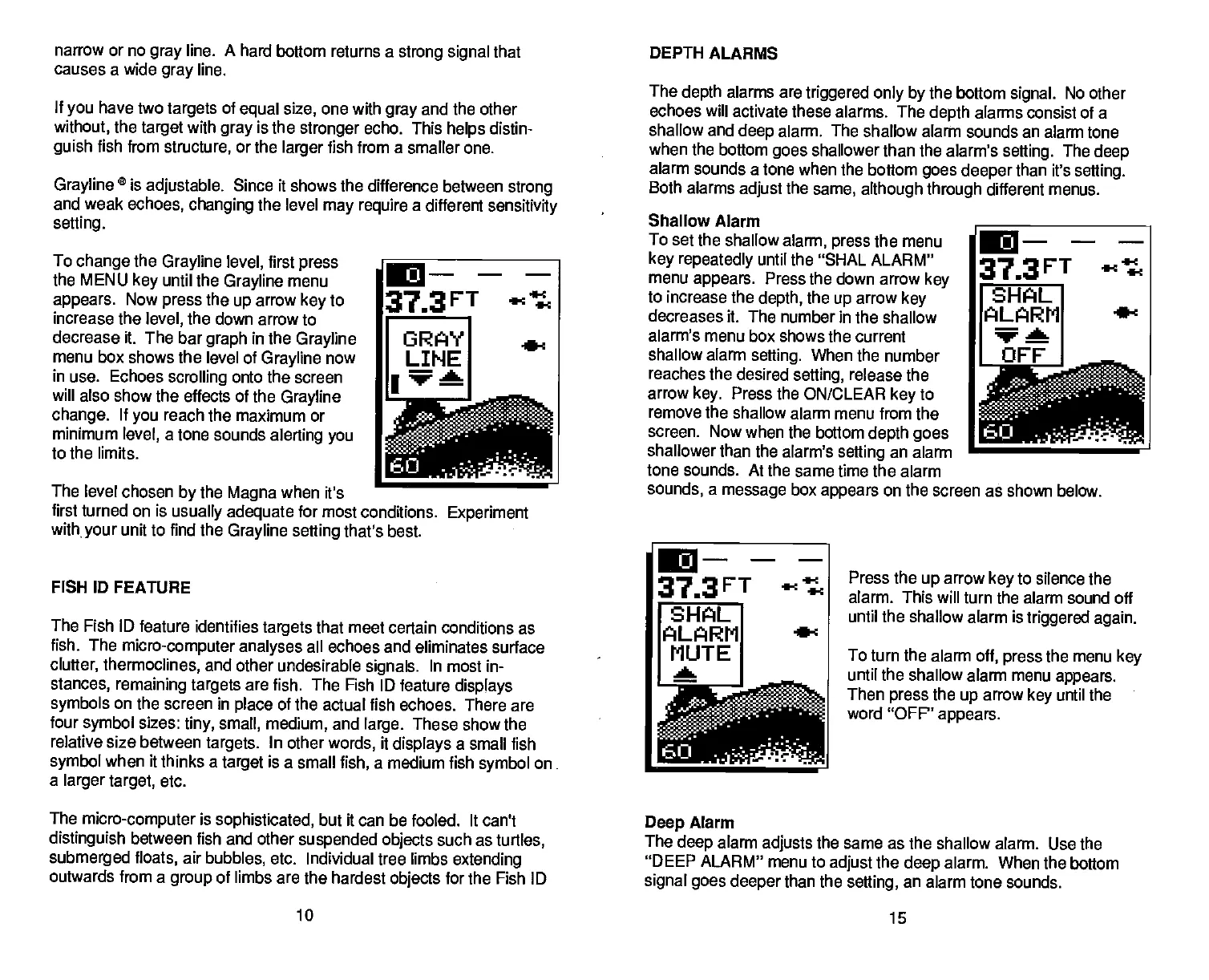
To
change
the
Grayline level,
first
press
the MENU
key
until the
Grayline
menu
appears.
Now
press
the
up
arrow
key
to
increase the
level,
the down arrow to
decrease it. The bar
graph
in
the
Grayline
menu box shows the
level of
Grayline
now
in use. Echoes
scrolling
onto the screen
will also show the effects
of the
Grayline
change.
If
you
reach the maximum or
minimum
level,
a
tone sounds
alerting you
to the limits.
The level chosen
by
the
Magna
when
it's
first turned on is
usually adequate
for
most conditions.
Experiment
with
your
unit to find the
Grayline selling
that's best.
FISH ID
FEATURE
The Fish ID feature identifies
targets
that meet certain conditions as
fish.
The
micro-computer analyses
all echoes and eliminates surface
clutter, thermoclines,
and other undesirable
signals.
In
most in-
stances,
remaining targets
are
fish. The Fish ID feature
displays
symbols
on the screen in
place
of the
actual fish echoes. There are
four
symbol
sizes:
tiny, small, medium,
and
large.
These show the
relative size between
targets.
In other
words,
it
displays
a small fish
symbol
when it thinks a
target
is a
small
fish,
a medium fish
symbol
on.
a
larger target,
etc.
The
depth
alarms are
triggered only by
the bottom
signal.
No other
echoes will activate these
alarms. The
depth
alarms consist of a
shallow and
deep
alarm. The shallow
alarm sounds an alarm tone
when the bottom
goes
shallower than the alarm's
selling.
The
deep
alarm sounds a tone when the bottom
goes
deeper
than it's
setting.
Both alarms
adjust
the
same,
although through
different menus.
Shallow Alarm
To set the shallow
alarm,
press
the menu
key repeatedly
until the "SHAL ALARM"
menu
appears.
Press the down
arrow
key
to increase the
depth,
the
up
arrow
key
decreases it. The number in
the shallow
alarm's menu box shows the current
shallow alarm
setting.
When the
number
reaches the desired
setting,
release the
arrow
key.
Press the ON/CLEAR
key
to
remove the shallow alarm menu from
the
screen. Now when the bottom
depth goes
shallower than the alarm's
setting
an alarm
tone
sounds. At the same time the alarm
sounds,
a
message
box
appears
on the screen as shown below.
Press the
up
arrow
key
to silence the
alarm. This will turn the alarm
sound off
until the shallow alarm is
triggered again.
To turn the alarm
off, press
the menu
key
until the shallow alarm
menu
appears.
Then
press
the
up
arrow
key
until the
word "OFF"
appears.
The
micro-computer
is
sophisticated,
but it can be fooled. It can't
distinguish
between fish and other
suspended
objects
such as
turtles,
submerged
floats,
air
bubbles,
etc.
Individual tree limbs
extending
outwards from a
group
of limbs are
the hardest
objects
for the Fish ID
Deep
Alarm
The
deep
alarm
adjusts
the same as the shallow
alarm. Use the
"DEEP ALARM"
menu to
adjust
the
deep
alarm. When the
bottom
signal goes
deeper
than the
setting,
an alarm tone
sounds.
10
15
373FT
act
SHAL
ALARM
.e-c
MUTE
a
-
-
-
.
-
60
PDF compression, OCR, web-optimization with CVISION's PdfCompressor



 To Next Page