DISPLAY
MODE
(cont.)
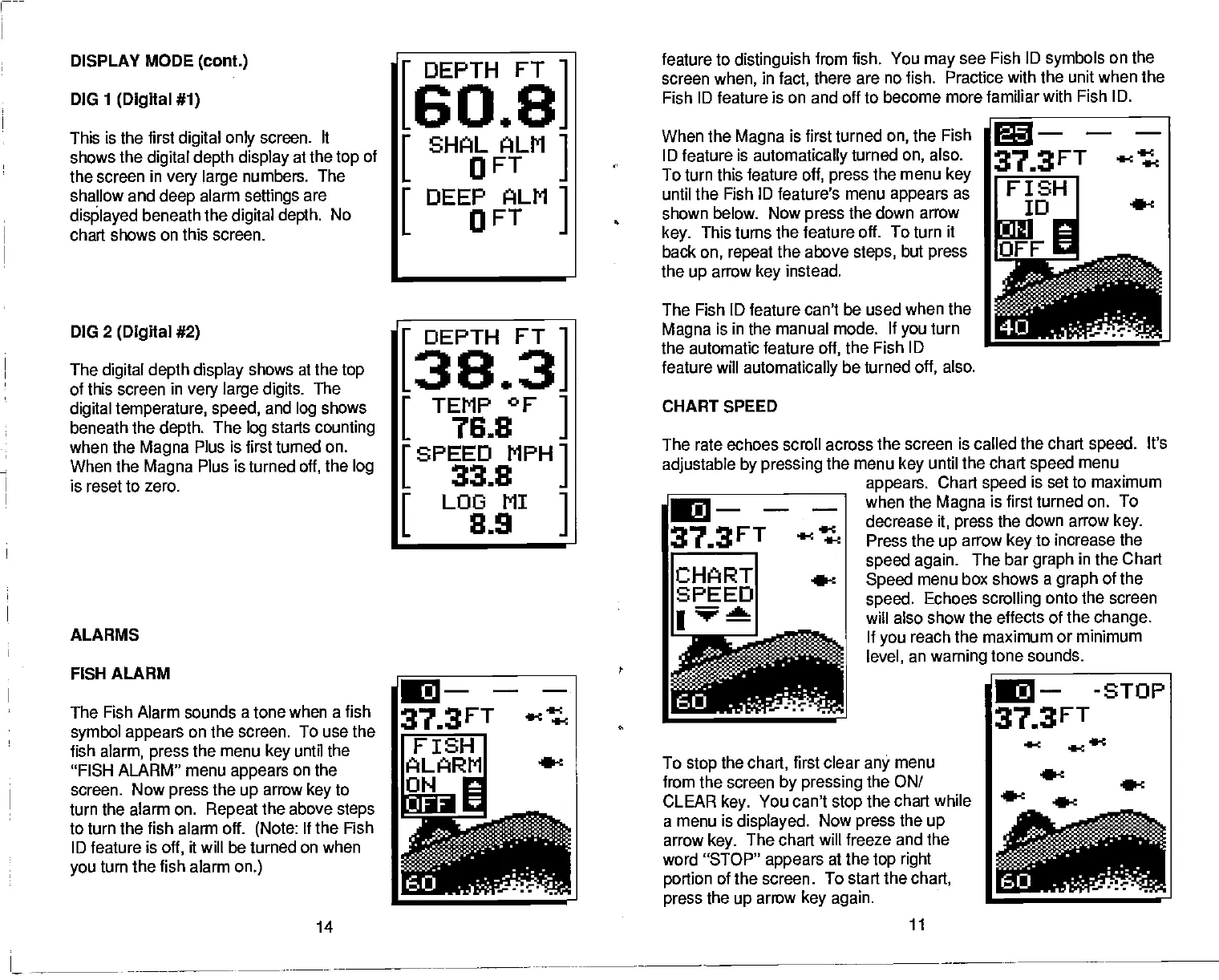
DIG
1
(Digital #1)
This is the
first
digital only
screen. It
shows the
digital depth
display
at the
top
of
the screen
in
very large
numbers. The
sha!low and
deep
alarm
settings
are
displayed
beneath the
digital depth.
No
chart shows on this screen.
DIG
2
(Digital #2)
The
digital depth display
shows at the
top
of this screen in
very large digits.
The
digital temperature, speed,
and
log
shows
beneath the
depth.
The
log
starts
counting
when the
Magna
Plus is first turned on.
When the
Magna
Plus is turned
off,
the
log
is reset to zero.
feature to
distinguish
from fish. You
may
see Fish ID
symbols
on the
screen
when,
in
fact,
there
are no fish. Practice with the unit when the
Fish ID feature is on and off to
become more familiar with Fish
ID.
When the
Magna
is first turned
on,
the Fish
ID
feature
is
automatically
turned
on,
also.
To turn this feature
off,
press
the menu
key
until the Fish
ID
feature's
menu
appears
as
shown below.
Now
press
the down arrow
key.
This turns the
feature off. To turn it
back
on,
repeat
the above
steps,
but
press
the
up
arrow
key
instead.
The Fish
ID
feature
can't be used when the
Magna
is in the manual
mode. If
you
turn
the automatic feature
off,
the
Fish ID
feature
will
afflomatically
be turned
off,
also.
CHART SPEED
The rate echoes scroll across
the screen is called the chart
speed.
It's
adjustable by pressing
the menu
key
until the chart
speed
menu
____________________
appears.
Chart
speed
is set to maximum
when the
Magna
is first turned on. To
decrease
it,
press
the down arrow
key.
Press the
up
arrow
key
to increase the
speed
again.
The bar
graph
in the Chart
Speed
menu box shows a
graph
of the
speed.
Echoes
scrolling
onto the screen
will also show the effects
of the
change.
If
you
reach the maximum or minimum
level,
an
warning
tone sounds.
To
stop
the
chart,
first clear
any
menu
from the screen
by pressing
the ON!
CLEAR
key.
You can't
stop
the chart while
a menu is
displayed.
Now
press
the
up
arrow
key.
The chart will freeze and the
word "STOP"
appears
at the
top right
portion
of the screen. To start the
chart,
press
the
up
arrow
key again.
DEPTH FT
[60.8]
I
SHAL ALM
L
OFT
I
DEEP ALM
L
OFT
373FT
FISH
ID
DEPTH FT
[38.3]
I
TEMP °F
L
76.8
ISPEED
MPH
L
33.8
I
LOOMI
L
81.9
ALARMS
IC---
'373FT
4Ct
CHART
•1
SPEED
FISH ALARM
The Fish Alarm sounds a tone
when a fish
symbol appears
on the
screen. To use the
fish
alarm,
press
the menu
key
until the
"FISH
ALARM"
menu
appears
on the
screen. Now
press
the
up
arrow
key
to
turn the alarm on.
Repeat
the above
steps
to turn the fish alarm off.
(Note:
If the Fish
ID feature is
off,
it
will
be turned on
when
you
turn the fish alarm
on.)
14
C—
-STOP
373FT
—
11
PDF compression, OCR, web-optimization with CVISION's PdfCompressor



 To Next Page