EasyManua.ls Logo

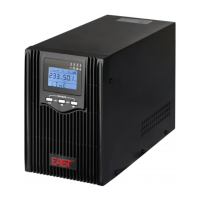
East EA901P - User Manual

Default Icon
27 pages
Print Icon
To Next Page IconTo Next Page
Loading...

Questions and Answers

Summary

Safety Information

UPS Safety Information

General safety precautions for installing, servicing, and maintaining the UPS; intended for indoor use only.

Battery Safety Information

Guidelines and precautions for handling and installing batteries, including safety measures against electric shock and short circuits.

Product Overview

Specifications

Detailed technical specifications for UPS models, covering input, output, efficiency, and overload capabilities.

Installation

Installation and Output Connection

Information on how to connect the UPS to power outlets and load cables.

Operation

UPS Settings

Instructions on configuring UPS settings like output voltage, battery low voltage, bypass mode, and AUO.

Fault Messages and Alarm

Troubleshooting

East EA901P Specifications

General IconGeneral
Capacity900VA/540W
Frequency50/60Hz
Output WaveformSimulated Sine Wave
Battery Type12V/9Ah
Battery Recharge Time4-6 hours
Communication InterfaceUSB

Related product manuals