EasyManua.ls Logo

Easy Storage HDVR004 - User Manual

Easy Storage HDVR004
31 pages
Print Icon
To Next Page IconTo Next Page
Loading...
1 -
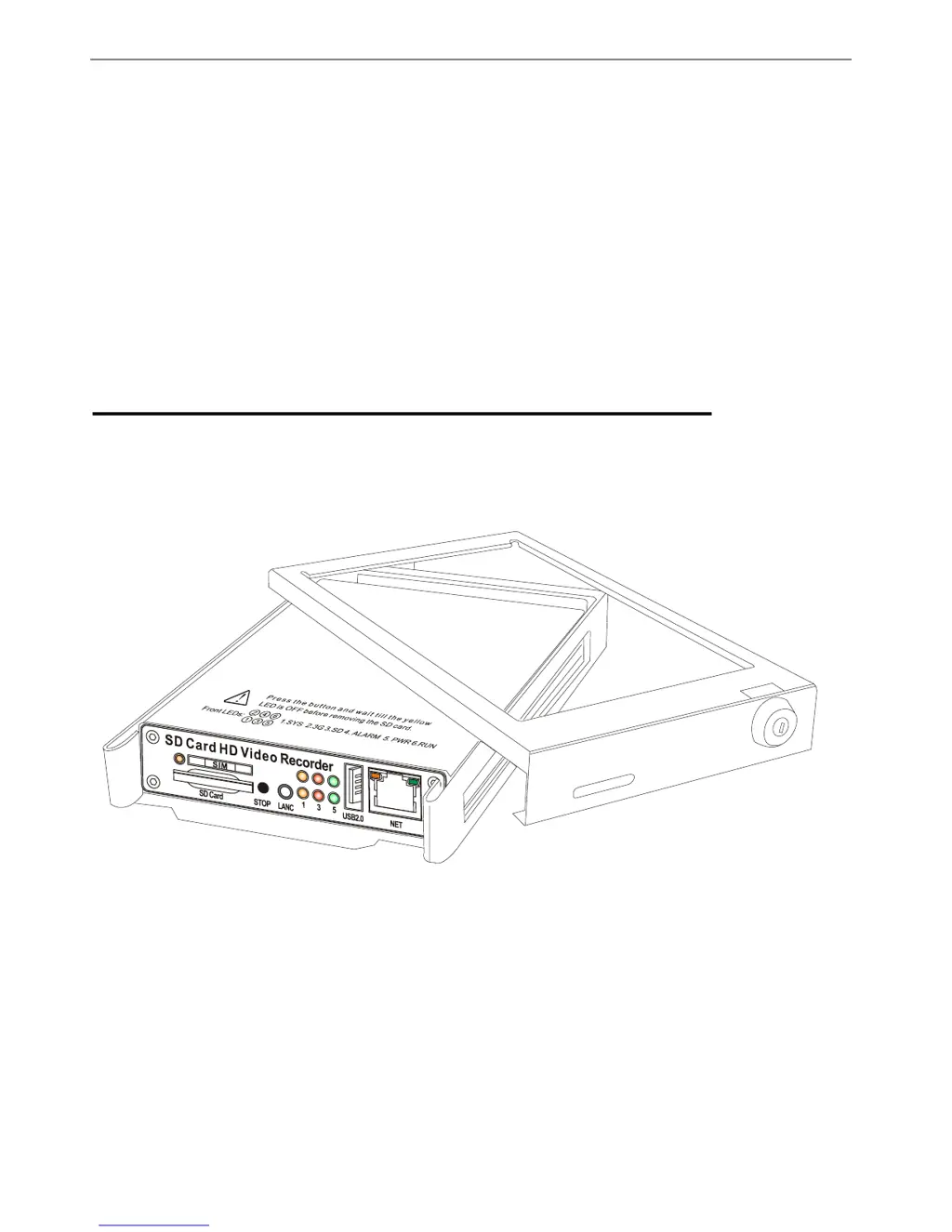
High Definition Digital Video Recorder
Users Manual
Installation Manual
Thank you for using our High Definition SD Card Video Recorder. This manual is applicable for HDVR004 &
HDVR004GW. Please read this User’s Manual carefully to ensure that you can use the device correctly and safely.
The contents of this manual are subject to be changed without notice.

Questions and Answers

  • J
    Joshua OrtizAug 2, 2025
    What to do if Easy Storage DVR video recording doesn't work?
    • J
      Jennifer WebsterAug 3, 2025
      If your Easy Storage DVR video recording isn't working despite your SD cards or hard drives being functional, ensure that the Record Mode hasn't been inadvertently set from "Automatic" to "Off." Also, verify whether the DVR is set to a scheduled record mode and that the current time aligns with your configured time period.
  • T
    Thomas AdamsAug 9, 2025
    Why does Easy Storage DVR video playback keep stopping?
    • C
      Cristina SmithAug 9, 2025
      If your Easy Storage DVR live images or playback video frequently halt when recording to an SD card or USB disk, this may be due to the recording medium's writing speed being insufficient. Ensure that your SD card or USB's writing speed meets the necessary requirements.
  • L
    Lisa StewartAug 17, 2025
    How to fix Easy Storage HDVR004 DVR when WiFi AP SSID is unavailable?
    • M
      Miss Denise PetersAug 17, 2025
      If, after connecting the Easy Storage DVR power, no WiFi AP SSID is available and indicators No.5 and No.6 on the panel are flashing alternately, this indicates that the DVR missed the ignition signal. Check if the yellow line of the input power lines is connected to the power positive level, or if it matches the setting of the effective electrical level in the menu settings.
  • B
    Bryan BushAug 25, 2025
    Does Easy Storage HDVR004 support RS485 control PTZ functions?
    • S
      Stacy PierceAug 25, 2025
      The Easy Storage DVR does not directly support PTZ functions, as the traditional RS485 is not supported in the High Definition Video System.

Summary

Safety and Warnings

Important Notices

A list of key operational and safety guidelines for device usage.

Product Figures and LED Indicators

LED Status Indicators

Explains the meaning of various LED lights for system status.

Initial Setup and Installation

Tamper-proof Case Mounting

Instructions for securing the DVR unit in its protective case.

Power Connection Procedures

Camera, Sensor, and Event Button Connections

Basic Operation: SD Card Management

SD Card Formatting Procedure

Detailed steps for formatting SD cards for the DVR.

Basic Operation: Recording Configuration

Setting Up Recording Details

Configuring resolution, bitrate, and frame rate for recordings.

Basic Operation: Camera Settings

Configuring Camera Parameters

Adjusting brightness, contrast, audio, and other camera settings.

Basic Operation: Alarm Configuration

Setting Up Alarm Details

Configuring trigger levels, OSD, and buzzer for alarms.

Basic Operation: Motion Detection and Power

Motion Detection Zone Setup

Defining areas for motion detection and alarm triggers.

Power Supply Configuration

Setting ignition level, power-off delay, and scheduled power on/off.

Basic Operation: Vehicle and Speed Settings

Vehicle Parameter Setup

Configuring license ID, speed unit, and speed limits.

Basic Operation: GPS Configuration

GPS Parameter Settings

Configuring GPS status, OSD, and time synchronization.

Basic Operation: G-Sensor Configuration

G-Sensor Parameter Setup

Setting G-Sensor thresholds and alarm parameters.

Basic Operation: Scheduled Recording

Setting Up Recording Schedules

Configuring specific time plans for recording.

Network Settings: WiFi Configuration

WiFi Network Settings

Configuring AP mode and Client mode for WiFi connectivity.

Troubleshooting Common Issues

WiFi and Recording Issues

Resolving WiFi visibility problems and recording failures.

Troubleshooting and Device Usage Q&A

Easy Storage HDVR004 Specifications

General IconGeneral
BrandEasy Storage
ModelHDVR004
CategoryDVR
LanguageEnglish