6 -
2. Product Figures
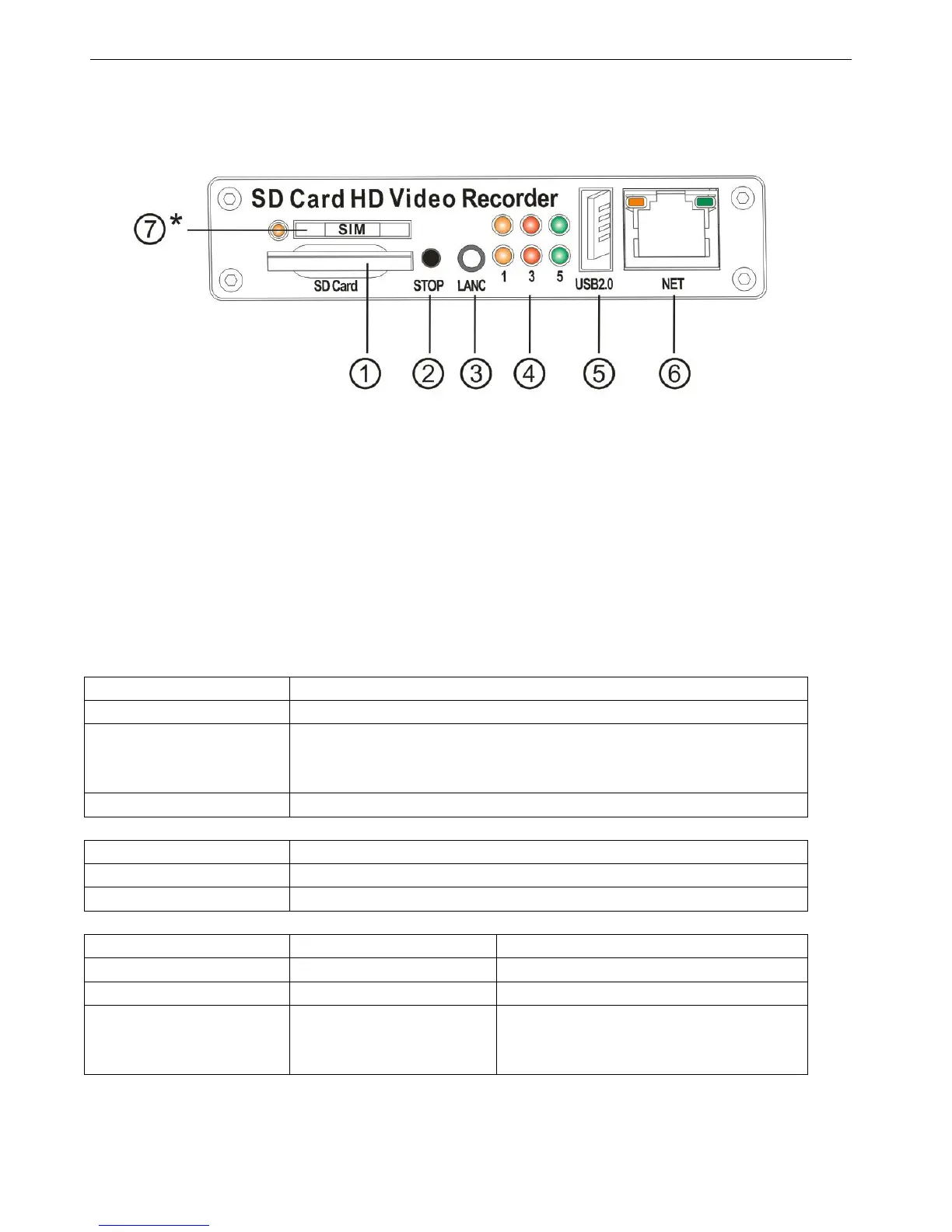
2.1 Front Panel
①:SD Card Slot
②: Stop Button: For stop recording
③: LANC Port: For connection to an Event button and status indicator
④: Status Lights (1: System; 2: 3G; 3: SD; 4: Alarm; 5: Power; 6: Run)
⑤: USB Host Port: Can be used as a secondary recording device, such as a flash memory card. This port cannot
be used as a direct access link to a PC, however.
⑥: Network Port (RJ45).
⑦: SIM Card Slot (Only for HDVR004GW)
Get to know the status of DVR system by the indication of LED lights:
When all of 4 channels are recording
Blinking every 2 seconds, LED indicator off times indicate the missing
number of cameras channels. For example, if it blinks 3 times per time,
there are 3 cameras missing in total.
No camera existing or no recording on.
3G model is working in normal mode.
No 3G module installed (3G is not available)
Blinking with RUN by turns
Blinking with PWR by turns
Ignition is not enabled and SDVR is OFF.
Blinking together with RUN
Blinking together with PWR
Ignition sense is not enabled & SDVR is
running. Unit will turn OFF when “Delay
Time” setting is reached.


 To Next Page