20 -
5.9 Setup G-Sensor parameters
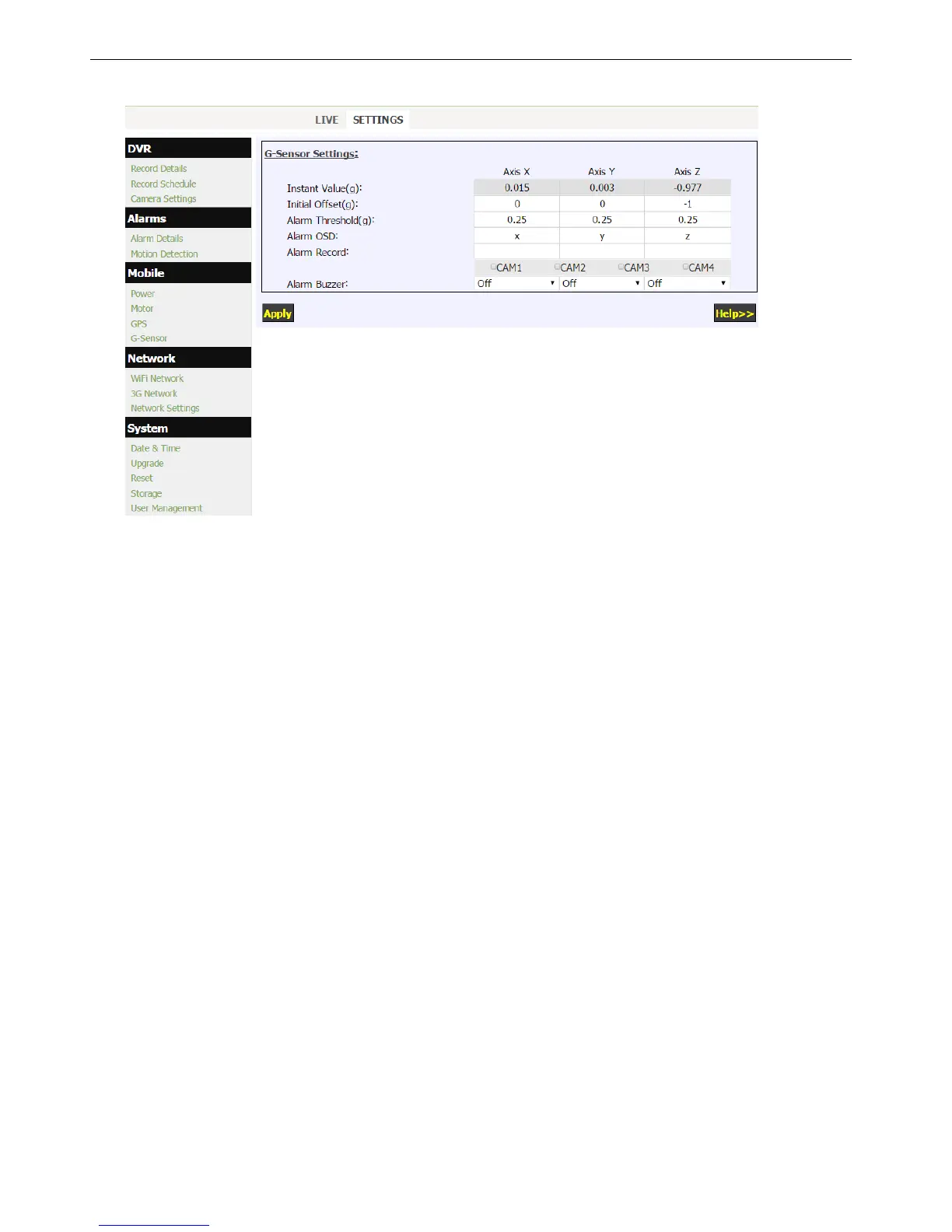
Click “G-Sensor” in the “Mobile” menu to setup G-Sensor Menu.
1. G-Sensor Instant Value can give the X/Y/Z axis accelerometer values instantly.
2. For Earth gravity effect, it will get about 1.0g on Z axis when DVR is placed on a horizontal platform.
3. Initial values should be set to the X/Y/Z axis values when the vehicle is still, and DVR is installed on desired
position.
4. Alarm Threshold can be set to the absolute differential value between initial value and acceptable maxim
value, if the absolute difference is over the threshold, it will trigger according axis alarm.
5. Combined Recording can be triggered when G-Sensor Alarm happened.
6. Recorded G-Sensor Values can provide reference of data analyzing when accidence happened.


 To Next Page