EasyManua.ls Logo

Ebro EBI IF-100 - Operation in Standard Mode

Ebro EBI IF-100
49 pages
Print Icon
To Next Page IconTo Next Page
To Previous Page IconTo Previous Page
Loading...
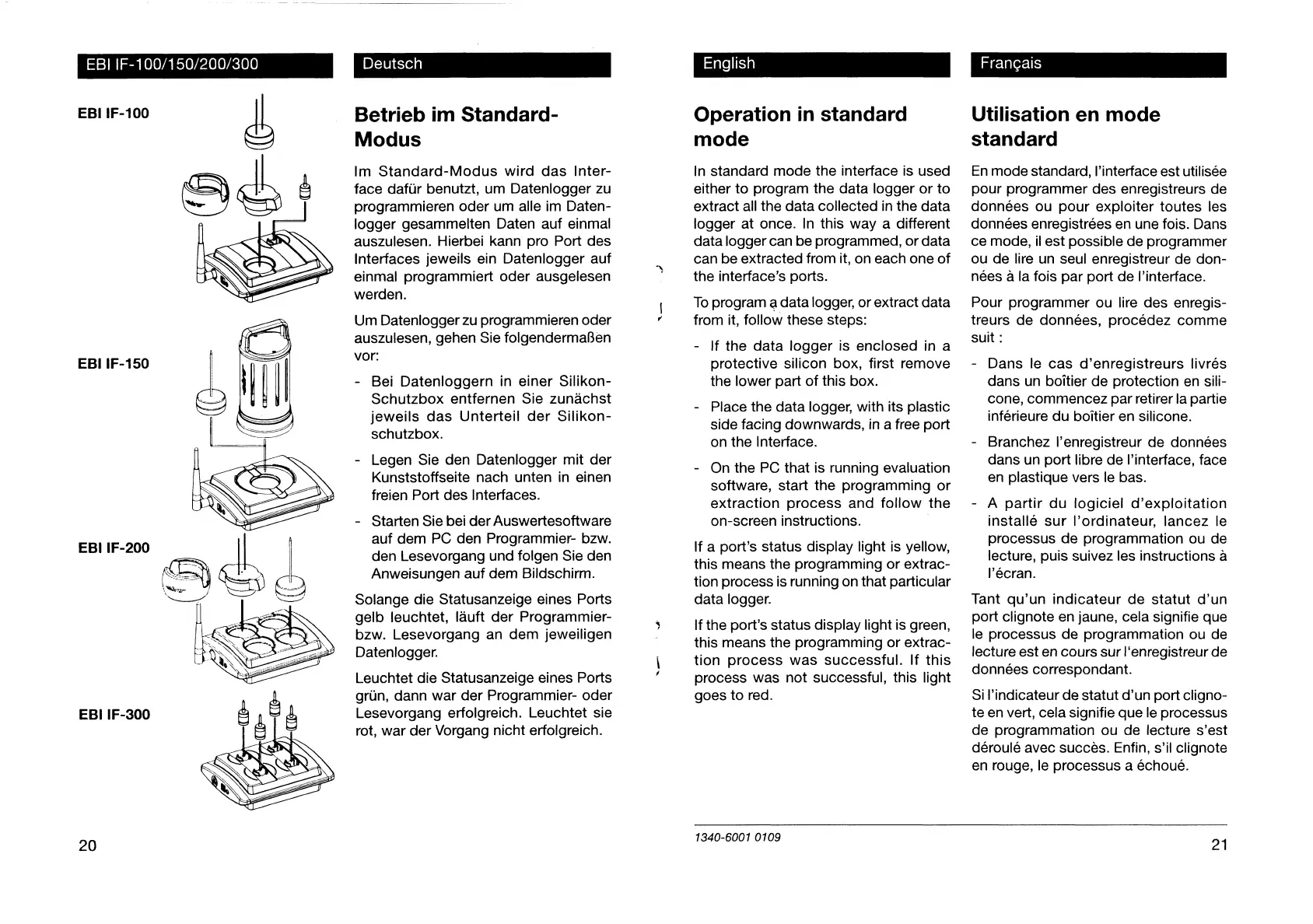
ΕΒΙ
ΙΓ-100/150/200/300
EBI
IF-100
EBI
IF-150
EBI
IF-200
EBI
IF-300
20
Betrieb
im
Standard-
Modus
Im
Standard-Modus
wird
das
Inter-
face
dafur
benutzt,
um
Datenlogger
zu
programmieren
oder
um
alle
im
Daten-
logger
gesammeliten
Daten
auf
einmal
auszulesen.
Hierbei
kann
pro
Port
des
Interfaces
jeweils
ein
Datenlogger
auf
einmal
programmiert
oder
ausgelesen
werden.
Um
Datenlogger
zu
programmieren
oder
auszulesen,
gehen
Sie
folgendermaBen
vor:
-
Bei
Datenloggern
in
einer
Silikon-
Schutzbox
entfernen
Sie
zunachst
jeweils
das
Unterteil
der
Silikon-
schutzbox.
-
Legen
Sie
den
Datenlogger
mit
der
Kunststoffseite
nach
unten
in
einen
freien
Port
des
Interfaces.
-
Starten
Sie
bei
der
Auswertesoftware
auf
dem
PC
den
Programmier-
bzw.
den
Lesevorgang
und
folgen
Sie
den
Anweisungen
auf
dem
Bildschirm.
Solange
die
Statusanzeige
eines
Ports
gelb
leuchtet,
lauft
der
Programmier-
bzw.
Lesevorgang
an
dem
jeweiligen
Datenlogger.
Leuchtet
die
Statusanzeige
eines
Ports
grin,
dann
war
der
Programmier-
oder
Lesevorgang
erfolgreich.
Leuchtet
sie
rot,
war
der
Vorgang
nicht
erfolgreich.
English
Operation
in
standard
mode
In
standard
mode
the
interface
is
used
either
to
program
the
data
logger
or
to
extract
all
the
data
collected
in
the
data
logger
at
once.
In
this
way
a
different
data
logger
can
be
programmed,
or
data
can
be
extracted
from
it,
on
each
one
of
the
interface’s
ports.
To
program
a
data
logger,
or
extract
data
from
it,
follow
these
steps:
-
If
the
data
logger
is
enclosed
ina
protective
silicon
box,
first
remove
the
lower
part
of
this
box.
-
Place
the
data
logger,
with
its
plastic
side
facing
downwards,
in
a
free
port
on
the
Interface.
-
On
the
PC
that
is
running
evaluation
software,
start
the
programming
or
extraction
process
and
follow
the
on-screen
instructions.
|
If
a
port’s
status
display
light
is
yellow,
this
means
the
programming
or
extrac-
tion
process
is
running
on
that
particular
data
logger.
If
the
port’s
status
display
light
is
green,
this
means
the
programming
or
extrac-
tion
process
was
successful.
If
this
process
was
not
successful,
this
light
goes
to
red.
Utilisation
en
mode
standard
En
mode
standard,
l'interface
est
utilisée
pour
programmer
des
enregistreurs
de
données
ou
pour
exploiter
toutes
les
données
enregistrées
en
une
fois.
Dans
ce
mode,
il
est
possible
de
programmer
ou
de
lire
un
seul
enregistreur
de
don-
nées
à
la
fois
par
port
de
l'interface.
Pour
programmer
ou
lire
des enregis-
treurs
de
données,
procédez
comme
suit
:
-
Dans
le
cas
d’enregistreurs
livrés
dans
un
boitier
de
protection
en
sili-
cone,
commencez
par
retirer
la
partie
inférieure
du
boîtier
en
silicone.
-
Branchez
l’enregistreur
de
données
dans
un
port
libre
de
l'interface,
face
en
plastique
vers
le
bas.
-
A
partir
du logiciel
d’exploitation
installé
sur
l’ordinateur,
lancez
le
processus
de
programmation
ou de
lecture,
puis
suivez
les
instructions
à
l'écran.
Tant
qu'un
indicateur
de statut
d'un
port
clignote
en
jaune,
cela
signifie
que
le
processus
de
programmation
ou
de
lecture
est
en
cours
sur
l'enregistreur
de
données
correspondant.
Si
l'indicateur
de
statut
d’un
port
cligno-
te
en
vert,
cela
signifie
que
le
processus
de
programmation
ou
de
lecture
s'est
déroulé
avec
succès.
Enfin,
s’il
clignote
en
rouge,
le
processus
a
échoué.
1340-6001
0109
21

Other manuals for Ebro EBI IF-100

Related product manuals