FCA‐22InstructionManual
Page11
Performa DPDtest onthe sampleandenter themeasuredppm Cl
2
value in theBuffer:#2 ppmMenu
andacceptthecalibration.Thedisplaye dCalvalue,x.xxmV/ppmCl
2
willchan getothenewslopevalue.
Foradetaileddescription seeElectrodeSpanCalibrationintheC‐22manual.
**RecordthedisplayedCl
2
ppmreadingatthesampletime,ifthevaluehaschangedbeforefinishing
theDPDtestthencorrecttheinputvalueappropriately**.
The zero point of the sensor is extremely stable and should not need adjusting. If the calibration is
neededthenplacethesensorinasampleofchlorinefreeprocesswaterandallowittoequil
ibratefor½
hour.Initiatethe standardizationin theBuffer:#1ppmMenu.TheStandardizeValue willbe0.00ppm
Cl
2
andtheCalvaluewilldisplaythenewmVsignalfromthesensor.
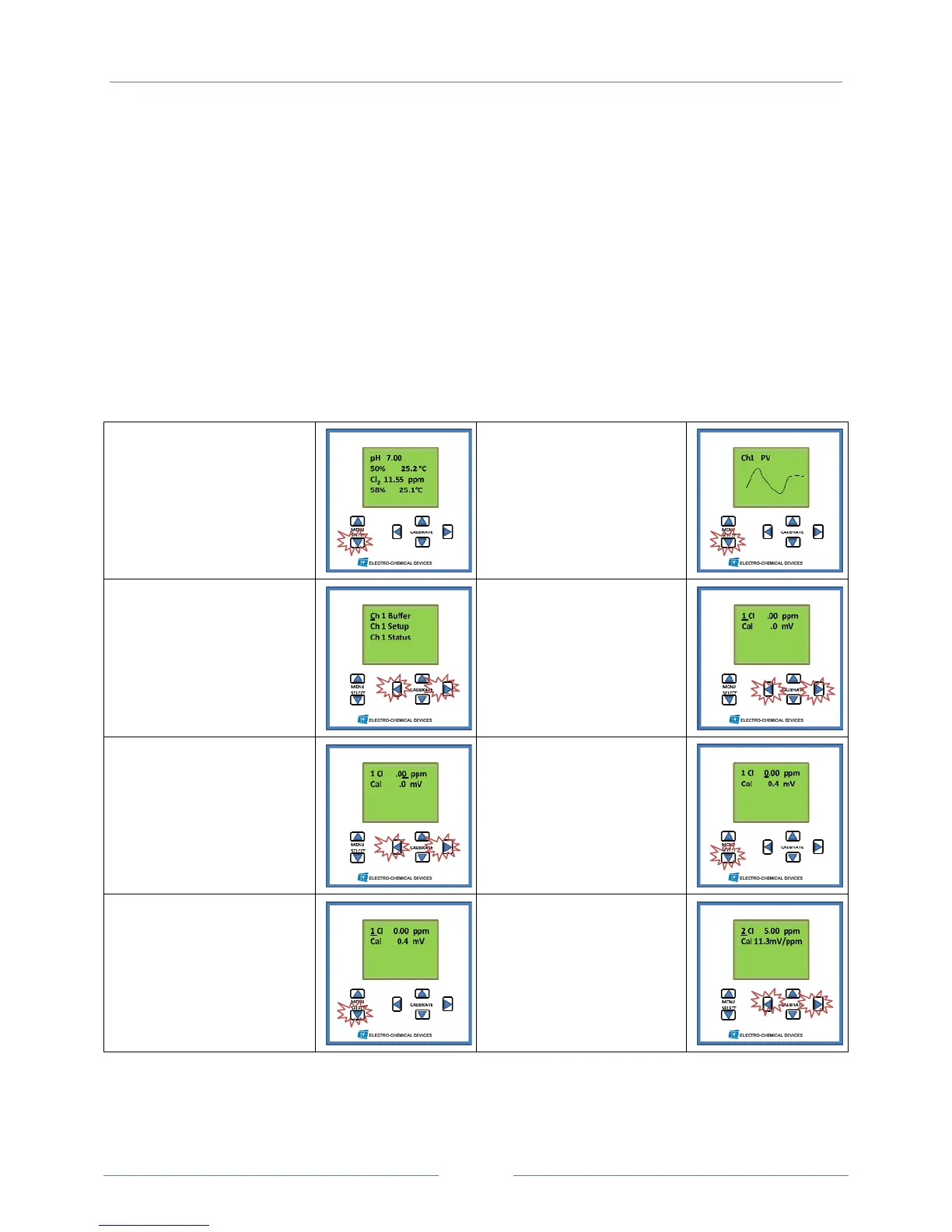
ChlorineCalibrationScreenShots
#1HomeScreen
PressMenuSelect
Downbutton
#2GraphicalDisplay
PressMenuSelect
Downbutton
#3SelectionMenu
SelectBUFFERby
simultaneouslypressing
thehorizontalCALIBRATE
keys.
#4ZeroPointCalibration
(optionalstep,setatfactory,
moveto#7)
Initiatethecalibrationby
simultaneouslypressing
thehorizontalCALIBRATE
keyswiththesensorina
0ppmchlorinesolution.
#5Adjustingzeropoint
Ifanon‐zeroppm
solutionisusedthen
adjustthevalueby
selectingthedigitwiththe
horizontalkeysandthe
valuewiththeverticalkey.
#6Acceptingthe
Calibration
Acceptthecalibrationby
pressingtheMenuSelect
downkey.
#7LeaveZeroCalibration
Screen
PressMenuSelect
Downbutton
#8SettingChlorineSlope
Initiatethecalibrationby
simultaneouslypressing
thehorizontalCALIBRATE
keyswiththesensorina
knownchlorinesolution.



 To Next Page