FCA‐22InstructionManual
Page8
StartUp
Supplysampleflowtothesystem.Adjustthesampleflowuntil thewaterisoverflowingintothecentra l
overflowtube.Athigherflowratestheexcesswaterwilloverflowdownthedrain.Aminimumflowof
10 gal/min is required to maintain the overflow condition.Verify the sample flow is passing throug
h
bothflowcellsandreturningtothe drain.TheChlorineSensorrequires1‐1½hoursofpolarizationby
the instrument before accurate measurements can be made. Allow the system to run at least 1 hou r
beforeproceedingtotheChlorineSensorcalibrationbelow.
Calibration
TemperatureCalibration
TheTemperature sensorinside thePHS10sensorwascalibratedat thefactory beforeshipping.Verify
thedisplayedtemperatureagreeswiththeactualtemperature.Ifthevaluedeviatesbymorethan2°C
thenadjusttheTemperatureTrim intheConfiguration&TrimMenutothecorrectvalue.Foradetailed
descriptionse
eTemperatureCalibrationintheC‐22manual.
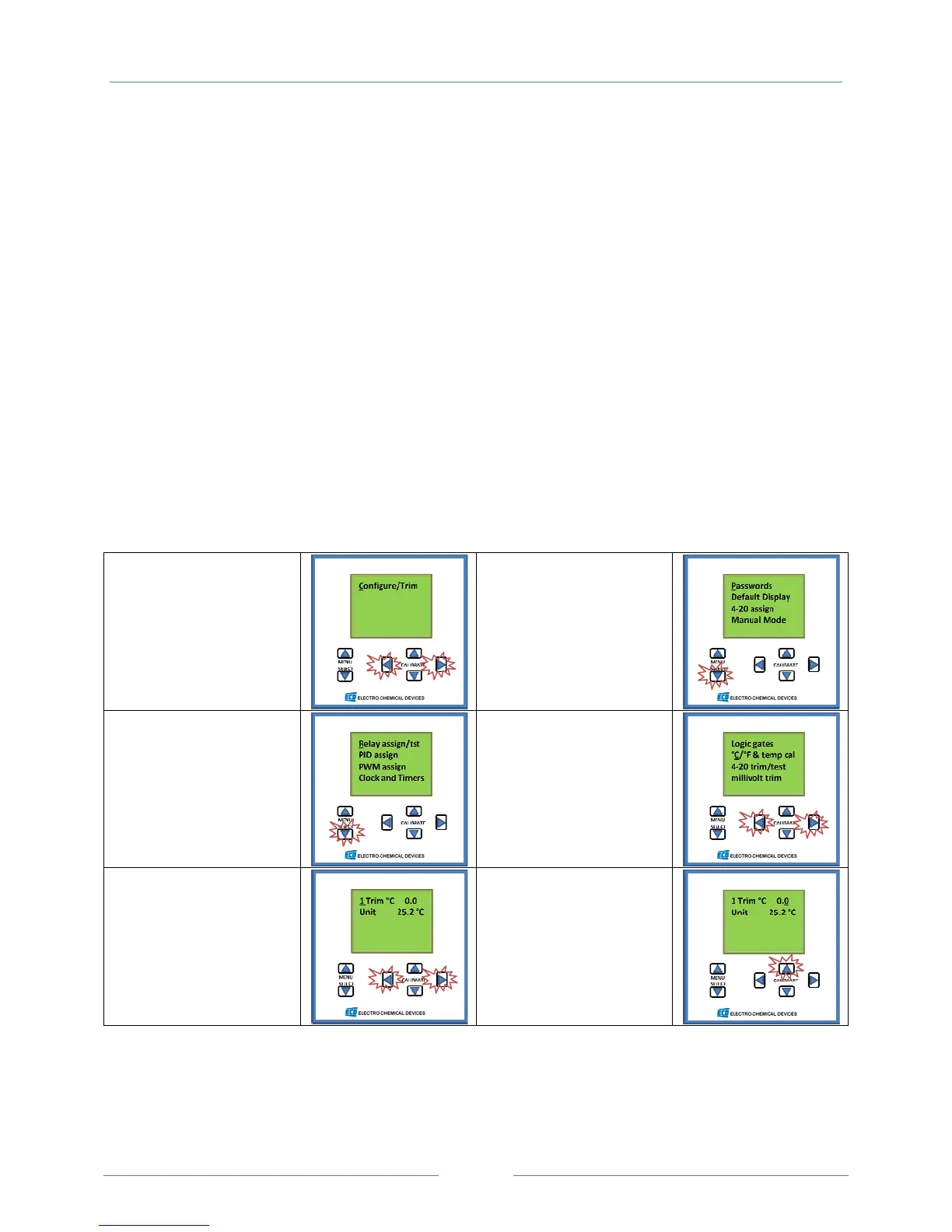
TemperatureCalibrationScreenShots
#1EntertheConfigur e/
TrimMenu
ScrolltotheConfigure
MenuusingtheMENU
SELECTkeyandenterthe
Menubysimultaneously
pressingbothHorizontal
CALIBRATEkeys.
#2Scrollthroughthe
PasswordsScreen
PresstheMENUSELECT
downKeyfourtimesto
thenextscreen.
#3Scrollthroughthe
RelayAssignScreen
PresstheMENUSELECT
downKeyfourtimesto
thenextscreen.
#4Choose°C/°F&temp
cal
SelecttheMenuby
Simultaneouslypressing
bothHorizontal
CALIBRATEkeys.
#5ChoosetheTrim°C
Menu
SelecttheMenuby
Simultaneouslypressing
bothHorizontal
CALIBRATEkeys.
#6AdjusttheTrimto
calibrate
thereading
Usingthevertical
CALIBRATEkeysadjust
thetrimtochangethe
Displayedtemperature



 To Next Page